
Ecommerce Category Page SEO: The 2026 Playbook
Master ecommerce category page SEO with 14 tactics covering keywords, faceted navigation, schema, internal links, and AI search optimization for online stores.
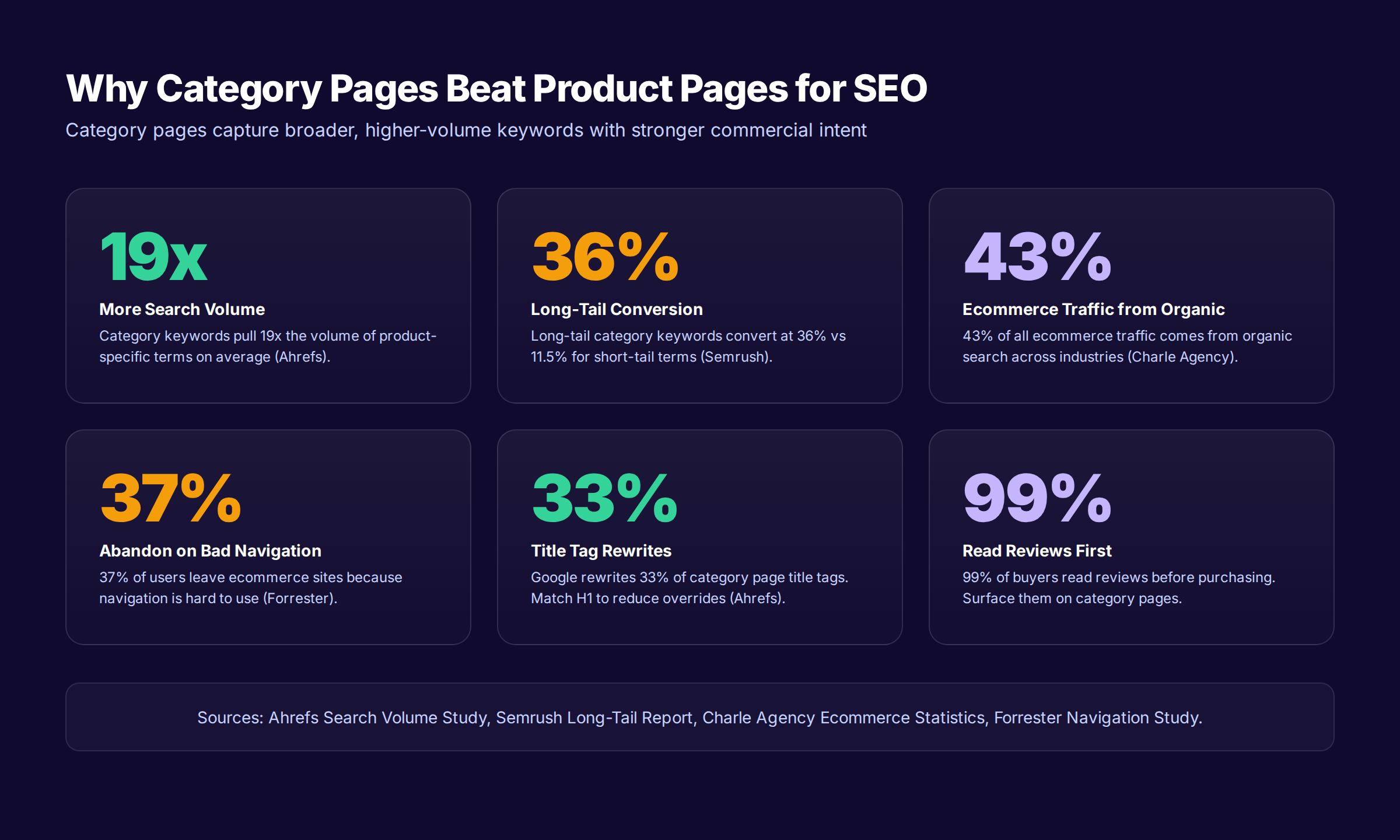
Most ecommerce stores treat category pages like glorified product lists. That mistake costs millions in lost organic revenue every year. Ecommerce category page SEO is the single biggest growth opportunity for any online store, because category keywords carry 19 times the search volume of product-specific terms and convert at rates that crush every other traffic source.
The problem compounds quietly. A category page with a thin intro, broken faceted navigation, and no schema gets buried under competitors who took 90 minutes to fix all three. Meanwhile, paid ads keep draining budget to recover the rankings you should already own.
This guide gives you the exact playbook we use at Stacc. We publish 3,500+ articles per month for ecommerce brands across 70+ industries, and the patterns that lift category pages from page 3 to page 1 are remarkably consistent. Category pages are not just product grids. They are buyer-intent hubs that compound rankings, traffic, and revenue when you build them right.
Here is what you will learn:
- Why category pages outperform product pages for ecommerce SEO
- How to structure a category hierarchy Google can crawl in three clicks
- The 7-part anatomy of a category page that ranks and converts
- How to handle faceted navigation without creating 50,000 indexable URLs
- The exact title tag, meta description, and H1 formula that wins
- How to add ItemList and BreadcrumbList schema for rich results
- Long-tail category strategies competitors have not built yet
- How to optimize category pages for AI Overviews and zero-click search
Why Ecommerce Category Page SEO Outperforms Product Page SEO
Category pages are the highest-value real estate on any ecommerce site. They capture broader keywords, hold link equity from internal sitewide links, and serve buyers who know what kind of product they want but not which exact one. That intent makes them the most valuable page type for organic traffic.
Search demand backs this up. Category-level keywords like “running shoes for men” pull tens of thousands of monthly searches. Product-specific terms like “Nike Pegasus 41 size 10 wide” pull a tiny fraction. Google research and Ahrefs studies consistently show that category keywords own roughly 19 times the volume of the long-tail product equivalents.
Conversion rates back it up further. Long-tail category keywords (“women’s wide-width trail running shoes”) convert at 36 percent compared with 11.5 percent for short-tail terms, according to a Semrush analysis. Buyers searching at the category level have already moved past awareness. They are comparing options inside a defined product type.
Category Pages vs Product Pages: The Math
The difference becomes obvious when you run the math on a 500-product store.
| Page type | Avg keywords ranked | Avg monthly visits | Conversion rate |
|---|---|---|---|
| Product page | 8 keywords | 15-40 visits | 1.8-2.5% |
| Category page | 60 keywords | 400-1,200 visits | 2.9-3.4% |
| Long-tail category | 25 keywords | 80-250 visits | 3.5-4.2% |
| Buying guide | 15 keywords | 200-600 visits | 0.9-1.4% |
A single optimized category page can outperform 30 individual product pages on traffic. And because category pages distribute link equity to the products inside them, the revenue impact ripples sitewide. For the full picture, read our ecommerce SEO guide for context on how category pages fit into the broader strategy.
Why Most Stores Get This Wrong
Three mistakes show up across nearly every audit we run on ecommerce category pages. Thin or copy-pasted intros. Faceted navigation that floods Google with junk URLs. Missing schema markup that prevents rich results. Each of these alone can knock a category page from page 1 to page 5.
The good news is that fixing them is mechanical. Once you understand the anatomy, you can apply the same template across hundreds of category pages and watch organic traffic compound month over month.
The Category Page Hierarchy That Search Engines Reward
Site architecture is the foundation. Before you optimize a single category page, the structure that surrounds it has to make sense. Google rewards pyramid hierarchies because they pass link equity logically and reduce crawl waste.
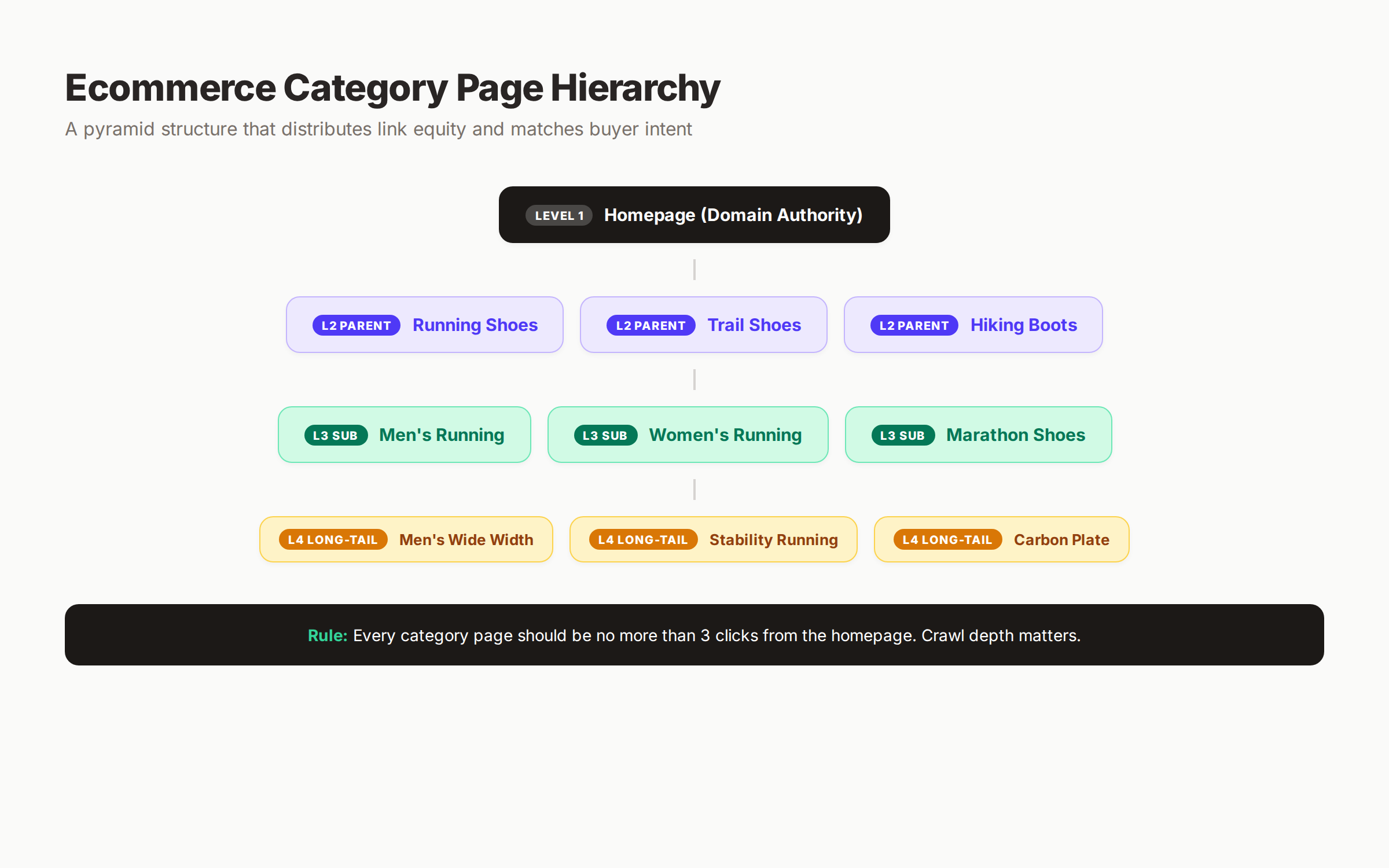
The pyramid rule is simple. Every category page should be reachable from the homepage in three clicks or fewer. Beyond three clicks, crawl depth starts working against you. Google deprioritizes pages buried deep in the navigation, even when they are well-optimized.
Four-Level Category Architecture
A clean ecommerce site uses four levels of depth.
| Level | Example | Purpose | Keyword volume |
|---|---|---|---|
| Level 1: Homepage | / | Domain authority anchor | Brand only |
| Level 2: Parent category | /running-shoes/ | Broad commercial keywords | 10,000-100,000 MSV |
| Level 3: Subcategory | /running-shoes/mens/ | Mid-tail commercial | 1,000-10,000 MSV |
| Level 4: Long-tail category | /running-shoes/mens/wide-width/ | Long-tail high-intent | 100-1,000 MSV |
Stop adding levels beyond Level 4. Each new layer fragments link equity, dilutes topical authority, and creates more URLs Google has to crawl. Most ecommerce sites do not need five or six levels of category nesting.
URL Structure for Categories
URL structure matters more for category pages than for any other page type. Categories are forever. Products come and go.
Three URL rules apply to every category page:
- Use folder structures based on top-level categories:
/parent-category/subcategory/ - Do not include numbers, dates, or session parameters in the canonical URL
- Use hyphens, not underscores, between words
A clean URL like /womens/running-shoes/trail/ tells search engines and shoppers exactly what they are looking at. A messy URL like /p?cat=12&sub=44&type=runner tells them nothing. Read our crawl budget optimization guide for a deeper dive on how URL structure affects how Google crawls your store.
Pagination That Does Not Break SEO
Long category pages get paginated. Most stores get this wrong. Two rules apply.
First, every paginated URL needs a self-referential canonical pointing to itself, not to page 1. Canonicalizing /page/2 to /page/1 tells Google those product pages do not exist as distinct URLs. They will get dropped from the index, taking the products with them.
Second, never apply noindex to paginated pages. The products inside them still need to be discoverable. Instead, allow indexing on every page and use rel-next/rel-prev signals (still useful for some search engines even though Google deprecated them as ranking signals).
Want category pages that rank without managing dev tickets? Stacc publishes optimized ecommerce content across 70+ industries, complete with schema and internal links. Start for $1 →
The Anatomy of a Ranking Ecommerce Category Page
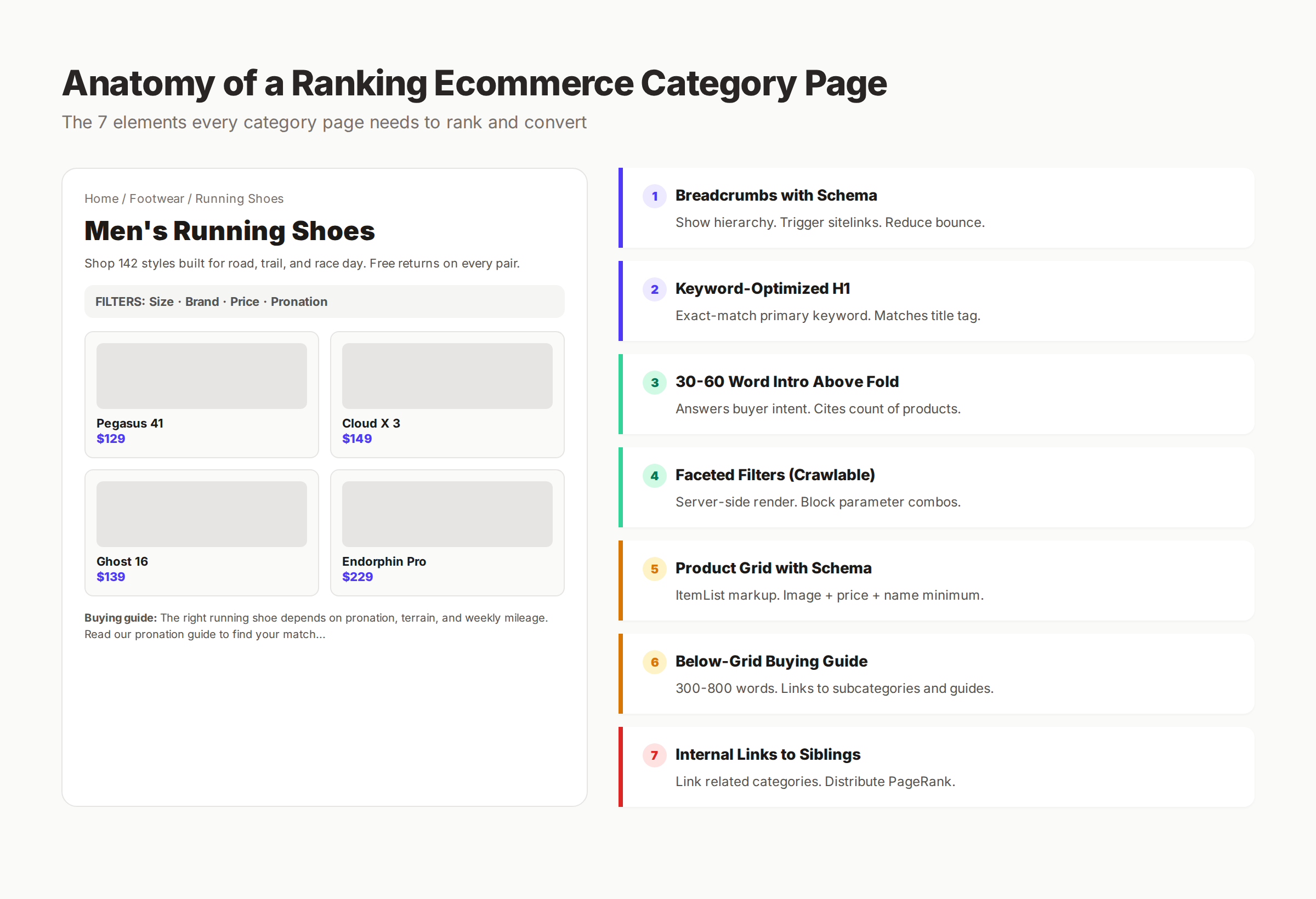
Every category page that ranks on page 1 includes the same 7 elements. Miss any one of them and you are starting at a structural disadvantage.
Element 1: Breadcrumbs With Schema
Breadcrumbs do three things at once. They show users where they are in the site hierarchy. They reduce bounce rate by giving visitors a path back to parent categories. And they trigger breadcrumb-style search results in Google, which earn higher click-through rates than plain URL displays.
Add BreadcrumbList schema to every category page. The markup is small. The visibility gain is measurable.
Element 2: Keyword-Optimized H1
The H1 is the most weighted on-page ranking signal for category pages. Use the exact-match primary keyword. Pair it with a subtle modifier when it makes sense.
| Bad H1 | Better H1 | Why |
|---|---|---|
| Welcome to Shoes | Men’s Running Shoes | Exact-match keyword, no fluff |
| Our Collection of Coffee Beans | Single-Origin Coffee Beans | Adds qualifier shoppers search for |
| Stuff We Sell for Babies | Organic Baby Clothing | Specific category + buyer-intent modifier |
Match the H1 to the title tag. Google rewrites title tags on 33 percent of category pages, and when it does, it uses the H1 50.76 percent of the time as the replacement, according to Ahrefs research. Matching the two prevents unexpected SERP rewrites.
Element 3: 30 to 60 Word Intro Above the Fold
Below the H1 and above the product grid, place a short intro of 30 to 60 words. This is the single most impactful copy on the page.
The intro should do four things:
- Confirm what the page is about
- Cite the number of products available
- Answer the most common buyer-intent question
- Set expectations on shipping, returns, or selection
Example for a running shoe category: “Shop 142 men’s running shoes built for road, trail, and race day. From cushioned daily trainers to carbon-plated racers, every pair includes free 60-day returns. Find your match by pronation type, terrain, or weekly mileage.”
That intro hits primary keyword density, signals selection size, and pre-empts buyer questions. Google can cite it in AI Overviews. Shoppers get oriented in five seconds.
Element 4: Faceted Filters That Crawl Correctly
Faceted navigation is where most ecommerce SEO efforts die. We cover the full strategy in the next section. The headline rule: filters must enhance UX without flooding Google with junk URLs.
Element 5: Product Grid With Schema
The product grid is the page. But Google cannot read product images. It can read structured data. Add ItemList schema with each product’s name, URL, and image. Cover the schema rules in the dedicated section below.
Element 6: Long-Form Buying Guide Below the Grid
This is where you separate from the 80 percent of ecommerce stores that stop optimizing after the title tag. Below the product grid, add 300 to 800 words of original buying guidance.
What goes in the buying guide:
- How to choose between subcategories (“road vs trail vs racing”)
- What features matter most for this product type
- Common buyer questions and answers
- Links to related guides and subcategories
- A 4-6 question FAQ section
This content does multiple jobs. It captures long-tail informational searches that bring buyers in earlier. It gives Google enough text to confirm topical relevance. It funnels readers to specific products through internal links.
Element 7: Internal Links to Related Categories
Every category page should link to 4 to 6 sibling categories. These links pass PageRank, help shoppers move between related categories, and build the topical hub structure search engines reward.
The link block goes near the bottom of the page, after the buying guide. Format it as a “Related Categories” or “You Might Also Like” section with descriptive anchor text, not generic labels.
For more on link distribution, see our internal linking guide for blog posts. The same principles apply to category pages.
Faceted Navigation: The Single Biggest Category SEO Pitfall
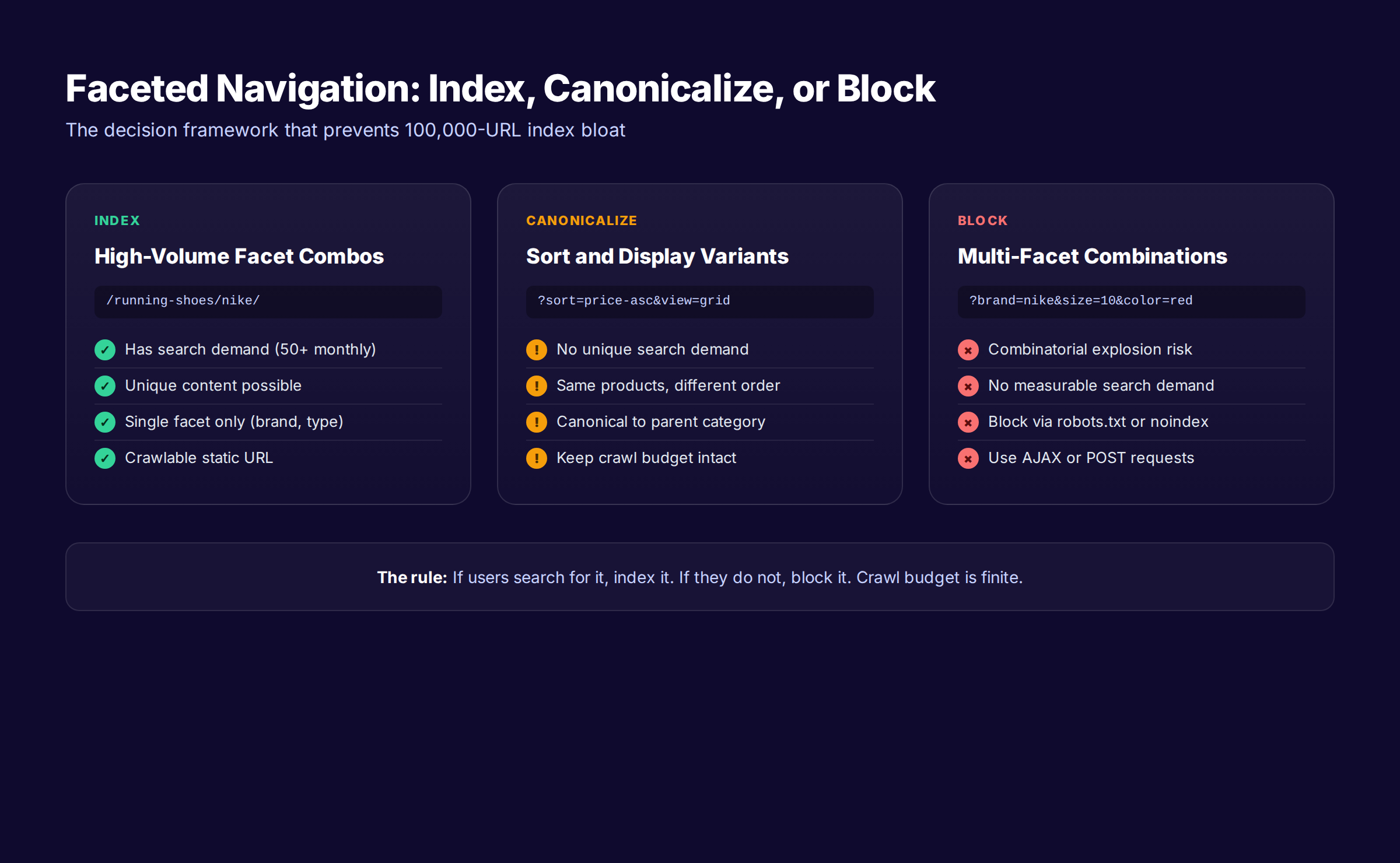
Faceted navigation breaks more ecommerce SEO than every other technical issue combined. A 200-product store can generate over 50,000 filtered URL combinations. Most are duplicates. All of them eat crawl budget.
The Three-Bucket Framework
Every faceted URL falls into one of three buckets. Index it, canonicalize it, or block it.
Index it when the filter combination has measurable search demand. /running-shoes/nike/ deserves to be indexed because thousands of people search “Nike running shoes” every month. Build it as a static URL, not a query string. Give it a unique title tag, H1, and intro.
Canonicalize it when the URL serves the same products in a different order or display. Sort by price, change view from grid to list, switch from 12 per page to 24. These variants do not have unique search demand. They should canonical to the parent category.
Block it when the URL is a multi-facet combination with no search demand. /running-shoes?brand=nike&size=10&color=red&pronation=neutral is technically valid but searches almost nobody runs. Block these via robots.txt, noindex tags, or AJAX-based filters that do not generate URLs at all.
Decision Rules for Each Facet Type
Different facets need different rules. Use this matrix.
| Facet type | Common example | Default treatment | Exceptions |
|---|---|---|---|
| Brand | nike, adidas | Index (high demand) | Block if very low volume |
| Category type | trail, road | Index (high demand) | Already a subcategory |
| Size | size 10 | Block (no search demand) | None |
| Color | red, blue | Canonicalize | Index only for fashion |
| Price range | under $100 | Block (low quality) | None |
| Sort order | price-asc | Canonicalize | None |
| Pagination | page 2 | Self-canonical | Do not noindex |
Implementation Methods
Three implementation methods control how faceted navigation behaves.
The first method is server-side rendering with selective indexing. Filters that should be indexed (like brand or type) generate clean static URLs. Filters that should not (like size or sort) generate query parameters blocked in robots.txt or canonicalized at the page level. This is the strongest method for SEO.
The second method is AJAX-based filtering. Filters change the displayed products via JavaScript without changing the URL at all. This is the safest method for crawl budget but loses the SEO benefit of indexable filter combinations like “Nike running shoes.”
The third method is hybrid. Most successful ecommerce stores combine approaches. High-value facets get static URLs and indexing. Low-value facets stay client-side. For an in-depth read, our crawl budget optimization guide covers this in more detail.
The Index Bloat Test
To check whether faceted navigation is hurting your store, run two reports.
Open Google Search Console, go to Coverage, and look at the “Indexed, not submitted in sitemap” report. If that number is more than twice your sitemap count, you have indexed URLs that should not be indexed. Most of the time, these are faceted variants.
Then check the “Crawled, currently not indexed” report. A high number here means Google is wasting crawl budget on pages it has decided not to rank. Filter those URLs by parameter to identify the worst offenders.
Need a partner who handles ecommerce SEO content while you fix technical SEO? Stacc ships 30+ optimized articles per month, every month. Start for $1 →
The 14-Point Category Page SEO Checklist
Use this checklist when you publish or audit any category page. Hit 14 out of 14 before moving on to advanced tactics.
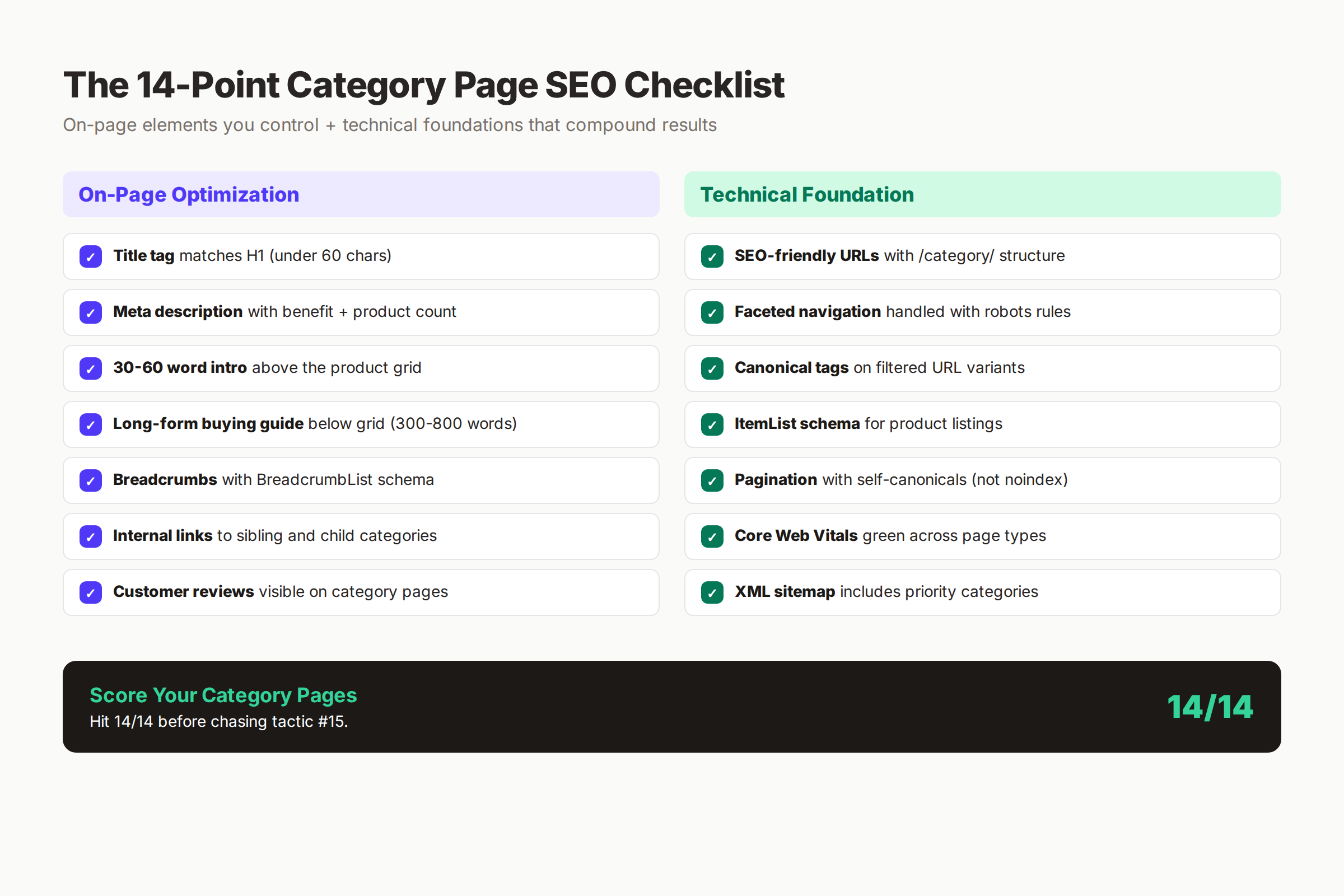
On-Page Elements
- Title tag includes primary keyword in the first 60 percent
- Title tag is under 60 characters and matches the H1
- Meta description sells the click with benefits and product count
- H1 uses exact-match primary keyword
- 30 to 60 word intro sits above the product grid
- Buying guide of 300 to 800 words sits below the grid
- FAQ section with 4 to 6 buyer questions answered
Technical Elements
- URL uses clean folder structure with primary keyword
- BreadcrumbList schema implemented and tested in Rich Results Test
- ItemList schema implemented for the product grid
- Canonical tag resolves filtered variants correctly
- Faceted navigation handled per decision matrix
- Pagination uses self-canonicals, not noindex
- Page passes Core Web Vitals on mobile and desktop
If any item is missing, fix it before chasing tactic number 15. The compounding effect comes from getting the foundation right, not from chasing edge cases.
Title Tags and Meta Descriptions That Win Clicks
Title tags and meta descriptions are the storefront window. Get them right and click-through rate climbs. Get them wrong and Google rewrites them for you (in ways you will not love).
The Title Tag Formula
The best-performing title tag format for ecommerce category pages follows a consistent pattern: [Primary Keyword] | [Modifier or Selection Count] | [Brand Name].
Examples that work:
| Category | Title Tag | Length |
|---|---|---|
| Running shoes | Men’s Running Shoes | 142 Styles |
| Coffee beans | Single-Origin Coffee Beans | Free Shipping |
| Baby clothing | Organic Baby Clothing | Sizes 0-24m |
| Bedroom furniture | Modern Bedroom Furniture | Free Returns |
Three rules apply:
- Primary keyword in the first 60 percent of the title
- A specific number, modifier, or benefit in the middle
- Brand at the end (if it fits)
Google rewrites title tags on 33.4 percent of pages, according to an Ahrefs study of 80,959 SERPs. The cleaner and more direct your title, the less likely it gets rewritten.
The Meta Description Formula
Meta descriptions do not directly impact rankings. They impact click-through rate, which Google watches as a quality signal.
The formula: [Selection benefit] + [Product count or feature] + [Trust signal] + [Soft CTA].
Example: “Shop 142 men’s running shoes built for road, trail, and race day. Free 60-day returns on every pair. Find your match by pronation type or terrain.”
Three rules apply:
- Keep it under 155 characters
- Include the primary keyword once (Google bolds it)
- End with an implied action (“Find your match”, “Compare top picks”)
Read our guide on how to write meta descriptions for additional rules and category-specific templates.
What Not to Do
Three mistakes show up in nearly every audit.
The first is brand-first titles like “Stacc Sports - Running Shoes”. Brand goes at the end, not the start. The second is duplicate meta descriptions across hundreds of category pages. Each category needs unique copy. The third is title stuffing like “Running Shoes | Best Running Shoes | Buy Running Shoes Online”. Use the keyword once. Lean on modifiers to fill the space.
Schema Markup for Ecommerce Category Pages
Schema markup is the second-biggest technical lift on a category page. Two schema types matter most: ItemList and BreadcrumbList. A third, FAQPage, becomes essential for AI Overview visibility.
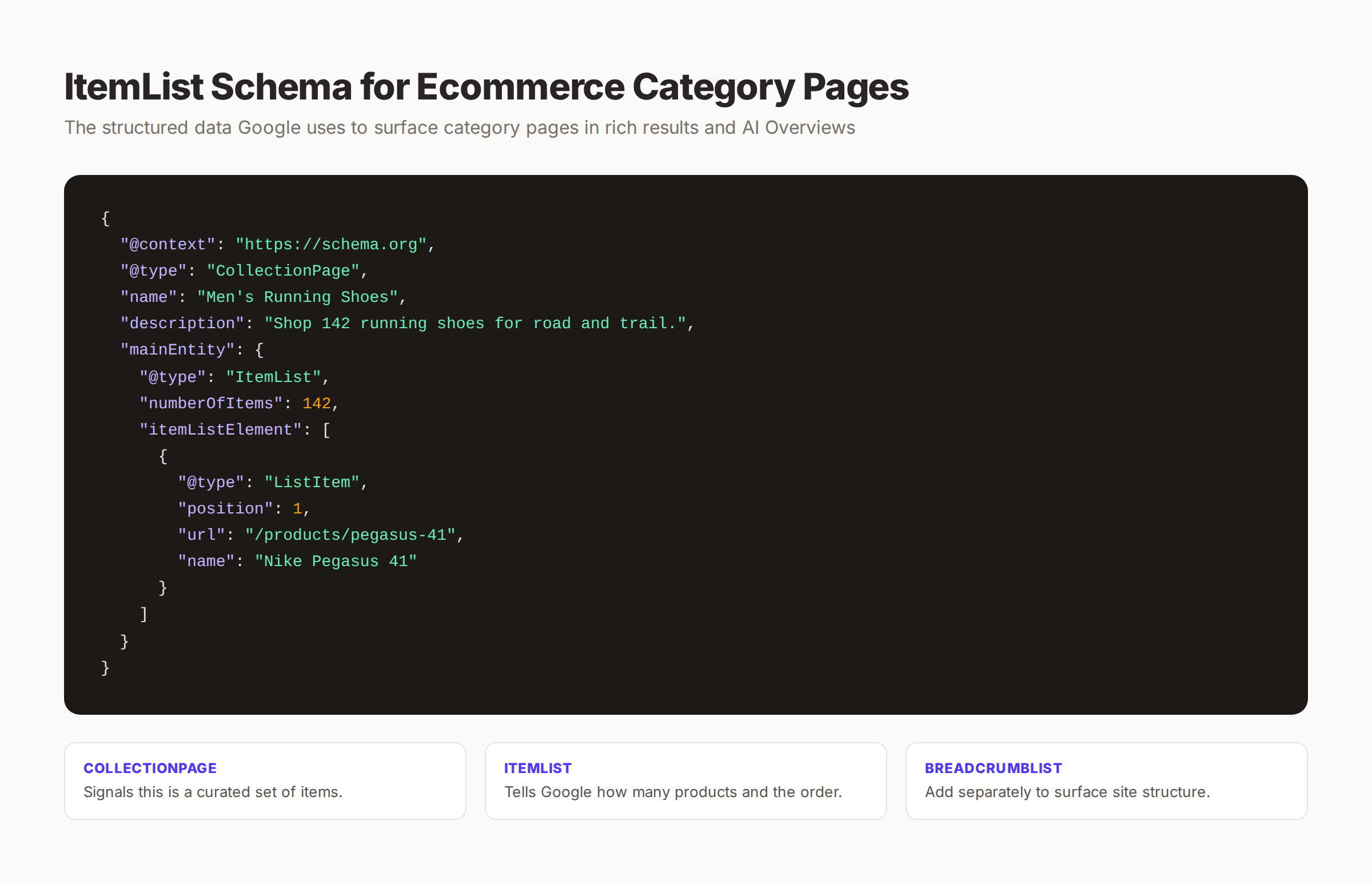
ItemList Schema
ItemList schema tells Google that your category page contains a structured list of products. Add it to every category page. Include the position, URL, and name of every product in the grid.
The minimum implementation needs:
@type: ItemListas the main entitynumberOfItemsreflecting the actual count- Each product as a
ListItemwithposition,url, andname
For deeper coverage, read our structured data guide and the related product page schema guide.
BreadcrumbList Schema
BreadcrumbList schema turns plain breadcrumbs into eligible rich results. Google displays “Home > Footwear > Running Shoes” in the SERP instead of the raw URL. Higher click-through follows.
Implementation is small. List each step of the breadcrumb with a position, name, and item URL. Test it in Google’s Rich Results Test before publishing.
CollectionPage Wrapper
Wrap the entire schema block in a CollectionPage type. This tells Google the page is a curated collection, not a single product or article. It matches how the page actually functions.
FAQPage Schema for AI Overviews
Add FAQ schema to the buying guide section of category pages. Each FAQ becomes eligible for direct citation in AI Overviews and People Also Ask boxes. Pick 4 to 6 buyer-intent questions and answer them in 40 to 60 words each.
For implementation patterns, see our guide on how to optimize for FAQ content in AI Overviews.
Internal Linking for Category Pages
Internal linking is the underrated lever. Every category page is a hub. Every product page is a spoke. The way you connect them determines how PageRank flows and how Google maps your topical authority.
The Three-Way Link Structure
Every category page should link in three directions.
Up the hierarchy: link from the breadcrumb back to the parent category. This signals the topical relationship and helps Google understand the site structure.
Sideways across siblings: link to 4 to 6 related categories at the bottom of the page. For a running shoe category, sibling links include trail shoes, racing flats, walking shoes, and hiking boots.
Down to products and subcategories: link to the highest-priority subcategories and to featured products within the page. The natural product grid already handles most of this, but specific anchor links inside the buying guide carry more weight.
Anchor Text Rules
Three rules govern anchor text for category-to-category links.
The first rule is descriptive, never generic. “Trail running shoes” is good. “Click here” is wasted ranking signal. The second rule is natural, never stuffed. Repeating “best men’s running shoes” 12 times in the buying guide is a flag, not a benefit. The third rule is varied. Mix exact match, partial match, and related anchors so the link profile looks organic.
For more on anchor text, see our coverage of anchor text optimization.
Hub Pages That Connect Categories
Beyond category-to-category links, build hub pages that connect multiple categories under a theme. A “Marathon Training” hub can link to running shoes, hydration packs, GPS watches, and recovery gear categories. These hubs capture broader keywords and act as link distribution points.
Hub pages are not category pages. They sit in your blog or guide section. They link out to the categories that earn the money. Read our internal linking case study for examples of how this structure compounds.
Long-Tail Category Pages: The Opportunity Most Stores Miss
Long-tail categories are the fastest path to compounding category-page traffic. They take 30 minutes to build, capture intent competitors do not target, and stack on top of parent categories without cannibalizing them.
What Counts as a Long-Tail Category
A long-tail category combines a parent category with one or more buyer-intent modifiers.
Examples:
- “wide-width men’s running shoes” (parent: running shoes; modifiers: men’s, wide-width)
- “organic cotton baby pajamas” (parent: baby clothing; modifiers: organic cotton, pajamas)
- “industrial farmhouse kitchen tables” (parent: kitchen tables; modifiers: industrial farmhouse style)
Each modifier adds buyer intent. Each long-tail page captures 100 to 1,000 monthly searches that the parent category would not rank for naturally.
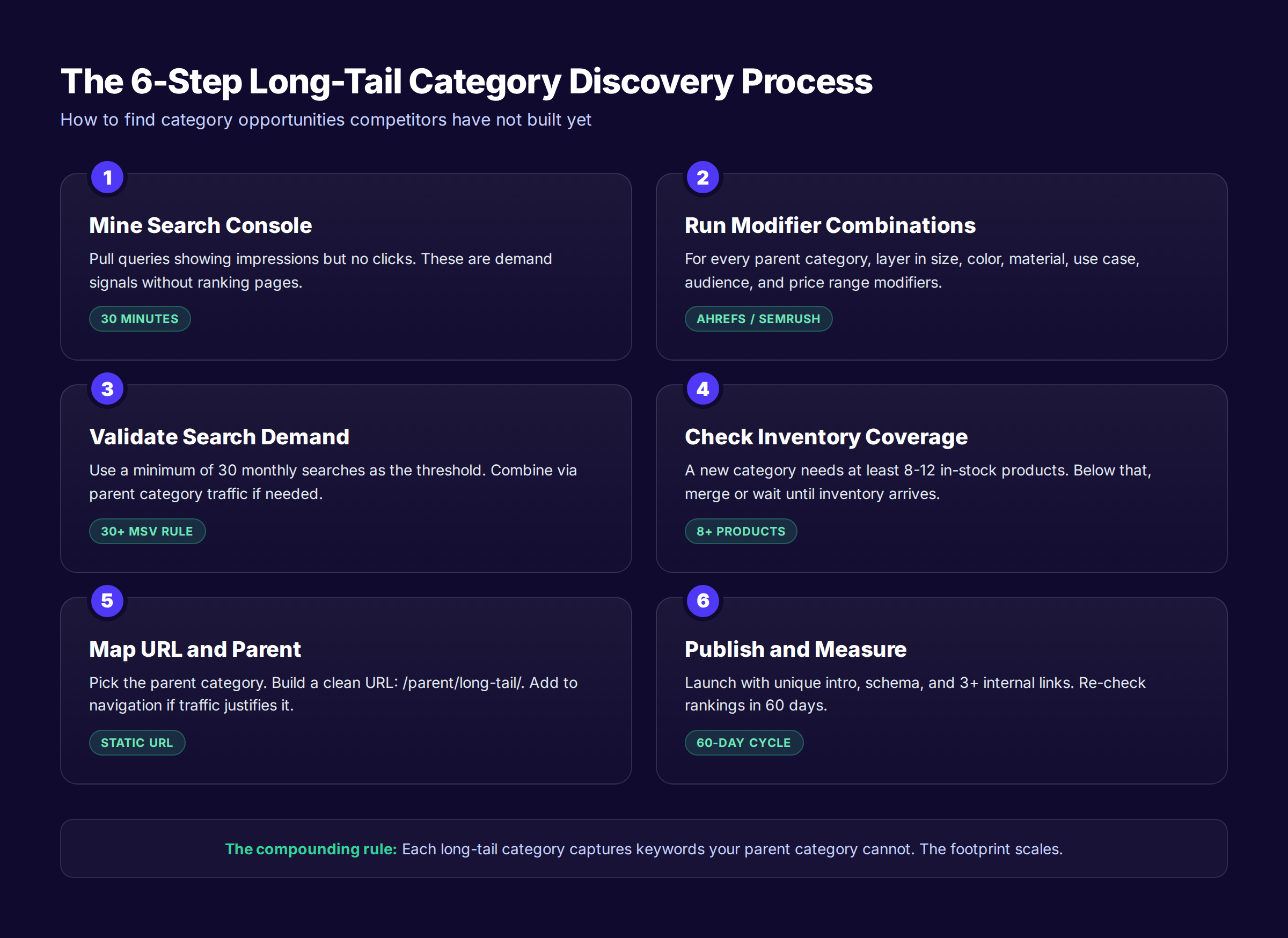
The 6-Step Discovery Process
To find long-tail category opportunities, follow this process.
Step 1: Mine Search Console. Pull queries that show impressions but no clicks. These are demand signals where Google thinks you might rank but no specific page targets the query.
Step 2: Run modifier combinations. For every parent category, layer in size, color, material, audience, use case, and price modifiers. Use keyword research tools like Ahrefs or Semrush.
Step 3: Validate search demand. Set a floor of 30 monthly searches. Lower than that and the page may not justify the effort.
Step 4: Check inventory coverage. A long-tail category needs at least 8 to 12 in-stock products to feel substantial. Below that, merge it into a broader category.
Step 5: Map URL and parent. Pick a clean URL: /parent/long-tail-modifier/. Add the new page to the navigation only if traffic justifies it.
Step 6: Publish and measure. Launch with a unique intro, schema, internal links, and a buying guide. Re-check rankings in 60 days.
How Long-Tail Pages Compound
A single long-tail category page captures 100 to 500 monthly searches. Build 20 of them and you add 2,000 to 10,000 monthly visits. These visitors convert at higher rates because they have already filtered themselves into a specific buyer intent.
This is what we call The Content Compound Effect. Each long-tail page adds to your store’s keyword footprint. Together they build topical authority that lifts the parent category’s rankings too.
For a parallel pattern, see how this works in keyword research for ecommerce where long-tail modifiers drive most of the traffic gains.
Content That Goes On a Category Page
The single biggest gap between top-ranking category pages and the rest is content. Specifically, useful content that helps shoppers make a decision and gives Google something to rank.
The Two-Section Content Model
Split content into two sections.
Section 1: Above-fold intro. 30 to 60 words. Confirms the page topic. Cites product count. Hints at selection diversity.
Section 2: Below-grid buying guide. 300 to 800 words. Explains how to choose between options. Highlights features that matter. Answers buyer-intent questions. Links to subcategories.
This structure satisfies two audiences. Skim shoppers see what they need above the grid. Researchers and search engines find the depth below it.
What to Put in the Buying Guide
Five elements make a buying guide rank.
- How to choose between subcategories. “When to pick a trail shoe vs a road shoe.”
- Feature explainers. “What pronation means and why it changes your shoe.”
- Common buyer questions answered. “Should I size up in running shoes?”
- Comparison tables. “Stability vs neutral vs motion-control.”
- Internal links to related guides and products. “Read our pronation guide.”
These elements turn a category page into a hybrid product-grid plus educational resource. That hybrid format is what wins category-level rankings.
A Real Example of Length and Depth
A top-ranking category page for “espresso machines” typically contains:
- 50-word intro above the grid
- 400-word buying guide below the grid covering pump types, boiler types, and brewing methods
- A 6-question FAQ section answering questions like “Single boiler vs dual boiler?”
- Links to 5 sibling categories and 3 buying guides
Total word count: 600 to 800 words. Plus the product grid. That depth is what separates page 1 from page 5.
Avoid the Content Trap
There is a content trap on category pages. Stuffing 2,000 words above the product grid annoys shoppers and tanks conversions. Google noticed this years ago. John Mueller has publicly confirmed that excessive above-fold copy can hurt rankings when it pushes products below the fold.
Keep above-fold content minimal. Push depth below the product grid where it does not interfere with the shopping experience. A case study from Ahrefs showed that one store increased traffic by cutting category copy from 800 words to 70 above the fold.
Optimizing Category Pages for AI Overviews and AI Search
AI Overviews appear on the SERP for an increasing share of ecommerce queries. Category-level keywords like “best running shoes” already trigger them on most US searches. Stores that do not optimize for AI Overviews lose visibility to competitors who do.
What AI Overviews Need
AI Overviews cite content that meets four criteria.
Cite-able copy. Short, declarative sentences that an LLM can lift directly. Replace fluff with facts and counts.
Structured Q&A blocks. FAQ sections with schema. Each question becomes a potential citation source.
Defined terms. When you use a category-specific term, define it. “Pronation is the natural inward roll of the foot during a running stride.”
Source authority. Recent updates, named author, and external links to recognized sources all raise the chance of citation.
How to Structure Category Pages for AI Search
Three structural changes make category pages AI-friendly.
The first change is adding an FAQ block with 4 to 6 buyer-intent questions. Each FAQ answers in 40 to 60 words. Pull questions from People Also Ask boxes for the target keyword.
The second change is using explicit definitions in the buying guide. Bold the term being defined. Follow with a one-sentence definition. AI Overviews favor this format heavily.
The third change is citing specific numbers. “142 styles in stock.” “Free 60-day returns.” “Used by 3,500+ shoppers in 2026.” Specific numbers get extracted more often than generic claims.
For broader strategy, read our guide on how to optimize for Google AI Overviews.
Why AI Overviews Hurt and Help Category Pages
AI Overviews compress the SERP. Some clicks disappear into zero-click answers. But AI Overviews also surface pages that would not have ranked in classic blue links. Stores cited in an AI Overview gain visibility that pure organic ranking could not deliver.
The net impact for ecommerce: category pages that get cited see traffic increase. Category pages that get ignored see traffic decline. The differentiator is structured, cite-able content.
The 6 Mistakes That Bury Ecommerce Category Pages
Before chasing tactic number 15, fix the 6 mistakes that bury the average ecommerce category page.
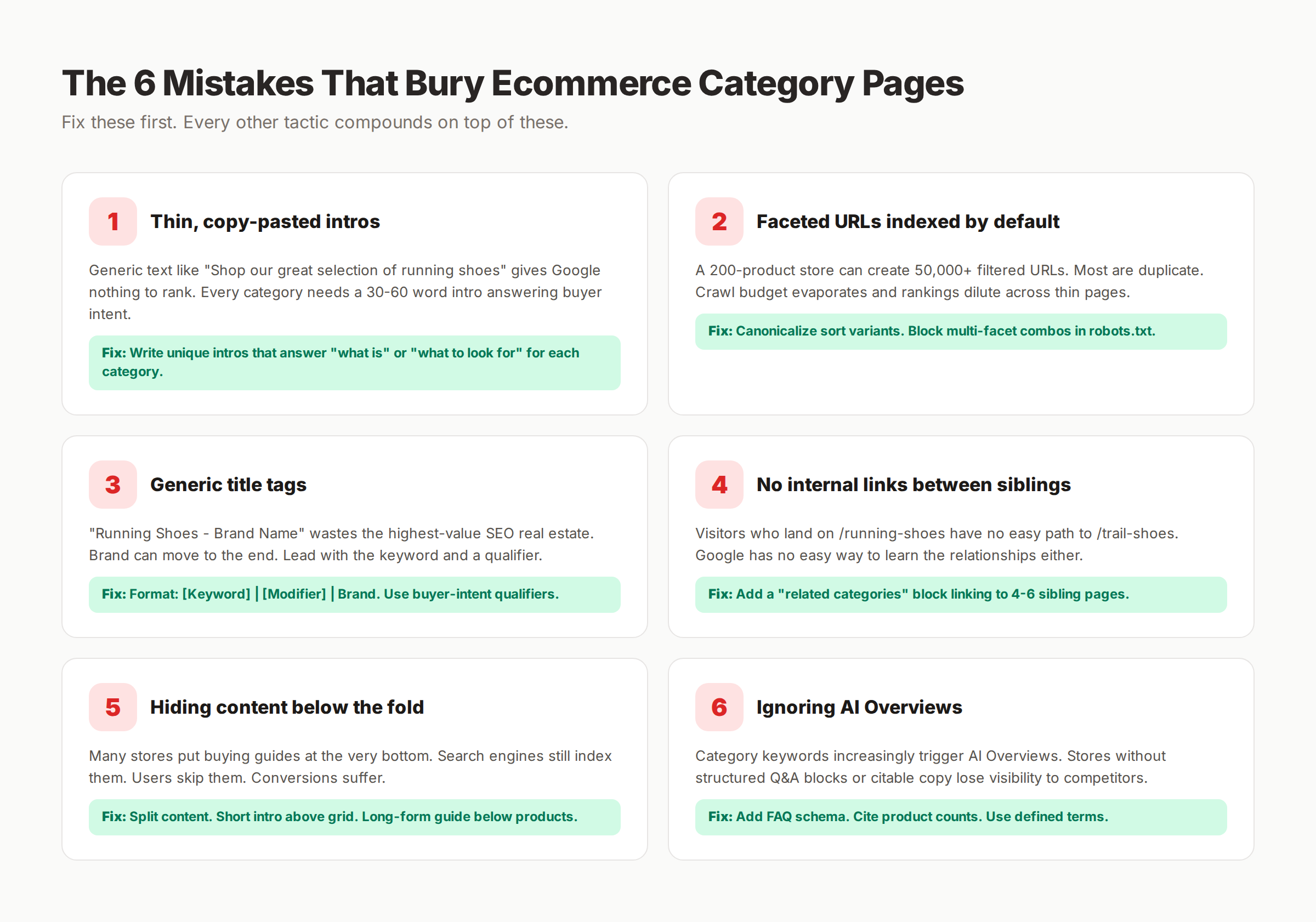
Mistake 1: Thin or Copy-Pasted Intros
Generic copy like “Shop our wide selection of running shoes” gives Google nothing to rank. Worse, the same copy on 20 category pages creates near-duplicate content.
Fix: Write a unique 30-60 word intro for every category. Use buyer intent. Cite product count.
Mistake 2: Faceted URLs Indexed by Default
Most ecommerce platforms ship with faceted URLs indexable out of the box. A 200-product store can spawn 50,000 filtered URLs within weeks.
Fix: Audit Search Console for indexed query strings. Canonicalize sort variants. Block multi-facet combinations.
Mistake 3: Generic Title Tags
“Running Shoes - Brand Name” wastes the most important SEO real estate. Brand belongs at the end. Keyword goes first. A modifier goes in the middle.
Fix: Use the formula: [Primary Keyword] | [Modifier] | [Brand].
Mistake 4: No Internal Links Between Siblings
Most stores link from category to product but never category to category. That leaves PageRank stuck and gives Google no signal about category relationships.
Fix: Add a “Related Categories” section with 4-6 sibling links to every category page.
Mistake 5: Hiding Content Below the Fold
Category pages with buying guides often bury them at the very bottom. Google still indexes the content. Shoppers skip it entirely.
Fix: Use the two-section model. Short intro above the grid. Detailed guide below.
Mistake 6: Ignoring AI Overviews
Category keywords increasingly trigger AI Overviews. Stores without FAQ schema, cite-able copy, or defined terms lose visibility to competitors who built for AI search.
Fix: Add FAQ schema. Use bolded definitions. Cite specific numbers.
Stop fixing the same SEO issues across hundreds of category pages. Let Stacc publish optimized ecommerce content while you focus on inventory and ops. Start for $1 →
How to Audit Existing Category Pages
For stores with 50 to 500 category pages, the question becomes prioritization. You cannot rebuild every page in a week. Use this audit framework to focus on the pages that will move revenue fastest.
Step 1: Pull Search Console Data
Export the last 3 months of category page performance. Sort by:
- Pages with impressions but low CTR (title tag opportunity)
- Pages with high CTR but low impressions (ranking opportunity)
- Pages with declining impressions over time (decay alert)
This sorts your category list by where the biggest gains hide. For methodology, see our SEO audit checklist.
Step 2: Score Each Category Page
Apply the 14-point checklist to each category. Score from 0 to 14. Anything below 10 needs work.
Three quick scoring questions:
- Does the title tag include the primary keyword in the first 60 percent?
- Is there a unique intro of 30-60 words above the product grid?
- Does the page have a buying guide below the grid?
If any answer is “no” the page is leaving rankings on the table.
Step 3: Prioritize by Revenue Potential
Rank categories by current revenue plus revenue potential. A category with 50,000 monthly searches that currently ranks position 11 has more revenue potential than a category with 500 searches ranking position 4.
Build a simple scoring matrix. Revenue potential (1-10) times current ranking gap (1-10) equals priority score. Work the top 20 percent first.
Step 4: Apply Fixes in Order
For each priority category, apply fixes in this order:
- Fix title tag and meta description
- Add or rewrite the 30-60 word intro
- Add the buying guide below the grid
- Implement ItemList and BreadcrumbList schema
- Audit and fix faceted navigation
- Add internal links to sibling categories
Each fix takes 15 to 90 minutes per page. The compounding effect of doing this across 50 priority pages can lift category traffic by 40 to 80 percent within 3 months.
Tools to Optimize Ecommerce Category Pages
Three categories of tools matter for category-page SEO.
Keyword Research Tools
Use these to find category-level keywords, validate search demand for long-tail variants, and map keywords to pages.
| Tool | Best For | Starting Price |
|---|---|---|
| Ahrefs | Full-coverage category keyword discovery | $108/mo |
| Semrush | SERP analysis and intent classification | $129/mo |
| Google Keyword Planner | Free baseline validation | Free |
| Google Search Console | Existing query performance data | Free |
For deeper coverage, read our list of the best free keyword research tools.
Technical SEO Audit Tools
Use these to audit category pages and faceted navigation issues.
- Screaming Frog SEO Spider for crawl analysis
- Ahrefs Site Audit for category-page-level issues
- Google Search Console for indexation reports
- PageSpeed Insights for Core Web Vitals
Content and Schema Tools
Use these to produce category-page content and validate schema.
- Google Rich Results Test for schema validation
- Stacc for category-page content production at scale (see our meta tag analyzer tool)
- Schema App for visual schema implementation
The right tool stack changes the math on category page SEO from “we will fix it next quarter” to “we can ship 50 fixes this week.”
Frequently Asked Questions About Ecommerce Category Page SEO
Are category pages or product pages more important for ecommerce SEO?
Category pages are more important for most ecommerce stores. They capture roughly 19 times the search volume of product pages, distribute link equity across the catalog, and convert at higher rates on commercial-intent keywords. Optimize categories first, then product pages.
How long should content on an ecommerce category page be?
A 30 to 60 word intro should sit above the product grid. A 300 to 800 word buying guide should sit below. Total category-page content lands between 350 and 900 words. More than that risks pushing products below the fold and hurting conversion rates.
Should I noindex faceted URLs on my ecommerce site?
Not by default. Some faceted URLs (like brand-specific filters with search demand) should be indexed. Others (like sort orders) should be canonicalized. Multi-facet combinations should be blocked. Use the three-bucket framework based on actual search demand for each filter type.
What is the difference between category pages and product listing pages?
A category page is a top-level or mid-tier grouping of related products (running shoes). A product listing page can be any page that lists products, including search results, tags, and filtered views. SEO effort should concentrate on category and subcategory pages, not arbitrary listings.
How do I optimize ecommerce category pages for AI Overviews?
Add FAQ schema with 4 to 6 buyer-intent questions. Use bolded definitions for category-specific terms. Cite specific numbers like product count and shipping windows. Keep paragraphs short and declarative so AI Overviews can extract individual sentences cleanly.
Should category pages use H1 or H2 for the page title?
Use H1. The H1 should match the title tag’s primary keyword. Google uses the H1 as the title tag replacement 50.76 percent of the time when it rewrites titles, so matching the two prevents unexpected SERP rewrites.
How often should I add new category pages?
Add new categories when search demand justifies them and inventory supports them. A new long-tail category needs 30+ monthly searches and 8+ in-stock products. Most stores can add 2 to 5 new category pages per month without diluting topical authority.
The Stacc Take on Ecommerce Category Page SEO
Category pages are the highest-value SEO real estate any ecommerce brand owns. They capture commercial-intent keywords, hold sitewide link equity, and convert better than any other page type. Getting them right is not optional.
The shift in 2026 is that AI Overviews now sit on top of category-level queries. Stores with cite-able copy, FAQ schema, and defined terms get pulled into AI answers. Stores without that structure get bypassed entirely. The gap is not closing. It is widening every quarter.
Build category pages like they are landing pages. Treat them as the front door for organic traffic. Apply the 14-point checklist. Audit your existing pages. Ship fixes in priority order. The compounding effect on revenue is real, and it shows up faster than most ecommerce teams expect.
Ready to scale category page SEO without hiring a content team? Stacc publishes optimized ecommerce content for stores across 70+ industries. $99/month for 30 articles. Cancel anytime. Start for $1 →
Related Tools & Resources
Free SEO Tools:
Best Lists:

Written by
Siddharth GangalSiddharth is the founder of theStacc and Arka360, and a graduate of IIT Mandi. He spent years watching great businesses lose organic traffic to competitors who simply published more. So he built a system to fix that. He writes about SEO, content at scale, and the tactics that actually move rankings.
30 SEO blog articles published every month
Keyword-optimized, scheduled, and live on your site. Automatically.
30-day trial · Cancel anytime
theStacc
Stop writing SEO content manually
30 blog articles, 30 GBP posts, and social media content. Published every month. Automatically.
Try for free$1 for 3 days · Cancel anytime