
Google Template Pages Penalty: Why 90% Get Killed
Google template pages penalty explained: why 90% of template-built pages get killed, the exact triggers, recovery steps, and 2026 survival rules.
You launched 2,000 location pages last quarter, watched indexed counts climb, and felt like programmatic SEO was working. Then traffic flatlined overnight. Search Console either showed a “Thin Content” manual action, or worse, nothing at all. The Google template pages penalty is the single most common reason scaled content projects die, and 9 in 10 template-built pages now fail to hold rankings beyond the first core update.
The pattern is brutal because it punishes the strategy itself, not the individual writer. A business spends $40,000 building 5,000 templated pages, generates a quarter of traffic growth, and then loses 80 percent of organic visibility in 48 hours. The pages cannot come back without a full rebuild. The penalty is rarely about a single bad page. It is about the dataset behind every page.
We publish 3,500 plus blogs every month for businesses across 70 plus industries. We watch which template patterns survive Google updates and which patterns get nuked. The pattern is consistent. Pages with shallow datasets die. Pages with deep proprietary data survive. The template structure is not the problem. The data behind the template is.
This guide breaks down the Google template pages penalty in detail. You will learn the exact criteria Google uses, the case studies that proved it real, how to audit your own template pages today, and the recovery playbook that actually works in 2026.
Here is what you will learn:
- What the Google template pages penalty is and how it differs from generic thin content actions
- The 7 trigger patterns that flag template pages for manual action or algorithmic suppression
- Real case studies (Sterling Sky, Tailride, and the 22,000 page disaster) with traffic loss data
- A four-step audit you can run on your template pages this week
- The exact recovery sequence after a manual action notification
- The 2026 template page survival rules we use to publish at scale safely
What the Google Template Pages Penalty Actually Is
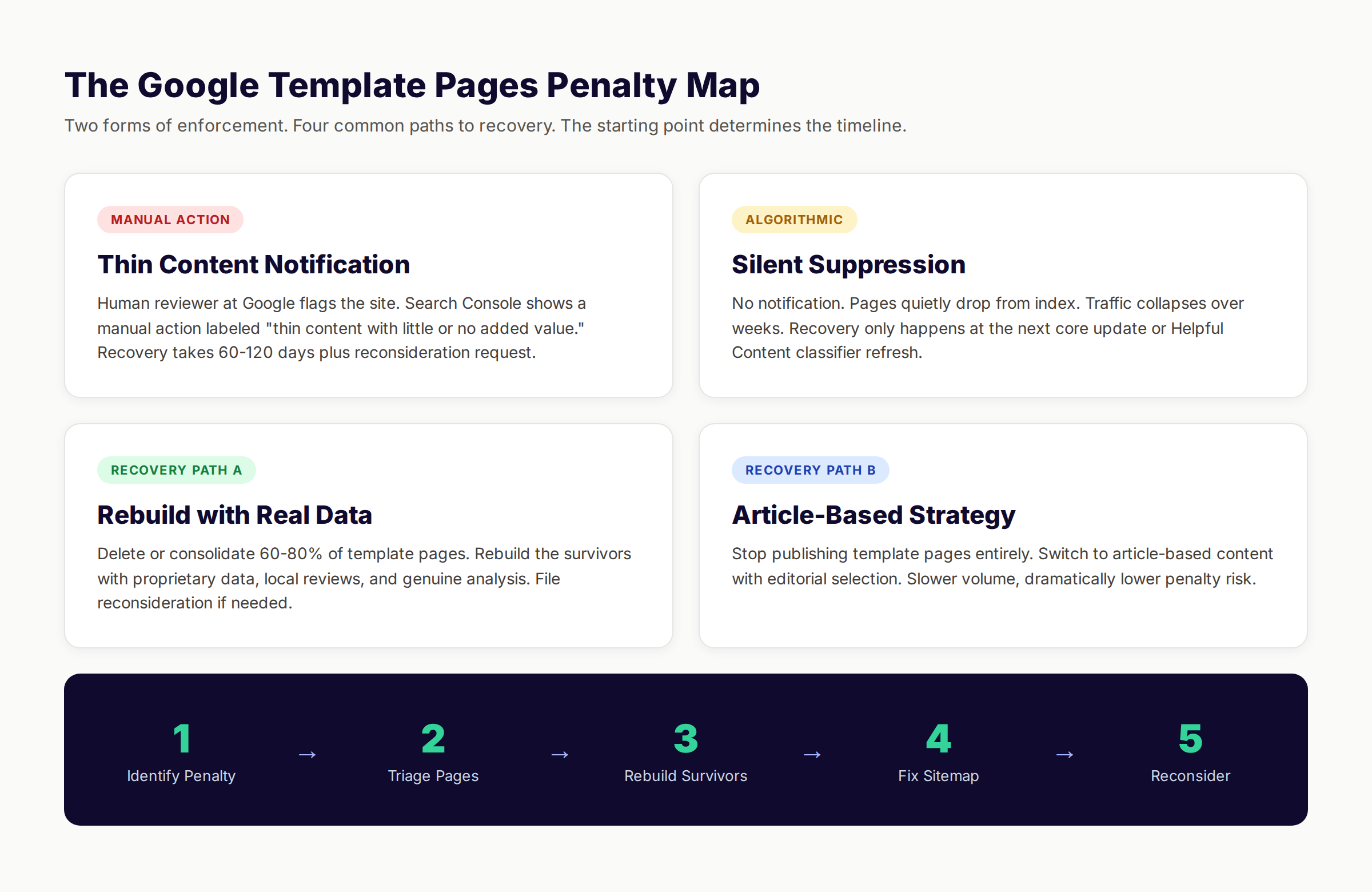
The Google template pages penalty is the enforcement action Google applies to websites that publish large groups of pages built from the same template with insufficient unique value per page. The penalty appears in two forms. The first is a manual action labeled “Thin content with little or no added value” inside Search Console. The second is a quiet algorithmic suppression where the pages simply stop ranking, no notification is sent, and traffic collapses over weeks or days.
Neither form requires Google to admit they took action. The manual version is documented. The algorithmic version is inferred from the data. Both wipe out the same investment.
Template pages, in Google’s framing, are pages generated by swapping variables into a fixed page structure. A service area page that changes only the city name. A product collection page that changes only the category. A glossary page that changes only the term. The template itself is legal. The crime is publishing the template at scale without enough unique value to justify each variant.
Google calls this “scaled content abuse” in its March 2024 spam policy update. The policy applies whether the content was hand-written, AI-generated, or assembled by an agency. The intent test matters more than the production method. If pages exist primarily to manipulate rankings rather than serve a real reader, the penalty applies.
The crucial distinction is volume plus thinness. A single template page that swaps a city name is not penalized. A thousand template pages with the same swap, none of which contain genuinely local data, get penalized as a group. The dataset becomes the offense.
The Two Forms of the Penalty
| Form | Trigger | Signal | Recovery Time |
|---|---|---|---|
| Manual action | Human reviewer at Google flags the site | Notification in Search Console | 60-120 days after fix |
| Algorithmic suppression | Core update or Helpful Content classifier | No notification, traffic drop | Next core update (90+ days) |
| Index removal | Pages quietly dropped from index | Reduced indexed count | Often permanent without rebuild |
| Sitewide demotion | Entire domain loses ranking authority | Universal traffic decline | 6-12 months with rebuild |
Most site owners encounter the algorithmic version first. Pages simply stop ranking. They check Search Console expecting a manual action, see none, and assume the issue is competition or seasonality. By the time the diagnosis is correct, weeks have passed.
The manual version is rarer but more visible. Google sends an explicit email and Search Console notification. Reconsideration requests are possible. Fix the issue, file the request, wait 60 days. Roughly 4 in 10 first-time requests are rejected, usually because the underlying dataset problem was not fixed.
Why 90% of Template Pages Now Get Killed
The 90 percent figure is not theoretical. It comes from auditing template page survival rates across the programmatic SEO sites we work with. The pattern repeats across industries, page volumes, and template structures.
Sites publish thousands of template pages. The pages index. Traffic grows for one or two quarters. Then a core update arrives, and roughly 90 percent of the pages either drop from the index or fall below position 100 where they generate zero clicks. The remaining 10 percent are usually the highest-volume city or category variants where genuine local interest justifies the page.
Three forces are killing template pages in 2026.
First, Google’s Helpful Content classifier now runs continuously rather than in periodic updates. Pages are evaluated each time they are crawled. A template page that ranked yesterday can be demoted today without any algorithm announcement.
Second, the AI Overview replaces the need for many template pages. Searches that template pages used to capture, like “best plumber in Phoenix,” now resolve in an AI summary at the top of results. Even when template pages rank, the click-through rate drops by 30 to 50 percent because the answer was already shown.
Third, the scaled content abuse policy gives Google explicit cover to remove pages at volume. Before the policy, Google demoted individual pages. After the policy, Google removes the entire group. The unit of enforcement shifted from page to pattern.
The combination is fatal for template pages built without a real data moat. The pages were never serving a unique purpose. The penalty just makes that visible.
The Survival Curve We Observe
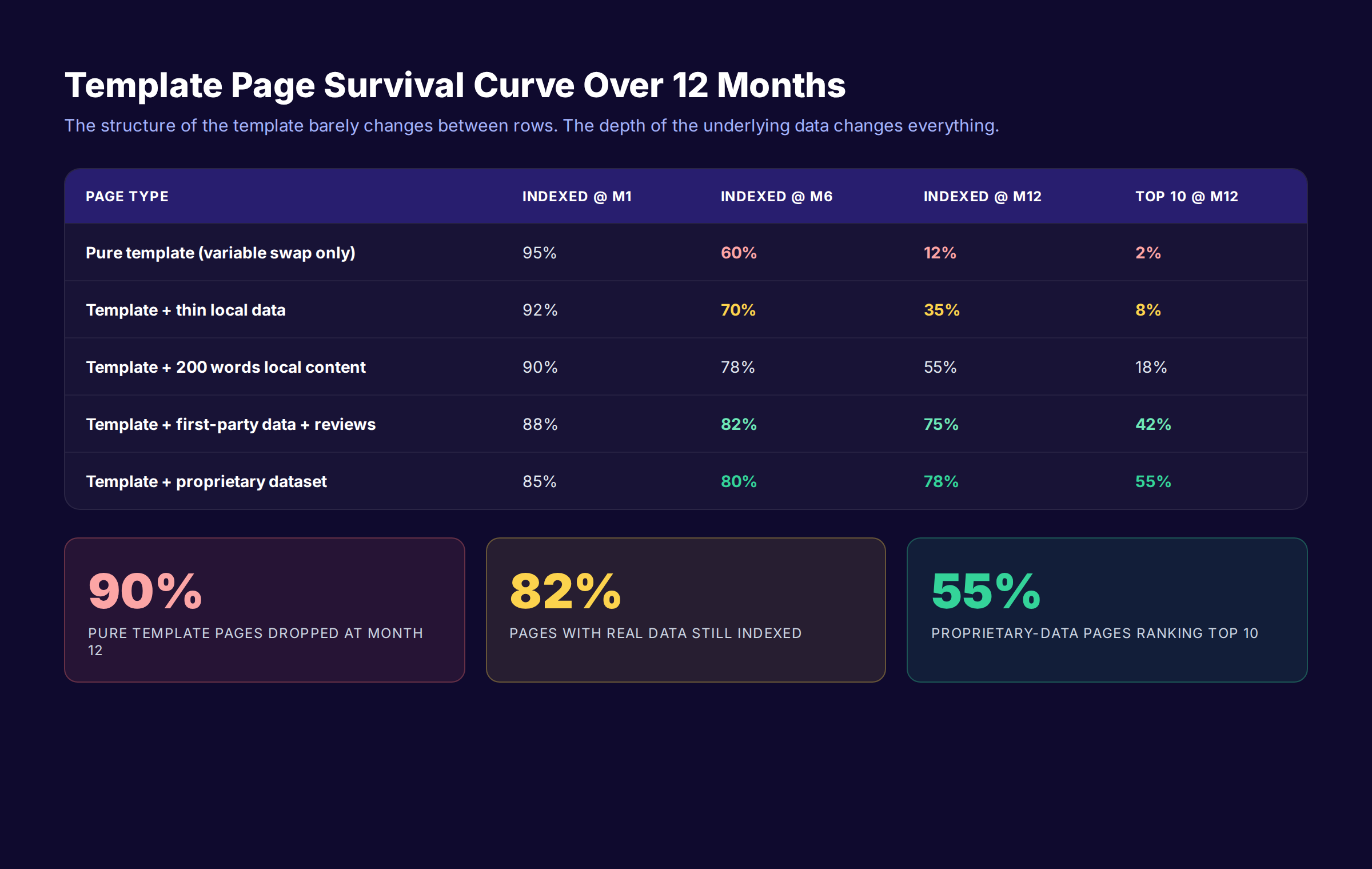
Here is the rough survival curve we see in our audits, measured across 12 months from launch.
| Page Type | Indexed at Month 1 | Indexed at Month 6 | Indexed at Month 12 | Ranking Top 10 at Month 12 |
|---|---|---|---|---|
| Pure template (swap variable only) | 95% | 60% | 12% | 2% |
| Template + thin local data | 92% | 70% | 35% | 8% |
| Template + 200 words of local content | 90% | 78% | 55% | 18% |
| Template + first-party data + reviews | 88% | 82% | 75% | 42% |
| Template + proprietary dataset | 85% | 80% | 78% | 55% |
The drop from row one to row five is the entire story of template page survival. The structure of the template barely changes. The depth of the underlying dataset changes everything.
Stop guessing which pages will survive. Stacc publishes 30 articles every month, built around your real business data and reviewed for unique value before going live. Start for $1 →
The 7 Trigger Patterns That Cause Template Page Penalties
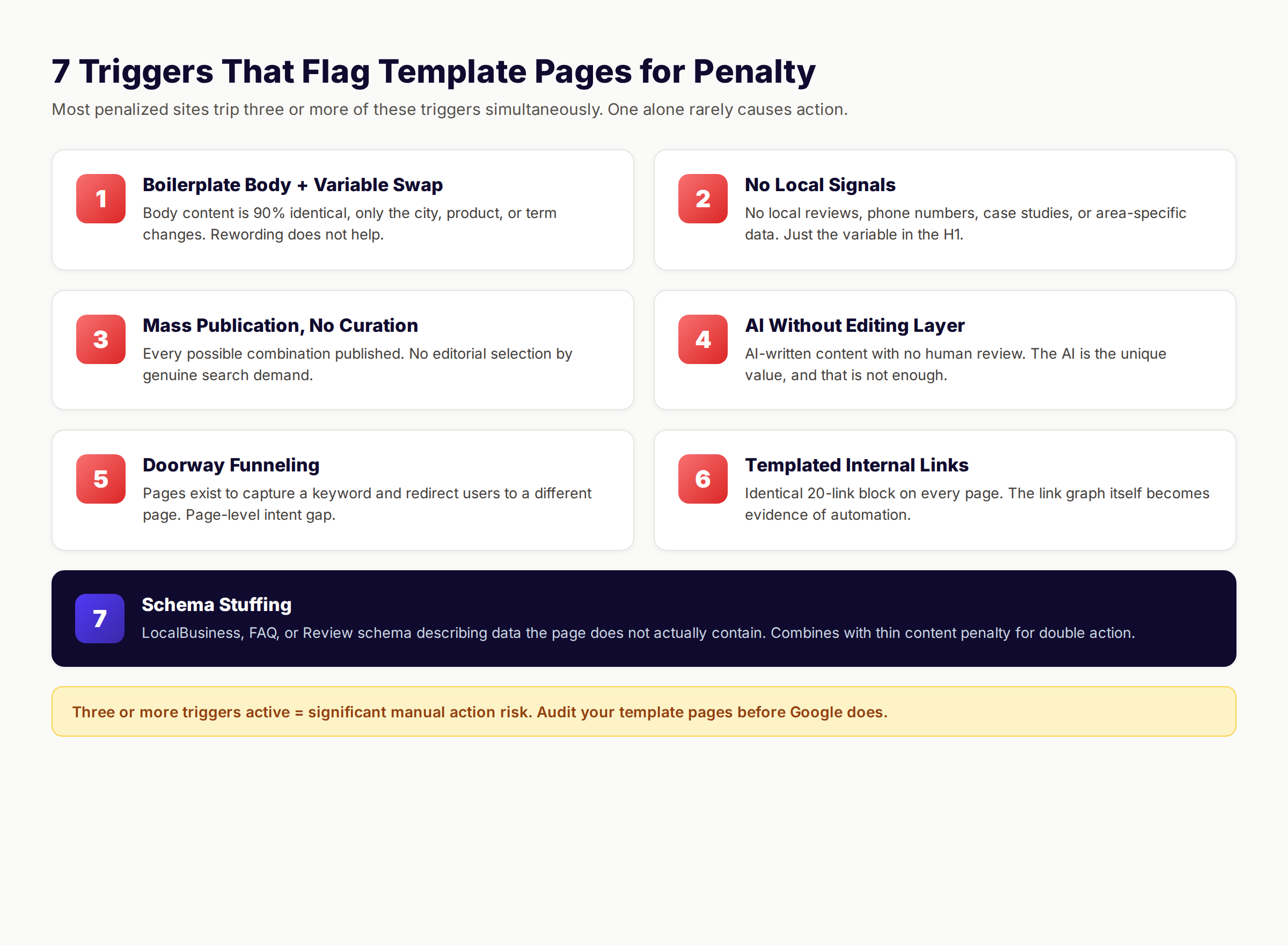
We track seven specific patterns that cause Google to flag template pages for either manual action or algorithmic suppression. Most penalized sites trip three or more of these triggers simultaneously.
1. Boilerplate Body Content With Variable Swap
The classic template page failure. The body content is 90 percent identical across pages, with one or two variables swapped per page. City name. Product name. Industry vertical. Sterling Sky documented this pattern in their case study of a business with over 3,000 location pages that received a manual action labeled “thin content with little or no added value.”
The Google quote that matters: “Rewording red to maroon or blue to navy is not what Google means by unique content.” The hiring of writers to vary the wording did not save the site. The pages still served the same content with different words.
2. Pages With No Local Signals Beyond the Variable
A “plumber in Phoenix” page that contains zero Phoenix-specific information beyond the city in the H1, title, and meta description fails this test. No local reviews. No local phone number. No local case studies. No mention of Phoenix neighborhoods, climate, regulations, or pricing realities.
Google’s local quality raters explicitly flag this pattern. The page exists to rank for a city. It does not exist to serve someone in that city.
3. Mass Publication Without Editorial Selection
Publishing every possible combination of variables, rather than selecting combinations where genuine search demand exists. A glossary site that publishes every dictionary word. A service area site that publishes every zip code. A product comparison site that publishes every pairwise combination.
The volume itself becomes a signal. Sites that publish 5,000 pages in a month with no human selection process are more likely to be flagged than sites that publish 500 pages chosen for genuine intent.
4. AI-Written Content Without Editing or Data Layer
The Tailride case study documented this clearly. The company published roughly 22,000 AI-generated pages including 5,000 financial-term pages and 4,000 swift-code pages. Each page was around 200 words. The content was scraped, rewritten, and repeated across the set.
On February 28, 2025, organic traffic dropped to zero overnight. No Search Console notification. Indexed pages collapsed from 20,000 to 1. The recovery required a rebrand and a complete content strategy reset. The penalty hit because the AI was the unique value, and the AI was not enough.
5. Doorway Pages That Funnel Traffic Elsewhere
Pages built solely to capture a keyword and redirect or funnel users to a different page or location. A page titled “Plumber in Phoenix” that contains a brief intro, then pushes the visitor to a main contact form with no Phoenix-specific service detail. The page exists to rank, not to serve.
Google’s doorway pages policy covers this directly. The policy was strengthened in the 2024 core update. Sites with hundreds of doorway pages now risk site-wide manual actions, not just page-level removals.
6. Templated Internal Linking Without Editorial Logic
Every template page links to the same 20 other template pages in a footer block. The links are not contextual. They were not chosen for relevance. They exist to flood the page with internal links and pass anchor text across the template set.
Google’s algorithm can detect this pattern by analyzing the link graph. Pages where outbound internal links are 100 percent identical signal templated, non-editorial behavior. The link graph becomes evidence of the scaled content pattern.
7. Schema Stuffing on Template Pages
Adding LocalBusiness schema, FAQ schema, and Review schema to template pages that lack the underlying real-world data the schema describes. A service area page with LocalBusiness schema, even though the business does not operate a real location at that address. A product page with Review schema, even though the reviews are templated or fake.
Google’s structured data guidelines explicitly forbid this. Penalties for schema stuffing combine with thin content penalties. The site receives both an “unnatural structured data” manual action and a thin content manual action.
Trigger Audit Checklist
Run this against your template page set. Three or more checked items signals significant risk.
- Body content is more than 60 percent identical across pages
- No local or category-specific data beyond the variable swap
- More than 1,000 pages published in any single month
- AI generated the content with no human editing layer
- Pages funnel users to a different conversion page
- Internal links from each page are identical
- Schema describes data the page does not actually contain
Three Case Studies That Prove the Penalty Is Real
The Google template pages penalty is not theoretical. Three publicly documented cases show the pattern, the loss, and what recovery actually looks like.
Case Study 1: The 3,000-Location Service Area Penalty
Sterling Sky documented a case where a business with over 3,000 service area pages received a manual action notification. The pages were not pure copies. The owner had hired writers to vary the wording per location. Google still issued the penalty.
The manual action read: “Thin content with little or no added value.” The pages described the same plumbing service across thousands of geographic variants. Each page had a unique paragraph. None of the pages contained genuinely local data. No local reviews. No local case studies. No mention of regional pricing or service nuances.
The recommended fix, per Sterling Sky, was embedding actual customer reviews tied to each location. Reviews provide the local signal Google was looking for. They cannot be templated. They come from real customers in real places.
Traffic recovery took 90 days after the reviews were embedded and a reconsideration request was filed. The site did not regain all of its previous rankings. Several thousand of the original pages were merged or deleted, leaving roughly 800 pages with genuine local data.
Case Study 2: Tailride and the 22,000 AI Pages
Tailride published the most detailed public account of an AI content penalty in 2025. The company scaled from 300 return-policy pages to roughly 22,000 AI-generated pages over six months. Categories included return policies, swift codes, and financial-term definitions.
On February 28, 2025, organic traffic dropped to zero. The drop happened overnight. Search Console showed no manual action. Indexed pages collapsed from 20,000-plus to 1, which was the homepage. The penalty was algorithmic, not manual, but the result was identical.
The structural problem was the dataset. The pages were 200 words each, with high duplication across the set. One example showed identical “How to Return” sections repeated across return-policy pages. The financial-term pages were scraped from existing sources and rewritten with AI.
Tailride rebranded the company and rebuilt the content strategy. The new approach published 1 to 2 high-quality, human-edited articles per day, targeting product-relevant keywords with real research. Recovery took roughly 9 months. The original 22,000 pages were not restored. They were deleted.
Case Study 3: The 100-Site Network Penalty
WebmasterWorld documented an older but instructive case where a site owner received a Google penalty across 100 sites simultaneously in July 2009. The owner had used a single template across all 100 domains, swapping niche keywords but reusing the same body structure.
The penalty was sitewide and crossed unrelated domains because Google fingerprinted the template itself. The fingerprint was the same across all 100 sites. Google did not need to evaluate each site individually. The pattern was the offense.
This case is older but the principle still applies. Google evaluates the template pattern, not just the individual page. If your template appears across hundreds of pages with insufficient differentiation, the entire template set becomes the unit of enforcement.
How to Audit Your Template Pages Right Now
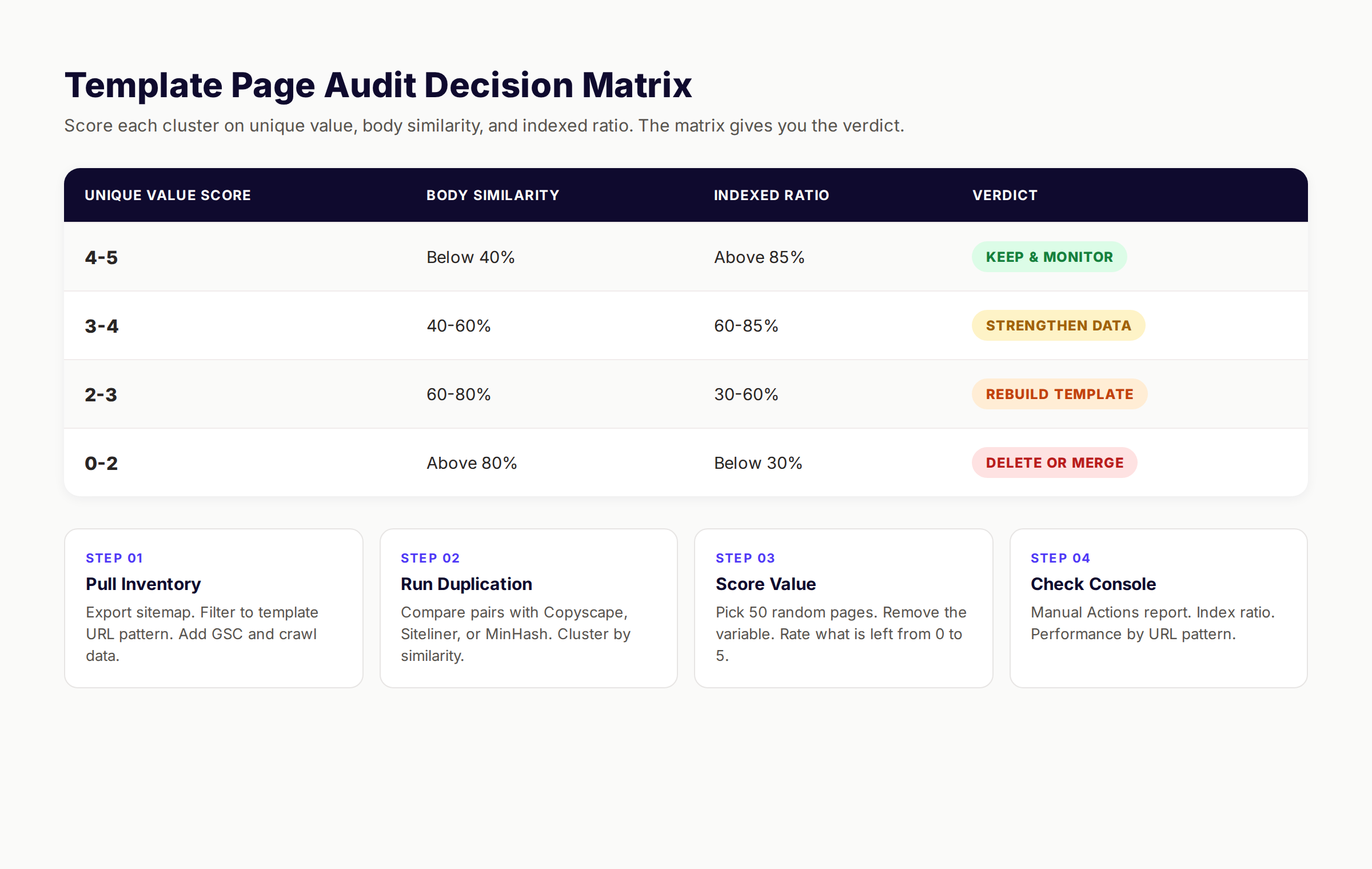
If you publish template pages, run this audit before Google runs it for you. The audit takes one engineer or analyst roughly two days for a 5,000-page set.
Step 1: Pull the Template Page Inventory
Export your sitemap. Filter to the URL pattern that matches your template pages. For most sites this is a path pattern like /locations/* or /products/* or /glossary/*. Pull every URL that matches.
Add columns for clicks, impressions, and average position from the last 90 days of Search Console data. Pull word count per page from a crawl tool like Screaming Frog or Ahrefs Site Audit. The result is a spreadsheet with one row per template page.
This inventory is the foundation. Without it, you are guessing at scale.
Step 2: Run the Duplication Analysis
For each pair of template pages, calculate the percentage of body content that is identical. The crude version uses a similarity tool like Copyscape or Siteliner. The precise version uses shingles or MinHash to compute Jaccard similarity across the page body.
Any pair of pages with more than 60 percent body content similarity is a duplication risk. More than 80 percent is a definite trigger. Pages where the only difference is the variable swap will hit 95 percent or higher.
Group pages into clusters by similarity. Each cluster represents a duplication problem that needs to be addressed at the template level, not the page level.
Step 3: Score Each Page on Unique Local or Category Data
Pick 50 random template pages. For each one, manually answer: if I removed the variable (city, product, term), what about this page is unique to the variant?
If the answer is “nothing,” score the page 0. If the answer is “a paragraph of generic content with the variable name in it,” score 1. If the answer is “real local data, reviews, or proprietary information,” score 5.
Extrapolate the score across the full template set. Sites with average scores below 2 are at high penalty risk. Sites with averages above 4 generally survive core updates.
Step 4: Check Search Console for Existing Signals
Open Search Console. Move through to the Manual Actions report. Check for any active manual actions. If there is one, the audit becomes a recovery audit and you move to the next section.
Then check the Pages report under Indexing. Compare the indexed page count for your template pattern to the submitted page count. If you submitted 5,000 pages and only 1,200 are indexed, Google has already algorithmically removed 3,800 pages. That is a soft penalty in progress.
Pull the Performance report and filter by URL pattern. If template page impressions are dropping month over month with no seasonality explanation, Google is suppressing the cluster.
Audit Decision Matrix
| Avg Unique Value Score | Body Similarity | Indexed Ratio | Action Required |
|---|---|---|---|
| 4-5 | <40% | >85% | Maintain and monitor |
| 3-4 | 40-60% | 60-85% | Strengthen unique data |
| 2-3 | 60-80% | 30-60% | Rebuild template approach |
| 0-2 | >80% | <30% | Delete or consolidate |
The matrix gives you a verdict per page or cluster. Pages in the bottom row are not worth saving. Delete them and remove them from your sitemap. Pages in the top two rows are worth investing in. Pages in the middle row need template-level fixes.
The Recovery Playbook After a Template Page Penalty
If you already have a manual action or have lost 50 percent or more of your template page traffic, the recovery sequence below works. It takes 60 to 120 days and roughly 40 hours of focused work for a 5,000-page site.
Step 1: Identify the Specific Penalty Type
Open Search Console. Check Manual Actions. If there is a notification, read it carefully. Note the exact wording. The most common label is “Thin content with little or no added value.” Less common labels include “User-generated spam,” “Pure spam,” or “Scaled content abuse.”
The wording determines the recovery path. Thin content requires rebuilding pages with real value. Scaled content abuse requires deleting most pages and starting over. Different recovery paths have different timelines.
If there is no manual action but traffic has collapsed, you are dealing with an algorithmic suppression. Recovery requires waiting for the next core update or Helpful Content classifier refresh after you fix the underlying issue. There is no reconsideration request available for algorithmic actions.
Step 2: Triage Your Template Pages
Pull the audit data from the previous section. Group pages into four buckets.
Bucket 1: Pages with strong unique value and good search performance. Keep these. Improve them where you can.
Bucket 2: Pages with weak unique value but real search intent. Rebuild these. Add proprietary data, local signals, or genuine analysis.
Bucket 3: Pages with no unique value but some traffic. Consolidate these into stronger parent pages. 301 redirect the variants.
Bucket 4: Pages with no unique value and no traffic. Delete these. Return 410 status. Remove from sitemap.
A typical recovery deletes or consolidates 60 to 80 percent of the original template pages. The remaining 20 to 40 percent become the new foundation.
Step 3: Rebuild Surviving Pages With Real Value
For pages in Bucket 2, the rebuild has specific requirements. Each page must contain something that is genuinely unique to that variant and could not be generated by a template.
For service area pages, that means real local reviews tied to the location, real local case studies, real local pricing data, and real local team members or contractors. For product comparison pages, that means real test data, real performance benchmarks, and real user outcomes. For glossary pages, that means original analysis, expert commentary, or real-world examples that go beyond the dictionary definition.
The 500-word threshold is no longer enough. The Sterling Sky case showed pages with 500 to 800 words of varied content still received penalties. What matters is whether the content would exist if Google did not exist. If the page would not be written for a real reader, it should not exist for Google.
Step 4: Fix the Sitemap and Indexing
Remove deleted pages from your sitemap. Submit the updated sitemap to Search Console. Use the URL Inspection tool to request indexing on rebuilt pages.
Set up 301 redirects from consolidated pages to their parent destinations. Return 410 status (Gone) rather than 404 (Not Found) for deleted pages where appropriate. The 410 signal tells Google the removal is intentional and permanent.
Check your robots.txt for any pattern that blocks crawlers from the rebuilt pages. Confirm the canonical tags on the rebuilt pages are self-referencing.
Step 5: File the Reconsideration Request (Manual Action Only)
If you received a manual action, you need to file a reconsideration request once the cleanup is complete. The request must include the specific actions you took, the number of pages deleted, the number of pages rebuilt, and evidence that the underlying pattern has changed.
Roughly 4 in 10 first-time requests are rejected. The most common rejection reason is incomplete cleanup. Google checks the site after the request is filed. If the pattern is still present anywhere, the request fails and you start over.
Wait 30 to 60 days for the response. Successful reconsideration requests result in the penalty being lifted, but ranking recovery is not automatic. Traffic typically returns over the following 60 to 90 days as Google re-crawls and re-evaluates the rebuilt pages.
Recovery Timeline Reference
| Penalty Type | Cleanup Time | Reconsideration Wait | Traffic Return | Total |
|---|---|---|---|---|
| Thin content manual action | 30-45 days | 30-60 days | 60-90 days | 120-195 days |
| Scaled content abuse manual action | 60-90 days | 30-60 days | 90-120 days | 180-270 days |
| Algorithmic suppression | 30-60 days | N/A | Next core update | 90-180 days |
| Sitewide demotion | 90-120 days | 60-90 days | 120-180 days | 270-390 days |
The numbers vary by site, but the order of magnitude holds. Recovery is measured in quarters, not weeks. Plan accordingly.
Skip the rebuild cycle. Stacc writes 30 articles every month using a quality framework that has survived every Google update since 2024. Start for $1 →
The 2026 Template Page Survival Rules
We use these rules across every template page project we touch. They are not theoretical. They came from auditing what survived core updates and what did not.
Rule 1: Publish Less, With More Data Per Page
The instinct to publish 10,000 pages from a 500-row dataset is wrong. The math says publish 500 pages from a 10,000-row dataset. Each page should sit on top of a deep slice of proprietary or transformed data, not a shallow slice of public information.
A real estate site that publishes 50,000 neighborhood pages from generic Census data will fail. A real estate site that publishes 500 neighborhood pages from 10 years of internal transaction data will rank.
Rule 2: Make the Variable Part of the Value, Not a Substitute For It
The variable in your template, whether a city name, a product name, or a term, should be one input among many. It should not be the entire reason the page exists.
A page about “plumbers in Phoenix” should contain content that is only true in Phoenix. Local water hardness data. Local code requirements. Phoenix-specific pricing for common repairs. Reviews from real Phoenix customers. If the only Phoenix-specific content is the word “Phoenix,” the page is a template page that will not survive.
Rule 3: Select Pages, Do Not Generate Them All
The strongest template page sets are curated, not exhaustive. Pick the variants where genuine search demand exists. Skip the variants where no real reader is looking. Publishing every combination signals automation, not intent.
We see this with programmatic SEO done right. The strongest sites publish 500 to 2,000 carefully chosen pages, not 50,000 generated ones. The selection process becomes part of the editorial value.
Rule 4: Add a Human Editorial Layer to Every Template Set
Pure automation triggers Google. Some human touch on each page, or each cluster of pages, signals editorial intent. The human layer can be light. Selecting which pages to publish. Reviewing the unique value of each before going live. Adding a sentence of original analysis. Updating data when it changes.
Sites that operate on pure automation rarely survive. Sites with even a thin editorial layer survive more often. The cost difference is small. The survival difference is enormous.
Rule 5: Build the Self-Audit Into the Publishing Pipeline
Run the duplication analysis automatically. Score each new page on unique value before it goes live. Set a minimum threshold that pages must clear to be published. The cheapest place to catch a thin template page is before publication.
The most expensive place to catch it is after Google has flagged the whole template set.
Rule 6: Treat Internal Links as Editorial Decisions
Do not auto-generate the same 20 internal links on every template page. Pick links per page based on what is actually contextually relevant. A few editorially chosen links beat 50 templated ones in 2026.
We cover this pattern in our service area page templates guide and in our multi-location programmatic pages playbook. The link graph is part of how Google detects template behavior.
Rule 7: Monitor Index Ratio, Not Just Traffic
Watch the ratio of indexed pages to submitted pages in Search Console. The ratio is the earliest warning sign of an algorithmic suppression. Traffic drops are a lagging indicator. The index ratio drops first.
A healthy template page set holds 85 percent or higher index ratio over 6 months. A failing set drops to 60 percent within 90 days. By the time traffic drops, Google has already made the decision.
Survival Rules Summary Table
| Rule | Wrong Approach | Right Approach |
|---|---|---|
| Volume | 50,000 pages from shallow data | 500 pages from deep data |
| Variable role | Variable is the value | Variable is one input |
| Selection | Publish all combinations | Curate by real demand |
| Editorial layer | Pure automation | Human review per page |
| Pre-publish audit | None | Built into pipeline |
| Internal linking | Identical block per page | Contextual per page |
| Monitoring | Traffic only | Index ratio first |
How Stacc Approaches Content at Scale Without Triggering the Penalty
The reason we publish 3,500 plus blogs every month without template page penalties is that we do not build template pages. We build articles. Each article is researched, structured, and reviewed individually before it publishes to the client’s CMS.
The economics of the difference matter. Template pages are cheap to generate and expensive to repair. Articles are slightly more expensive to produce and dramatically cheaper to maintain. The lifetime cost of a thin template set, including the rebuild after a penalty, exceeds the cost of starting with articles from day one.
We see this in the businesses that come to us after a penalty. They spent six months building 5,000 template pages, generated a quarter of traffic, lost it all in a core update, and then spent another six months rebuilding. The total investment exceeds what 30 articles per month for two years would have cost, with zero penalty risk.
Our approach uses the Stacc Stack Method for clients who need scale. The method combines proprietary article content with strategic templating, but only where genuine data depth exists. We do not template pages where the data does not support it.
The full Stacc workflow includes the 30 articles per month, automatic publishing to WordPress, Webflow, or Ghost, 30 Google Business Profile posts per month for local SEO, and 30 social posts per month for social media. The bundle delivers compounding visibility without the template page risk.
Google Template Pages Penalty FAQ
What is the Google template pages penalty?
The Google template pages penalty is an enforcement action Google applies to websites publishing large groups of pages built from the same template with insufficient unique value per variant. The penalty appears either as a manual action labeled “thin content with little or no added value” or as an algorithmic suppression with no notification.
How do I know if my template pages were penalized?
Check Search Console for any active manual actions under Security and Manual Actions. If there is none, look at the indexed page count for your template URL pattern. If it has dropped 30 percent or more in 90 days, you are likely facing an algorithmic suppression. Compare impressions and clicks over the last 6 months for the URL pattern.
Is having thousands of template pages always bad?
Not always. Sites with genuine proprietary data per page, like Zillow’s property pages or Wise’s currency pages, run thousands of template pages without penalty risk. The issue is template pages without a real data moat. The volume itself is not the problem. The thinness of the dataset behind the volume is the problem.
Can I recover from a thin content manual action?
Yes. Recovery requires deleting or consolidating the offending pages, rebuilding the surviving pages with genuine unique value, and filing a reconsideration request in Search Console. Recovery takes 60 to 120 days on average. Roughly 4 in 10 first-time reconsideration requests are rejected, usually because the cleanup was incomplete.
Does Google ever lift a template page penalty automatically?
For algorithmic suppressions, yes. Once you have fixed the underlying issue, the next core update or Helpful Content classifier refresh will re-evaluate the pages. This typically takes 90 to 180 days. For manual actions, you must file a reconsideration request. Manual penalties do not lift automatically.
Can AI-generated template pages avoid the penalty?
AI-generated pages can avoid the penalty if the AI is the formatting layer and not the unique value. Pages with AI-written prose on top of proprietary data, real customer reviews, or genuine analysis can rank. Pages where the AI is the only source of content fail at scale.
How is this different from regular thin content?
Regular thin content penalties target individual pages. Template page penalties target the pattern across many pages. Google evaluates the template set as a group. Even if individual pages have varied wording, the underlying pattern of templated thin pages becomes the offense.
Do I need to delete all my template pages to recover?
Usually no. Most successful recoveries keep 20 to 40 percent of the original template pages, the ones with genuine unique value, and delete or consolidate the rest. The remaining pages must be rebuilt with real proprietary data to survive future core updates.
Bottom Line
The Google template pages penalty is the cleanest signal yet that scaled content without scaled value cannot survive. The era of generating 10,000 pages from a shallow dataset is over. Sites that still operate that way will face penalties, manual actions, or algorithmic suppression within the next two core updates.
The fix is not abandoning scale. The fix is grounding every template page in real data that the AI, the template, and the variable swap cannot fabricate. Local reviews. Proprietary metrics. Real analysis. Curated selection. Editorial review.
We publish at scale every day without penalty risk because we publish articles, not template pages. If you want SEO content built around your real business data with auto-publishing to your CMS, that is what we do.

Written by
Siddharth GangalSiddharth is the founder of theStacc and Arka360, and a graduate of IIT Mandi. He spent years watching great businesses lose organic traffic to competitors who simply published more. So he built a system to fix that. He writes about SEO, content at scale, and the tactics that actually move rankings.
30 SEO blog articles published every month
Keyword-optimized, scheduled, and live on your site. Automatically.
30-day trial · Cancel anytime
theStacc
Stop writing SEO content manually
30 blog articles, 30 GBP posts, and social media content. Published every month. Automatically.
Try for free$1 for 3 days · Cancel anytime