
Headless CMS for SEO: The Complete Guide (2026)
Headless CMS for SEO explained. Compare 8 top platforms, learn technical setup, avoid common mistakes, and choose the right headless CMS for your rankings.
Headless CMS for SEO: The Complete Guide (2026)
Your content team writes brilliant articles. Your developers ship fast frontends. But Google cannot index your pages. That is the headless CMS SEO problem in one sentence.
The decoupled architecture that makes headless CMS so powerful for developers also strips away the SEO infrastructure that traditional platforms handle automatically. No built-in sitemaps. No automatic meta tags. No schema markup out of the box. Every SEO element becomes a manual implementation task.
This costs rankings. A poorly configured headless setup can drop organic traffic by 40 to 80 percent within 60 days. The fix is not switching back to WordPress. It is understanding what headless CMS for SEO requires and building it correctly from day one.
We publish 3,500+ blogs across 70+ industries. We push content to headless CMS platforms through APIs daily. This guide covers everything we know about making headless CMS work for search rankings.
Here is what you will learn:
- How headless CMS architecture impacts crawlability and indexing
- The 8 best headless CMS platforms for SEO ranked by use case
- Technical SEO requirements every headless setup must implement
- Common headless CMS SEO mistakes that destroy rankings
- How to choose between headless and traditional CMS for your project
- Content velocity strategies that work with headless publishing workflows
Table of Contents
- What Is a Headless CMS and Why It Matters for SEO
- Headless CMS vs Traditional CMS: The SEO Trade-Off
- The 8 Best Headless CMS Platforms for SEO
- Technical SEO Requirements for Headless CMS
- Content Strategy and Publishing Workflows
- Common Headless CMS SEO Mistakes
- How to Choose the Right Headless CMS for Your Project
- Frequently Asked Questions
What Is a Headless CMS and Why It Matters for SEO {#ch1}
A headless CMS stores and manages content without dictating how that content displays. The “head” (the presentation layer) is removed. Content lives in a backend repository and gets delivered through APIs to any frontend, device, or platform.
Traditional CMS platforms like WordPress bundle content management with a built-in theme system. You write a post. WordPress stores it, applies your theme, and renders HTML for visitors. Backend and frontend are one unit.
A headless CMS separates these completely. Authors create content through an admin interface. Developers build a separate frontend application that fetches content through REST or GraphQL APIs. The same content backend can power a website, a mobile app, digital signage, and a voice assistant simultaneously.
Why Headless CMS Adoption Is Accelerating
The global headless CMS market reached $1.6 billion in 2024 according to Grand View Research. Three forces drive this growth.
Multi-channel content delivery. Modern businesses publish to 5 to 10 channels. A headless CMS lets you manage all content from one source. Update a product description once. It syncs to your website, mobile app, email system, and in-store kiosk automatically.
Frontend performance. Headless sites built with static generation or server-side rendering routinely score 90+ on all three Core Web Vitals metrics. Pre-rendered HTML loads faster than PHP-generated pages. No database queries per visitor. No theme bloat.
Developer freedom. Frontend teams use modern frameworks like Next.js, Astro, Vue, and Svelte. No PHP constraints. No theme limitations. Full control over every line of HTML, CSS, and JavaScript.
The SEO Challenge Headless CMS Creates
The same decoupling that delivers these benefits also removes SEO infrastructure. Traditional CMS platforms handle meta tags, sitemaps, schema markup, canonical URLs, and Open Graph tags through plugins. Headless CMS platforms do none of this automatically.
Every SEO element must be deliberately implemented in the frontend application. Miss one and your rankings suffer. A headless site with client-side rendering and no server-side HTML can remain invisible to Googlebot for weeks.
The headless CMS for SEO equation is simple. The architecture offers a higher performance ceiling. But it demands more technical SEO knowledge to reach it.
Your SEO team. $99 per month. Stacc publishes 30 optimized articles to your headless CMS via API. We handle the content. You handle the architecture. Start for $1 →
Headless CMS vs Traditional CMS: The SEO Trade-Off {#ch2}
The choice between headless and traditional CMS is not about which is better. It is about which trade-offs your project can absorb. Here is an honest comparison of how each architecture handles SEO.
| Factor | Headless CMS | Traditional CMS (WordPress) |
|---|---|---|
| Page speed | Under 1 second (SSG/SSR) | 2 to 4 seconds (uncached) |
| Meta tag management | Manual frontend implementation | Automatic via Yoast/RankMath |
| XML sitemap | Must build or generate | Auto-generated by plugin |
| Schema markup | Manual JSON-LD injection | Plugin-generated |
| Canonical URLs | Manual implementation | Automatic |
| Open Graph tags | Manual implementation | Automatic |
| Core Web Vitals | Excellent control | Theme-dependent |
| SEO plugin ecosystem | None | Massive (Yoast, RankMath, AIOSEO) |
| Multi-channel delivery | Native | Not supported |
| Developer requirement | Required | Optional |
| Setup complexity | Weeks | Hours |
| Monthly hosting cost | $50 to $200+ | $10 to $50 |
Where Headless CMS Wins for SEO
Core Web Vitals performance. Pre-rendered headless sites eliminate PHP processing on every request. No database queries per visitor. Pages load from a CDN edge node closest to the user. Google uses Core Web Vitals as a ranking signal. Improving these metrics directly impacts rankings.
Clean HTML output. No theme bloat. No plugin-injected scripts you did not request. Every line of HTML serves a purpose. Search engines parse clean markup more efficiently.
Full rendering control. You choose the strategy. SSR for dynamic pages. SSG for static pages. ISR for pages that update periodically. No uncertainty about whether Googlebot processes your JavaScript correctly.
Edge deployment. Frontend applications deploy to CDN edges globally. Every visitor gets served from the closest server. Time to first byte drops to under 100 milliseconds.
Where Traditional CMS Wins for SEO
Plug-and-play SEO. Yoast SEO and RankMath provide instant meta tag management, readability analysis, XML sitemaps, and schema markup. A non-technical user can configure professional SEO in under an hour.
Real-time SEO feedback. Content editors see optimization scores while writing. They get suggestions for title length, meta description quality, keyword density, and internal linking. Headless CMS platforms offer no equivalent.
Lower barrier to entry. A small business owner can install WordPress, add an SEO plugin, and start ranking within days. Headless requires a developer to build the frontend before a single page goes live.
Preview functionality. WYSIWYG editing with instant visual feedback. Content editors see exactly how posts render before publishing. Most headless setups require custom preview integration.
The Verdict by Use Case
| Scenario | Recommended Approach |
|---|---|
| Small business website or blog | Traditional WordPress |
| Content-heavy publication | Headless with Astro or Next.js |
| Enterprise with mobile app | Headless CMS |
| Ecommerce multi-channel | Headless CMS |
| Marketing team without developers | Traditional CMS |
| SaaS product with documentation | Headless CMS |
| Local service business | Traditional WordPress with automated publishing |
The performance advantage of headless comes from architecture, not the CMS itself. A poorly configured headless setup with client-side rendering and missing metadata will perform worse than a basic WordPress site with Yoast installed.
The 8 Best Headless CMS Platforms for SEO {#ch3}
Not all headless CMS platforms handle SEO equally. Some provide structured content models that make metadata management easier. Others offer nothing beyond raw API access. Here are the 8 platforms that give you the best foundation for search rankings.
1. Sanity — Best for Developer Teams and Programmatic SEO
Sanity offers the most flexible content modeling of any headless CMS. Schema is defined as code. Content is queried with GROQ. This gives developers total control over how SEO fields are structured and exposed through the API.
SEO strengths:
- Customizable content studio for SEO workflows
- Strong free tier that supports real production traffic
- Excellent for programmatic SEO at scale (5,000+ documents)
- Real-time collaboration with version history
- Portable text format for rich content rendering
SEO limitations:
- No built-in SEO metadata management. You must create custom fields for titles, descriptions, and Open Graph tags.
- No automatic sitemap generation. Build this in your frontend.
- Steeper learning curve than visual editors.
Best for: Development teams building custom frontends with Next.js or Astro. Publishers running programmatic SEO at scale. Teams that need deep content modeling flexibility.
Pricing: Free tier available. Paid plans from $15 per month.
2. Contentful — Best for Enterprise Scale
Contentful is the enterprise standard for headless CMS. It powers brands like Spotify, Nike, and BMW. The platform offers structured content modeling, multi-region delivery, and a strong app marketplace.
SEO strengths:
- Strong content modeling for multi-channel delivery
- AI Actions for automated alt text, meta descriptions, and translations
- SEO marketplace apps extend functionality
- Excellent API performance and uptime
- Multi-language support with fallback content
SEO limitations:
- Expensive. Premium features require custom enterprise plans.
- No built-in SEO fields. Must configure custom content models.
- Complex pricing that scales quickly with usage.
Best for: Enterprise teams with multi-region content needs. Organizations that require strict governance and workflow automation. Teams with budget for premium tooling.
Pricing: Free tier (25,000 API calls). Paid plans from $489 per month.
3. Strapi — Best Open-Source Option
Strapi is the most popular open-source headless CMS. It is self-hosted, free, and offers a plugin ecosystem that extends functionality. The SEO plugin adds metadata fields, sitemap generation, and structured data support.
SEO strengths:
- Open-source and free to self-host
- SEO plugin adds metadata management, sitemaps, and JSON-LD
- Full control over content architecture and hosting
- No vendor lock-in
- REST and GraphQL APIs out of the box
SEO limitations:
- Self-hosting means you manage performance, security, and updates
- SEO plugin is good but not as mature as WordPress equivalents
- Requires technical setup and ongoing maintenance
Best for: Budget-conscious teams with technical resources. Organizations that want full control over their data and infrastructure. Teams avoiding vendor lock-in.
Pricing: Free self-hosted. Cloud plans from $45 per month.
4. Storyblok — Best for Marketing Teams
Storyblok combines a headless CMS with a visual editor. Marketing teams can compose pages visually while developers maintain full frontend control. SEO fields are accessible in the visual editor sidebar.
SEO strengths:
- Visual editor with real-time page composition
- SEO metadata fields built into the editing interface
- Strong Next.js integration with SSR and SSG support
- AI SEO App for enhanced optimization
- Good balance of marketer autonomy and developer flexibility
SEO limitations:
- Visual editor adds complexity for simple content models
- Pricing scales with team size
- Less developer flexibility than pure API-first platforms
Best for: Marketing teams that need visual editing without sacrificing headless architecture. Teams using Next.js. Organizations where content editors outnumber developers.
Pricing: Free tier available. Paid plans from $21 per month.
5. Ghost — Best Out-of-the-Box SEO for Publishers
Ghost is technically a headless CMS with built-in frontend rendering. It ships with the strongest SEO defaults of any platform. Sitemaps, canonical tags, Article schema, and Open Graph tags all work automatically.
SEO strengths:
- Automatic XML sitemaps
- Built-in Article schema markup
- Canonical URLs and Open Graph tags by default
- Fast Node.js performance with built-in CDN
- Clean semantic HTML5 output
SEO limitations:
- Primarily for blogs and publications
- Limited complex content modeling
- Small plugin ecosystem
- Programmatic SEO at scale is harder
Best for: Publishers, newsletters, and content creators. Teams that want headless benefits without building a custom frontend. Blog-first businesses.
Pricing: Self-hosted free. Ghost Pro from $11 per month.
See our full Ghost SEO guide for detailed optimization tactics.
6. Prismic — Best for AI-Powered SEO
Prismic has invested heavily in AI features for 2026. The platform offers an AI landing page builder, SEO metadata assistant, and built-in image optimization through an Imgix partnership.
SEO strengths:
- AI metadata assistant with character counters and search result previews
- Built-in image optimization (compression, next-gen formats)
- Auto-generated SEO metadata tabs for every page type
- Slice Machine for reusable content components
- Strong Next.js and Nuxt integrations
SEO limitations:
- Smaller ecosystem than Contentful or Sanity
- AI features require paid plans
- Less developer mindshare than larger platforms
Best for: Teams that want AI-assisted SEO workflows. Marketing sites that need reusable page components. Teams building landing pages at scale.
Pricing: Free tier available. Paid plans from $10 per month.
7. Hygraph — Best for Complex Content Graphs
Hygraph (formerly GraphCMS) is built on GraphQL natively. It excels at complex content relationships and federated content sources. The platform offers strong content governance and workflow tools.
SEO strengths:
- Native GraphQL with excellent query performance
- Complex content relationships for large sites
- Strong content governance and approval workflows
- Multi-project management for agencies
- Good documentation for SEO implementation
SEO limitations:
- No built-in SEO fields. Must configure custom models.
- Higher learning curve for simple use cases
- Pricing can escalate with complexity
Best for: Large sites with complex content relationships. Agencies managing multiple client projects. Teams that need federated content from multiple sources.
Pricing: Free tier available. Paid plans from $399 per month.
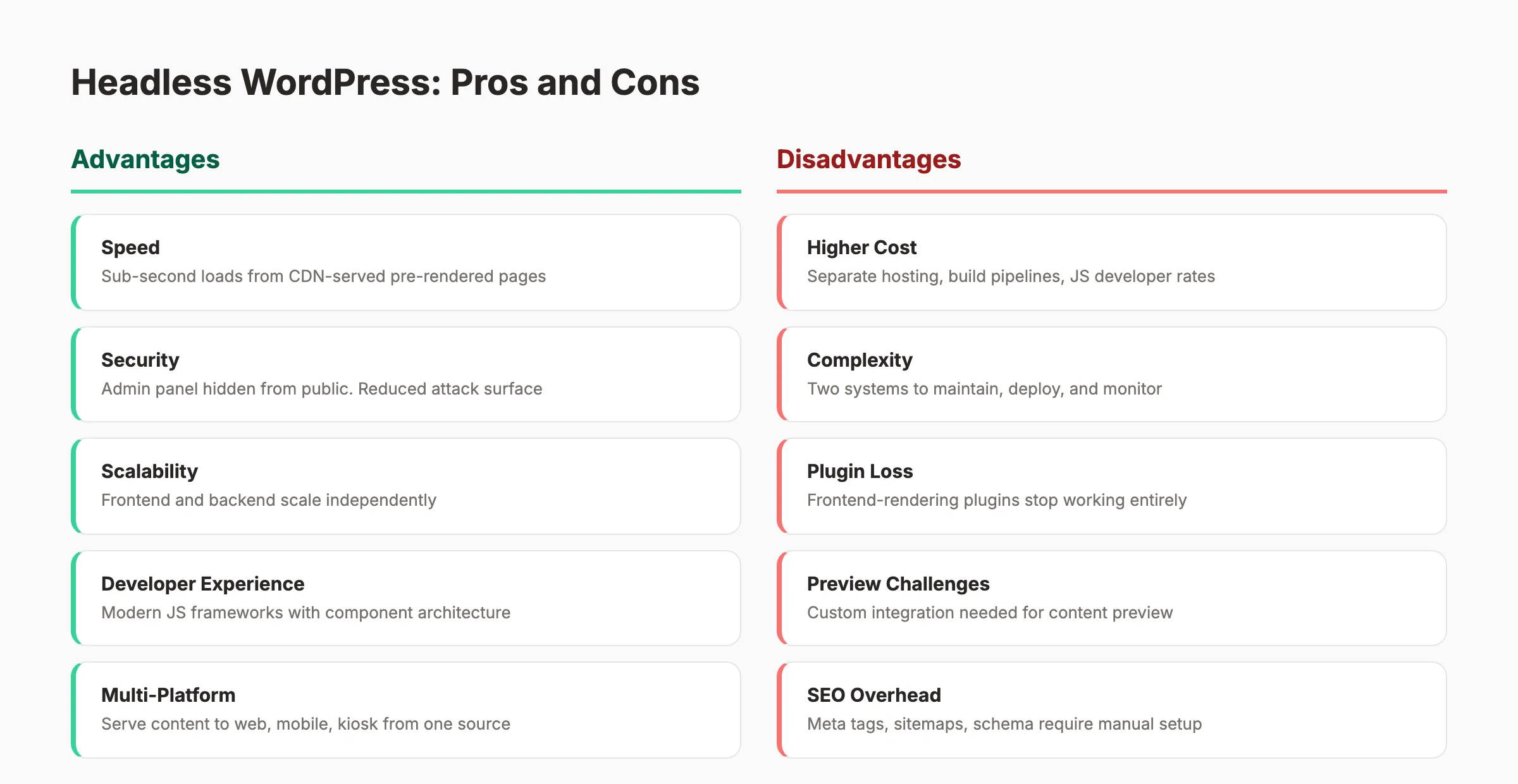
8. WordPress (Headless Mode) — Best for Teams Already on WordPress
WordPress can function as a headless CMS through its REST API or the WPGraphQL plugin. You keep the familiar WordPress editor. You build a custom frontend that pulls content through the API.
SEO strengths:
- Familiar editing interface for content teams
- Yoast and RankMath metadata accessible through API extensions
- Massive plugin ecosystem for backend functionality
- WPGraphQL reduces over-fetching compared to REST
- Large developer community and documentation
SEO limitations:
- PHP backend adds complexity compared to API-native platforms
- Plugin compatibility issues in headless mode
- Preview functionality requires custom integration
- Not as performant as purpose-built headless platforms
Best for: Teams already invested in WordPress. Organizations that want to modernize their frontend without retraining content editors. Sites with existing WordPress content libraries.
Pricing: Free (self-hosted). Hosting from $10 per month.
See our headless WordPress guide for the full implementation walkthrough.
Headless CMS SEO Comparison Table
| Platform | Best For | Starting Price | Free Plan | Built-in SEO | Schema Support | Sitemap |
|---|---|---|---|---|---|---|
| Sanity | Developer teams, programmatic SEO | $15/mo | Yes | Custom fields only | Manual | Manual |
| Contentful | Enterprise, multi-region | $489/mo | Yes (limited) | Custom fields only | Manual | Manual |
| Strapi | Open-source, self-hosted | Free | Yes (self-hosted) | Via plugin | Via plugin | Via plugin |
| Storyblok | Marketing teams | $21/mo | Yes | Built-in fields | Manual | Manual |
| Ghost | Publishers, bloggers | $11/mo | Yes (self-hosted) | Full defaults | Auto (Article) | Auto |
| Prismic | AI-assisted SEO | $10/mo | Yes | AI assistant | Manual | Manual |
| Hygraph | Complex content graphs | $399/mo | Yes | Custom fields only | Manual | Manual |
| WordPress Headless | WordPress migrations | $10/mo | Yes | Via API + plugins | Via plugins | Via plugins |
Publishing 30 SEO articles per month for $99? That is what Stacc does. We push content to any headless CMS via API. No writers. No editors. No agency. Start for $1 →
Technical SEO Requirements for Headless CMS {#ch4}
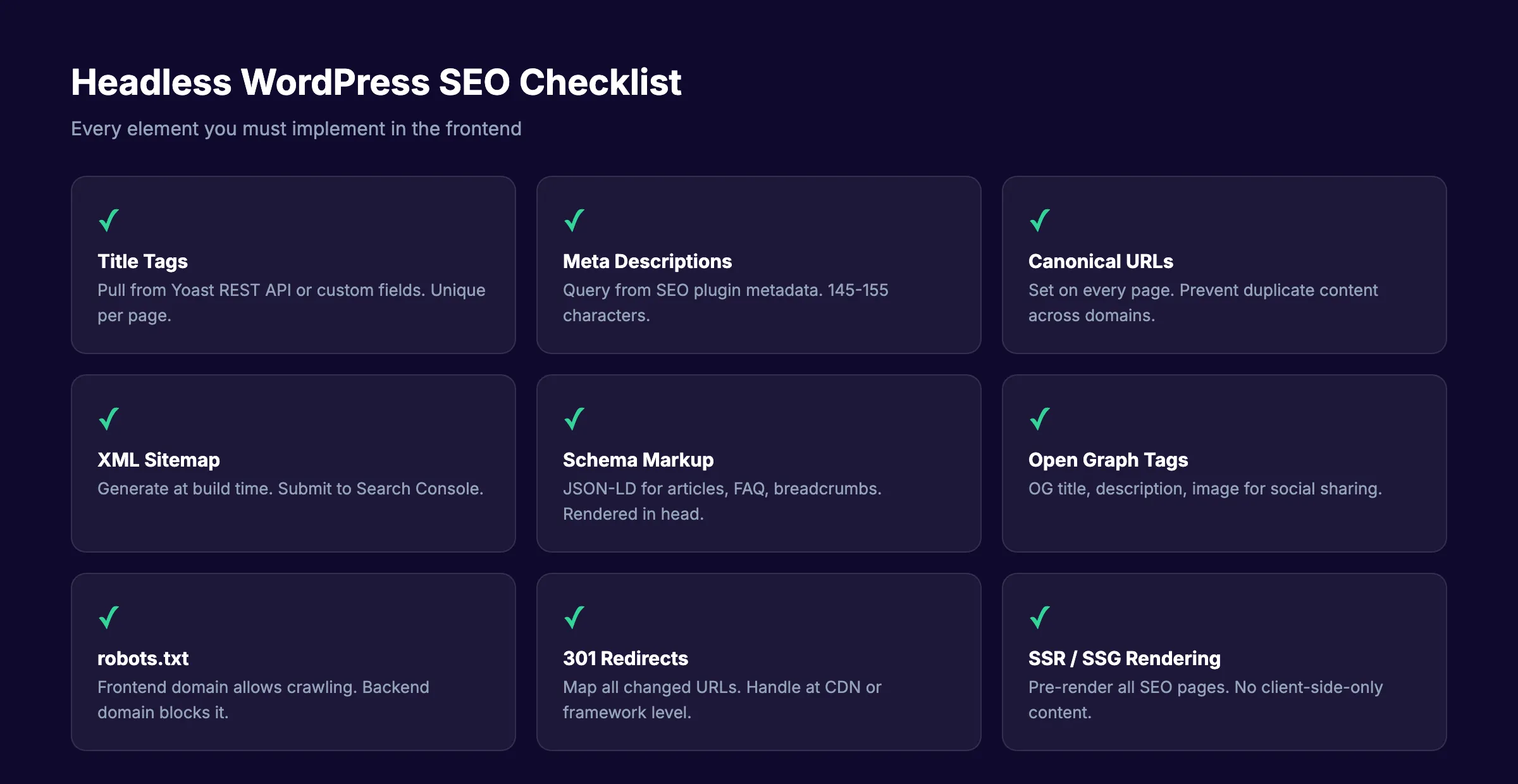
Every headless CMS for SEO success depends on implementing these technical requirements in your frontend. Skip any one and your rankings will suffer.
1. Server-Side Rendering or Static Site Generation
This is the most critical requirement. Never rely on client-side JavaScript rendering for SEO-critical pages.
Googlebot processes JavaScript. But the rendering queue adds delays of hours to weeks. Content may not get indexed reliably. A site that launched with client-side rendering saw 4,231 pages crawled but not indexed. After switching to SSR, that dropped to 295 pages. Organic traffic increased 92.5 percent.
Implementation:
- Use Next.js with
getStaticPropsfor static pages - Use Next.js with
getServerSidePropsfor dynamic pages - Use Astro’s default static mode for content-heavy sites
- Use Incremental Static Regeneration (ISR) for pages that update frequently
- Never ship SEO pages with pure client-side rendering
2. Metadata Management
Every page needs server-rendered meta tags in the HTML head. Store metadata in your CMS. Pull it through the API. Render it server-side.
Required elements:
- Title tags (under 60 characters)
- Meta descriptions (145 to 155 characters)
- Canonical URLs
- Open Graph tags (title, description, image, URL)
- Twitter Card tags
- robots meta tags where needed
Implementation pattern: Store SEO fields as part of your content model. Query them alongside content. Inject them into the page head during SSR or SSG.
3. XML Sitemap Generation
Headless CMS platforms do not generate sitemaps automatically. Your frontend or build process must create one.
Requirements:
- Include every indexable page
- Match your actual URL structure exactly
- Update automatically when content changes
- Submit to Google Search Console after every deployment
- Respect canonical URLs and noindex directives
Implementation: Next.js has a built-in sitemap API. Astro generates sitemaps through its integration. For custom builds, query your CMS API at build time and generate the XML file.
4. Structured Data (Schema Markup)
Schema markup helps search engines understand your content. Headless sites must implement JSON-LD manually.
Required schema types by content:
| Content Type | Schema Type | Priority |
|---|---|---|
| Blog posts | Article | High |
| Product pages | Product | High |
| FAQ sections | FAQPage | Medium |
| How-to guides | HowTo | Medium |
| Local business | LocalBusiness | High |
| Organization | Organization | Medium |
| Breadcrumbs | BreadcrumbList | Medium |
Implementation: Generate JSON-LD blocks server-side. Pull data from CMS fields. Inject into the page head. Validate with Google’s Rich Results Test.
5. URL Structure and Routing
Clean, stable URL structures are essential. Programmatically define URLs in your frontend routing configuration.
Rules:
- Lowercase only
- Hyphens between words
- Three to five words maximum
- Include primary keywords
- Remove stop words
- No random strings or IDs in URLs
- Consistent trailing slash policy
6. Image Optimization
Headless CMS platforms store images. Your frontend must handle optimization.
Requirements:
- Serve WebP or AVIF formats
- Implement responsive srcset
- Lazy load below-the-fold images
- Compress images to under 300 KB
- Add descriptive alt text
- Use a CDN for image delivery
Implementation: Use Cloudflare Images, Imgix, or Sanity’s built-in image pipeline. Configure your frontend to request optimized variants.
7. Internal Linking
Internal links pass authority and help crawlers discover content. In a headless setup, links must be managed through the CMS or frontend.
Requirements:
- 3 to 5 internal links per 1,000 words
- Descriptive anchor text with target keywords
- Link from new posts to older established posts
- Link from cornerstone posts to new content
- Avoid linking the same target more than twice per page
8. robots.txt and Crawl Management
Control what search engines can access. Block staging environments, preview URLs, and API endpoints.
Requirements:
- Block CMS backend from indexing
- Block staging and preview environments
- Allow access to sitemap
- Prevent crawl budget waste on utility pages
Content Strategy and Publishing Workflows {#ch5}
A headless CMS is only as good as the content flowing through it. The best architecture in the world will not rank without consistent, optimized publishing.
Content Velocity for Headless Sites
Google rewards consistent publishing combined with topical depth. Sites that rank publish at least 20 posts per month. Top performers publish 30 to 60.
The math is simple. Google needs content to crawl, index, and rank. Topical authority builds on volume plus quality plus interlinking. One post a month does not generate enough surface area for Google to understand what your site is about.
Headless CMS platforms make high-velocity publishing easier because content and presentation are separate. Your content team writes in the CMS. Your frontend handles display. Changes to design do not disrupt editorial workflows.
Topic Clusters on Headless CMS
The strongest content structure is the topic cluster. Pick a pillar topic. Write a 3,000+ word pillar post. Then write 10 to 20 cluster posts that go deep on subtopics and link back to the pillar.
Example pillar: “Headless CMS for SEO” (this guide)
Example clusters:
- Sanity SEO best practices
- Next.js headless CMS setup guide
- Headless CMS vs WordPress for publishers
- Contentful SEO configuration
- Ghost vs headless WordPress comparison
Each cluster post links to the pillar. The pillar links to every cluster post. Tag every post with the cluster identifier so your frontend can build related content modules automatically.
API-Driven Publishing Workflows
The real power of headless CMS for SEO is API-driven publishing. Content flows from creation tools through the CMS API to the frontend automatically.
Workflow example:
- Keyword research identifies target terms
- Content briefs are created with SEO requirements
- Articles are written and optimized
- Content is pushed to the headless CMS via API
- Frontend rebuilds or regenerates affected pages
- Sitemap updates automatically
- New content is live and indexable within minutes
This is how Stacc works. We publish 30 SEO articles per month directly to your headless CMS through its API. Each article includes keyword research, meta data, internal links, and feature images. Your frontend picks up the new content automatically.
Content Freshness and Updates
Headless CMS platforms make content updates efficient. Change a product description in the CMS. It updates everywhere that content appears. No manual copying between systems.
Freshness strategy:
- Update pillar posts quarterly with new data and examples
- Refresh statistics and references every 6 months
- Add new sections to existing posts rather than writing new thin content
- Use ISR to regenerate pages without full rebuilds
- Track content decay through Google Search Console performance data
Stop managing content production manually. Stacc publishes 30 SEO articles per month to your headless CMS. Keyword research, writing, optimization, and publishing. All automated. Start for $1 →
Common Headless CMS SEO Mistakes {#ch6}
Teams make the same mistakes repeatedly. Here are the ones that destroy rankings.
Mistake 1: Client-Side Rendering for SEO Pages
The most damaging mistake is launching with pure client-side rendering. Googlebot sees empty HTML before JavaScript executes. Content may never get indexed.
The fix: Use SSR or SSG for every page that needs to rank. Next.js getStaticProps and Astro’s static mode handle this natively. ISR works for pages that change frequently. Never ship SEO pages with client-side rendering only.
Mistake 2: Missing Metadata in the Initial HTML
Meta tags injected by JavaScript after page load are invisible to Google’s first crawl wave. Title tags, meta descriptions, canonical URLs, and Open Graph tags must exist in the server-rendered HTML.
The fix: Pull metadata from your CMS through the API. Render it in the page head during SSR or SSG. Test by viewing page source (not the DOM inspector) and confirming tags exist.
Mistake 3: No XML Sitemap
Without a sitemap, Googlebot discovers pages only through internal links. Large sites with deep architecture will have orphan pages that never get crawled.
The fix: Build automated sitemap generation into your frontend. Query the CMS API at build time. Generate a valid XML sitemap. Submit it to Google Search Console. Update it after every content change.
Mistake 4: Forgetting Structured Data
Schema markup is not optional in 2026. Rich results require structured data. AI search engines use schema to understand content context.
The fix: Implement JSON-LD for Article, Product, FAQ, HowTo, and BreadcrumbList schema types. Generate this server-side from CMS fields. Validate with Google’s Rich Results Test before publishing.
Mistake 5: robots.txt Misconfiguration
A single incorrect line in robots.txt can block thousands of pages. One audit found a Disallow: /static/ line that blocked all CSS and JavaScript files. Pages rendered without styles. Googlebot could not process the content correctly.
The fix: Review robots.txt carefully. Allow access to CSS, JS, and image files. Block only what should not be indexed. Test with Google’s robots.txt tester.
Mistake 6: Ignoring the CMS Backend Indexing
If your headless CMS backend is publicly accessible, Googlebot may crawl and index it. This wastes crawl budget and creates duplicate content.
The fix: Block the CMS backend from indexing. Add noindex meta tags. Use robots.txt to prevent crawling. Host the backend on a separate subdomain. Ensure only your frontend domain is indexed.
Mistake 7: No Content Preview for Editors
Content editors who cannot preview their work publish more errors. Broken formatting, missing images, and layout issues reach production.
The fix: Implement preview mode in your frontend. Next.js draft mode queries preview API endpoints. Astro server routes can render unpublished content. Without preview functionality, editorial workflows break down.
Mistake 8: Neglecting Image Optimization
Raw images from the CMS can be massive. A 5MB hero image tanks Largest Contentful Paint regardless of how fast your frontend is.
The fix: Implement responsive images with srcset. Serve WebP or AVIF formats. Use a CDN with image optimization. Add lazy loading for below-the-fold images. Set explicit width and height attributes to prevent layout shift.
How to Choose the Right Headless CMS for Your Project {#ch7}
The right choice depends on your team, your budget, and your technical requirements.
Decision Framework
Choose Sanity if:
- You have a development team comfortable with code
- You need programmatic SEO at scale
- Content modeling flexibility is critical
- You want a strong free tier
Choose Contentful if:
- You are an enterprise with multi-region needs
- You have budget for premium tooling
- You need strict governance and workflows
- AI-assisted content operations matter
Choose Strapi if:
- You want open-source with no vendor lock-in
- You have technical resources to self-host
- Budget is a primary constraint
- You need plugin extensibility
Choose Storyblok if:
- Your marketing team needs visual editing
- You use Next.js as your frontend
- Marketers outnumber developers
- You need a balance of flexibility and ease
Choose Ghost if:
- You run a publication or blog
- You want strong SEO defaults without configuration
- Speed matters more than complex content modeling
- You prefer a built-in frontend
Choose Prismic if:
- AI-assisted SEO workflows appeal to your team
- You build landing pages at scale
- You need reusable content components
- You want built-in image optimization
Choose Hygraph if:
- Your content has complex relationships
- You need federated content from multiple sources
- You manage multiple projects or clients
- GraphQL is your preferred query language
Choose Headless WordPress if:
- Your team already uses WordPress
- You want to keep the familiar editor
- You have existing WordPress content
- You need Yoast or RankMath metadata via API
Cost Comparison
| Approach | Monthly Cost | Time Investment | SEO Control |
|---|---|---|---|
| DIY headless (free tools) | $0 to $50 | 40+ hrs/month | Full |
| Headless CMS (paid) | $50 to $500 | 20 to 30 hrs/month | Full |
| Headless + freelance writers | $2,500 to $7,500 | 10 to 20 hrs/month | Full |
| SEO agency | $3,000 to $10,000 | 5 to 10 hrs/month | Limited |
| Stacc + headless CMS | $99 | 0 hrs/month | Full |
The Stacc model combines a headless CMS frontend with done-for-you content production. We publish 30 SEO articles per month directly to your headless CMS via API. You get the performance benefits of headless architecture without the content production overhead.
Frequently Asked Questions {#faq}
Is headless CMS better for SEO than WordPress?
A headless CMS can outperform WordPress for SEO when implemented correctly. Pre-rendered pages load faster, which improves Core Web Vitals. You get full control over HTML output. But you must manually implement meta tags, schema markup, sitemaps, and canonical URLs. Without this work, headless CMS hurts SEO. Use SSR or static generation for every page that needs to rank.
What is the best headless CMS for SEO in 2026?
Ghost offers the best out-of-the-box SEO with automatic sitemaps, schema, and meta tags. Sanity provides the most flexibility for developer teams. Storyblok is best for marketing teams that need visual editing. Strapi is the top open-source choice. The best platform depends on your team structure and technical requirements.
Does headless CMS affect page speed?
Yes, positively. Headless sites built with static generation or server-side rendering routinely load in under 1 second. Pre-rendered HTML eliminates database queries per visitor. CDN edge delivery serves content from the closest server. These performance gains directly improve Core Web Vitals scores.
Can you do SEO without plugins on a headless CMS?
Yes, but it requires more work. Traditional WordPress SEO plugins handle meta tags, sitemaps, and schema automatically. On a headless CMS, your development team must implement each element in the frontend. The trade-off is more control and better performance in exchange for more setup work.
How much does a headless CMS cost?
Self-hosted open-source options like Strapi and Ghost are free. Cloud-hosted platforms range from $10 per month (Prismic, Ghost Pro) to $500+ per month (Contentful, Hygraph). Development costs add $5,000 to $50,000 for initial builds. Ongoing maintenance requires JavaScript developer time.
What frontend framework works best with headless CMS for SEO?
Next.js is the most popular choice. It handles SSR, SSG, and ISR. Astro produces the fastest static sites with zero JavaScript by default. Nuxt offers comparable capabilities for Vue teams. The right choice depends on your team’s skills and performance requirements.
How do I migrate from WordPress to headless CMS without losing SEO?
Map all existing URLs to new URL structures. Implement 301 redirects for every changed URL. Migrate meta titles and descriptions to the new CMS. Rebuild XML sitemaps. Verify schema markup renders correctly. Submit the new sitemap to Google Search Console. Monitor for crawl errors for 60 days post-migration.
Can Stacc publish to a headless CMS?
Yes. Stacc publishes 30 SEO articles per month directly to any headless CMS via API. We support WordPress REST API, Ghost Admin API, Contentful, Sanity, and Strapi. Each article includes keyword research, meta data, internal links, and feature images. Your frontend picks up new content automatically.
The Bottom Line
Headless CMS for SEO is a trade-off, not an upgrade. The architecture offers superior performance, multi-channel delivery, and frontend freedom. It also demands deliberate technical SEO implementation that traditional platforms handle automatically.
The platforms that succeed with headless CMS treat SEO as a frontend engineering requirement from day one. They implement SSR or SSG for every indexable page. They generate sitemaps, schema, and metadata at build time. They monitor Core Web Vitals and crawl health continuously.
The content strategy matters just as much as the architecture. A headless CMS with no content velocity is an empty shell. Sites that rank publish 20 to 30 optimized posts per month consistently. Most teams cannot maintain that pace alone.
If you want the performance benefits of headless architecture without the content production burden, Stacc publishes 30 SEO articles per month directly to your headless CMS. We handle keyword research, writing, optimization, and API delivery. You keep your platform, your performance, and your rankings.
Start for $1 → See the difference in 3 days
This article was researched and published by the Stacc editorial team. We publish 3,500+ blog posts across 70+ industries through the Stacc platform, including content delivered to headless CMS architectures via API. All platform features and pricing verified against public sources as of May 2026.
Related Reading
- Headless WordPress: Complete Guide
- Ghost SEO Guide: Rank Your Ghost CMS Blog
- WordPress SEO: How to Optimize Your Site
- Webflow SEO Guide: Complete Playbook
- Technical SEO Checklist
- How to Write SEO Blog Posts That Rank
- Core Web Vitals Optimization
- JavaScript SEO Guide
- Schema Markup SEO Guide
- Done-for-You SEO Services
Related Tools

Written by
Siddharth GangalSiddharth is the founder of theStacc and Arka360, and a graduate of IIT Mandi. He spent years watching great businesses lose organic traffic to competitors who simply published more. So he built a system to fix that. He writes about SEO, content at scale, and the tactics that actually move rankings.
30 SEO blog articles published every month
Keyword-optimized, scheduled, and live on your site. Automatically.
30-day trial · Cancel anytime
theStacc
Stop writing SEO content manually
30 blog articles, 30 GBP posts, and social media content. Published every month. Automatically.
Try for free$1 for 3 days · Cancel anytime