
Headless WordPress 2026: Complete Annual Guide
Headless WordPress in 2026: 8.3% of WP sites now run decoupled. Learn what changed, what works, and how to build with Next.js, Astro, or static generators.
Headless WordPress 2026: The Complete Annual Guide
WordPress powers 43.6% of all websites. Yet only 8.3% of those sites run headless — a number that grew 23% in the past year alone. The gap between traditional and decoupled WordPress is widening, and 2026 is the year headless moves from developer curiosity to business necessity for performance-critical sites.
The shift is not random. Google made Core Web Vitals a ranking factor. Users expect sub-2-second loads. AI search engines favor fast, structured content. Traditional WordPress, with its plugin bloat and database-dependent rendering, struggles to meet these thresholds without extensive optimization.
At Stacc, we publish thousands of articles monthly and push content to WordPress sites through the REST API every day. We have seen which headless setups succeed and which collapse under maintenance debt. This guide covers what changed in 2026, what is working right now, and what you should do if you are considering the switch.
Here is what you will learn:
- What changed in the headless WordPress ecosystem in 2026
- The four-layer architecture every headless build needs
- Which frontend framework to choose in 2026 (Next.js, Astro, Nuxt, or SvelteKit)
- SEO challenges unique to headless and how to solve each one
- Real cost breakdowns for headless vs. traditional hosting
- When headless WordPress makes sense — and when it does not
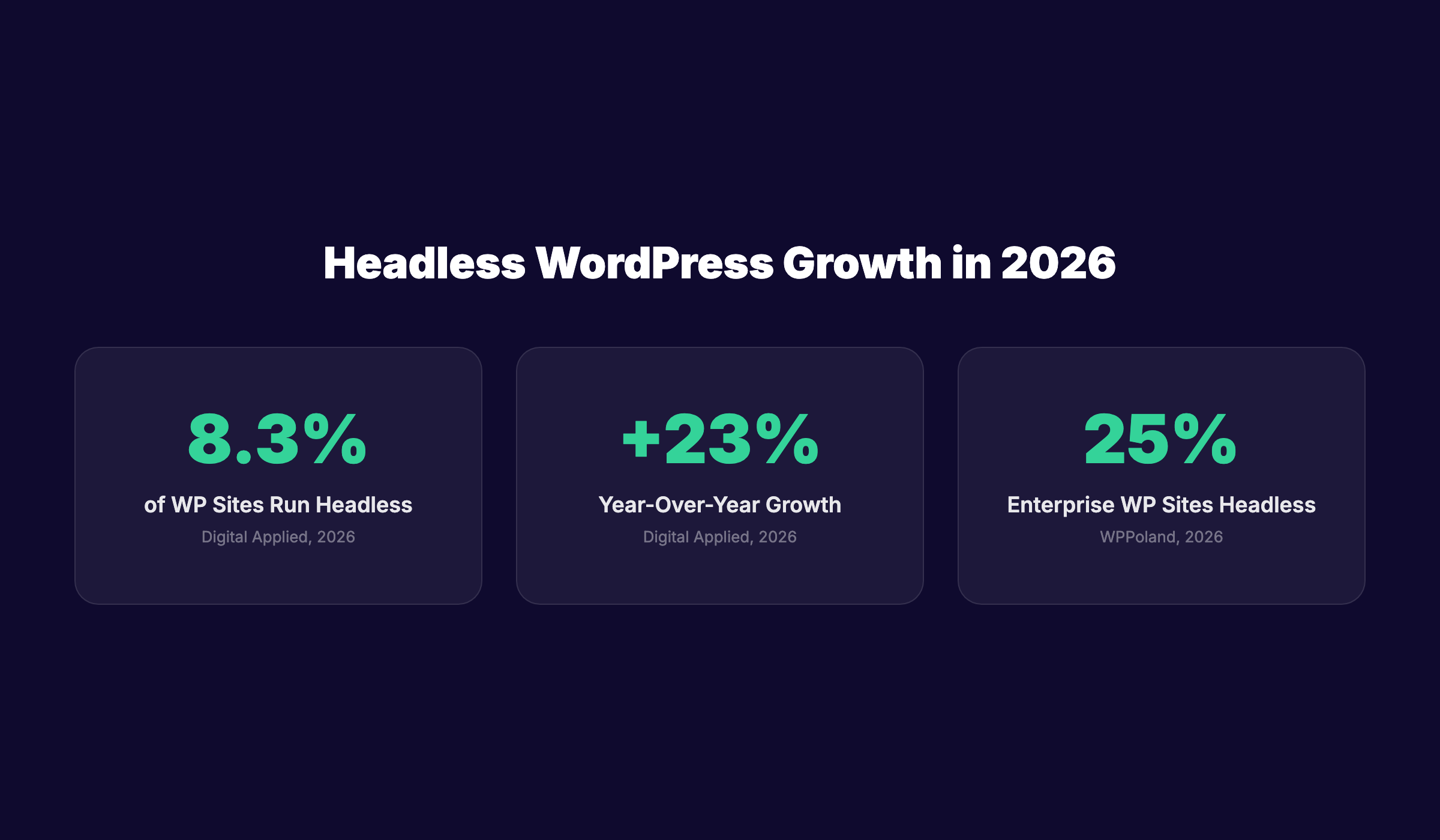
Table of Contents
- What Changed in Headless WordPress for 2026
- The Four-Layer Architecture Explained
- Choosing Your 2026 Frontend Framework
- Setting Up the WordPress Backend
- SEO for Headless WordPress: What Actually Works
- Hosting, Costs, and Deployment
- Security Considerations for Decoupled Sites
- When to Go Headless (and When Not To)
- Frequently Asked Questions
What Changed in Headless WordPress for 2026
Three major shifts reshaped the headless WordPress ecosystem this year. Each one affects whether, when, and how you should decouple.
WPGraphQL Reached Canonical Status
WPGraphQL, the GraphQL API for WordPress, is now the default recommendation for headless builds. The plugin crossed 2 million active installations in early 2026 and received official backing from the WordPress core team. REST API remains supported, but new headless projects increasingly start with GraphQL for its efficient data fetching and strongly typed schema.
The practical impact: you can request exactly the fields you need in a single query. No more over-fetching post metadata you do not use. No more chaining multiple REST endpoints to build a page. For complex sites with custom post types, ACF fields, and relational data, WPGraphQL reduces API calls by 60–80%.
Astro 6 and the Rise of Content-First Frameworks
Astro released version 6 in March 2026, cementing its position as the leading content-focused frontend framework. Unlike React-based frameworks that ship JavaScript to the browser by default, Astro renders pages to static HTML and hydrates only interactive components. The result: Lighthouse scores of 95–100 with minimal effort.
For WordPress sites where most pages are content, not applications, Astro represents a compelling middle path. You get the content management of WordPress with the performance of a static site. The Astro + headless WordPress stack saw 340% growth in starter templates and tutorials in 2025–2026.
AI Search Changed the Performance Calculation
Google AI Overviews, ChatGPT search, and Perplexity now process content differently than traditional search engines. They favor fast-loading, well-structured pages with clear semantic markup. Headless sites built with modern frameworks have a structural advantage here: server-side rendering produces clean HTML that AI crawlers parse easily, while client-side hydration adds interactivity without blocking content.
The 2026 calculation is simple: if your site loads slowly or relies heavily on client-side rendering for content, AI search engines may skip you. Headless is not the only fix, but it is the most thorough one.
Key 2026 statistics:
| Metric | Value | Source |
|---|---|---|
| WordPress global market share | 43.6% | W3Techs, 2026 |
| Headless WordPress adoption | 8.3% of all WP sites | Digital Applied, 2026 |
| Year-over-year headless growth | +23% | Digital Applied, 2026 |
| Enterprise WP sites running headless | 25% | WPPoland, 2026 |
| WPGraphQL active installations | 2M+ | WPGraphQL.org, 2026 |
| Headless CMS market size | $973.8M (2025) | Industry reports |
| Projected headless CMS market (2035) | $7.1B | Industry reports |
Performance is not optional in 2026. Stacc publishes content that loads fast on any architecture — traditional WordPress, headless, or static. Our articles are structured for Core Web Vitals from the first draft. See how Stacc optimizes content for speed
The Four-Layer Architecture Explained
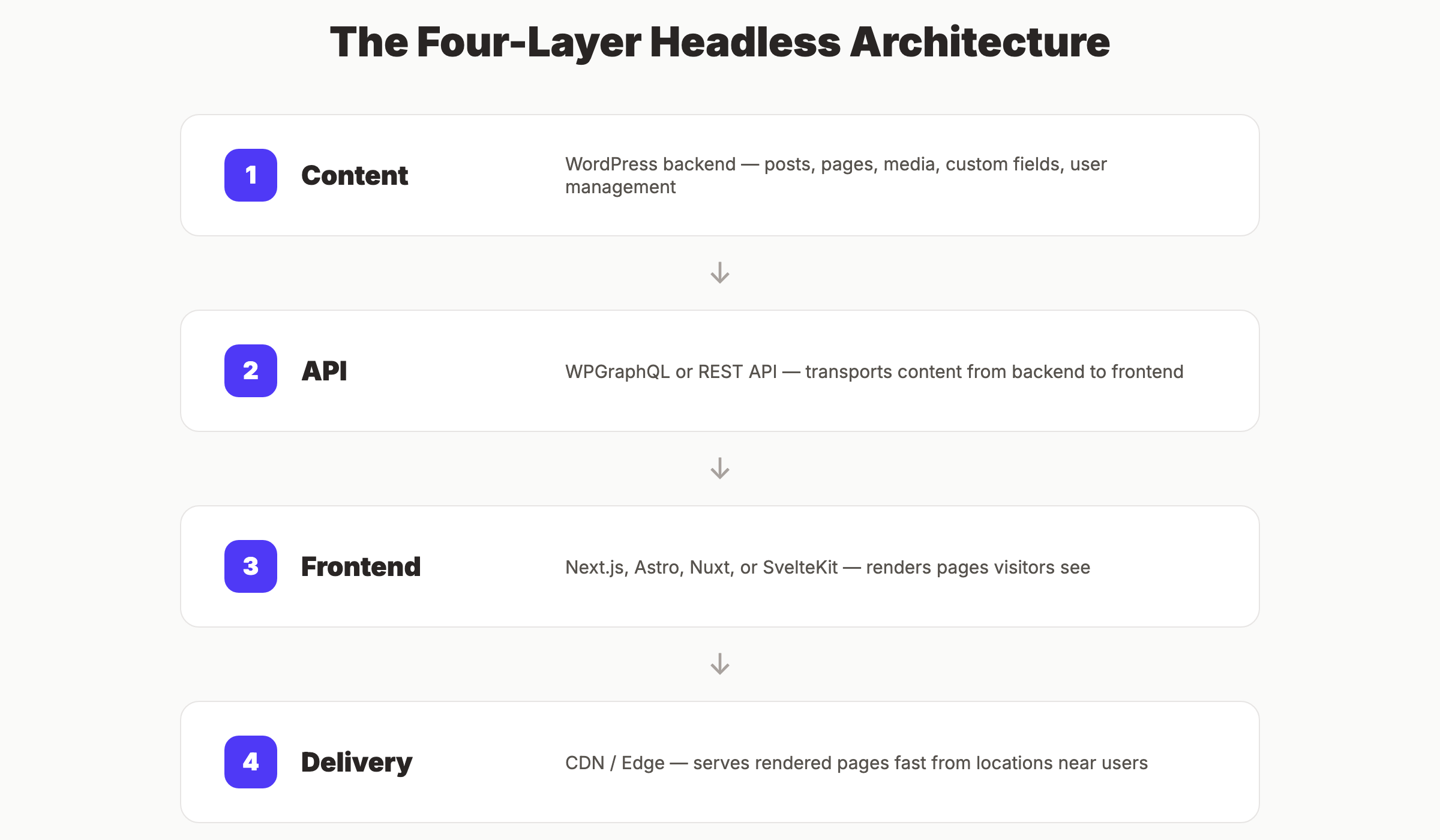
Every headless WordPress site has four distinct layers. Understanding each one prevents the most common implementation mistakes.
Layer 1: Content (WordPress Backend)
WordPress remains your content management system. Editors create posts, upload media, and manage taxonomy in the familiar wp-admin interface. The difference: the frontend theme is irrelevant. You can install a barebones theme or disable the frontend entirely.
Best practices for the content layer:
- Use a non-public URL or subdomain for wp-admin (e.g., cms.yoursite.com)
- Disable the default frontend with a plugin or server rule
- Keep WordPress updated — security patches still matter
- Use Advanced Custom Fields (ACF) for structured content beyond basic posts
- Install a headless-specific plugin like WPGraphQL or enable the REST API
Layer 2: API (Data Transport)
The API layer connects WordPress to your frontend. You have two primary options:
REST API (Built into WordPress since 4.7)
- Familiar to most WordPress developers
- Well-documented, broad plugin support
- Less efficient for complex queries (multiple round trips)
WPGraphQL (Plugin required)
- Single-query data fetching
- Strong typing prevents frontend errors
- Better performance for relational content
- Growing ecosystem of extensions
For most 2026 builds, WPGraphQL is the better choice. The learning curve is steeper, but the performance and developer experience gains justify the investment.
Layer 3: Frontend (Presentation)
This is where headless WordPress diverges most from traditional setups. Your frontend is a separate application built with a modern framework. It fetches content from the API and renders pages.
Popular 2026 options:
- Next.js (React) — Most popular, excellent for dynamic sites
- Astro — Fastest for content sites, minimal JavaScript
- Nuxt (Vue) — Strong Vue ecosystem, good for teams already using Vue
- SvelteKit — Lightweight, fast compilation, growing adoption
Layer 4: Delivery (Hosting and CDN)
The delivery layer serves your rendered pages to visitors. For static sites, this means a CDN like Cloudflare, Vercel, or Netlify. For server-rendered sites, you need a Node.js host or edge function platform.
2026 hosting trend: Edge rendering. Platforms like Vercel, Cloudflare Pages, and Netlify Edge Functions render pages at the CDN edge, close to the user. This reduces latency without the complexity of managing servers.
Why this architecture matters: Decoupling these layers means each can be optimized independently. Your content team uses WordPress without learning code. Your developers use modern tools without fighting PHP themes. Your site loads fast because the frontend is built for performance, not backward compatibility.
Choosing Your 2026 Frontend Framework
The framework you choose determines your development experience, performance ceiling, and hiring pool. Here is how the top options compare for headless WordPress in 2026.
Next.js (React)
Best for: Dynamic sites with user accounts, e-commerce, or complex interactivity
Next.js remains the most popular headless frontend, backed by Vercel and the massive React ecosystem. Version 15 introduced the App Router as the default, with server components that reduce client-side JavaScript.
Pros:
- Largest developer talent pool
- Excellent documentation and community
- Built-in image optimization, font optimization, and SEO tools
- Incremental Static Regeneration (ISR) updates pages without full rebuilds
- Vercel hosting integration is built-in
Cons:
- React complexity for simple content sites
- Larger bundle sizes than Astro or SvelteKit
- Server components have a learning curve
Headless WordPress integration: Use the Faust.js framework by WP Engine, or connect directly via WPGraphQL. Next.js has the most mature headless WordPress tooling of any framework.
Astro
Best for: Content-heavy sites where performance is the top priority
Astro’s “zero JavaScript by default” approach makes it the fastest option for blogs, marketing sites, and documentation. It supports React, Vue, Svelte, and other components through “islands” architecture — interactive pieces hydrate independently while the rest stays static HTML.
Pros:
- Fastest Time to First Byte (TTFB) of any major framework
- Lighthouse scores near 100 with minimal optimization
- Content collections API simplifies blog and page management
- Growing ecosystem, including WordPress-specific starters
Cons:
- Smaller ecosystem than Next.js
- Less suited for highly dynamic applications
- Fewer headless WordPress-specific resources (though growing)
Headless WordPress integration: Use the WordPress REST API or WPGraphQL with Astro’s content collections. The @astrojs/node adapter enables server rendering if needed.
Nuxt (Vue)
Best for: Teams already invested in the Vue ecosystem
Nuxt 3, released in 2022, matured significantly by 2026. It offers server-side rendering, static generation, and hybrid modes similar to Next.js.
Pros:
- Excellent developer experience for Vue developers
- Strong TypeScript support
- Built-in SEO and performance optimizations
- Active community, especially in Europe and Asia
Cons:
- Smaller hiring pool than React
- Fewer headless WordPress-specific tools
- Vue ecosystem is smaller than React’s
SvelteKit
Best for: Teams that prioritize minimal bundle size and fast compilation
SvelteKit uses Svelte’s compile-time approach to produce highly efficient JavaScript. It is the newest of the major frameworks but gained significant traction in 2025–2026.
Pros:
- Smallest bundle sizes
- Fastest build times
- Simple, readable code
- Growing community and corporate backing
Cons:
- Smallest ecosystem and hiring pool
- Fewest headless WordPress resources
- Less battle-tested at enterprise scale
Framework Decision Matrix
| Factor | Next.js | Astro | Nuxt | SvelteKit |
|---|---|---|---|---|
| Performance | Good | Excellent | Good | Excellent |
| Content sites | Good | Excellent | Good | Good |
| Dynamic apps | Excellent | Fair | Good | Fair |
| Developer pool | Largest | Growing | Medium | Small |
| WP headless tooling | Most mature | Growing | Limited | Limited |
| Learning curve | Medium | Low | Medium | Low |
| Bundle size | Medium | Minimal | Medium | Minimal |
Our 2026 recommendation: Choose Astro for content sites where speed is critical. Choose Next.js for dynamic sites with user accounts, e-commerce, or complex features. Choose Nuxt only if your team already knows Vue. Choose SvelteKit for experimental projects or teams that value minimalism.
The right framework depends on your content, not trends. Stacc publishes to WordPress via API every day. We know which content structures work across Next.js, Astro, and traditional WordPress — and we optimize for all three. Learn about Stacc’s content optimization
Setting Up the WordPress Backend
The backend setup determines whether your headless project thrives or becomes a maintenance burden. Get these foundations right before touching the frontend.
Hosting the Backend
Your WordPress backend needs reliable hosting, even though visitors never see it. The backend handles content editing, media uploads, API requests, and plugin updates.
Recommended hosting options:
| Provider | Price Range | Best For |
|---|---|---|
| Kinsta | $35–$300/month | High-traffic sites, enterprise |
| WP Engine | $25–$600/month | Teams wanting Atlas headless platform |
| Cloudways | $14–$285/month | Flexible server choice, budget-conscious |
| SpinupWP + VPS | $10–$50/month | Developers comfortable with server management |
Critical configuration:
- Use a subdomain (cms.yoursite.com) or separate domain for the backend
- Enable SSL on the backend — API requests require HTTPS
- Restrict wp-admin access by IP if possible
- Disable the default frontend theme or redirect it to your headless site
Essential Plugins
| Plugin | Purpose | Free/Paid |
|---|---|---|
| WPGraphQL | GraphQL API for WordPress | Free |
| WPGraphQL for ACF | Exposes ACF fields in GraphQL | Free |
| Advanced Custom Fields | Structured content fields | Free / Pro $49/year |
| Yoast SEO or Rank Math | SEO metadata | Free / Paid |
| WPGraphQL Yoast SEO | Exposes Yoast metadata via GraphQL | Free |
| Custom Post Type UI | Creates custom post types | Free |
| All-in-One WP Migration | Backup and migration | Free / Paid |
Configuration Checklist
- WordPress installed on subdomain or separate domain
- WPGraphQL activated and tested in GraphQL IDE
- ACF Pro installed with fields for all content types
- WPGraphQL for ACF configured to expose custom fields
- SEO plugin configured with title templates and meta descriptions
- WPGraphQL SEO extension exposing meta data
- Permalinks set to “Post name” format
- Media library organized with descriptive filenames
- User roles configured (editors should not need admin access)
- Regular backup schedule established
Why backend setup matters: A poorly configured backend creates problems that surface months later. Missing SEO metadata, unexposed custom fields, or slow API responses will break your frontend or hurt rankings. Invest time upfront to avoid emergency fixes later.
SEO for Headless WordPress: What Actually Works
Headless WordPress introduces SEO challenges that traditional WordPress solves automatically. Yoast SEO handles meta tags, sitemaps, and schema in traditional setups. In headless, you must implement these yourself.
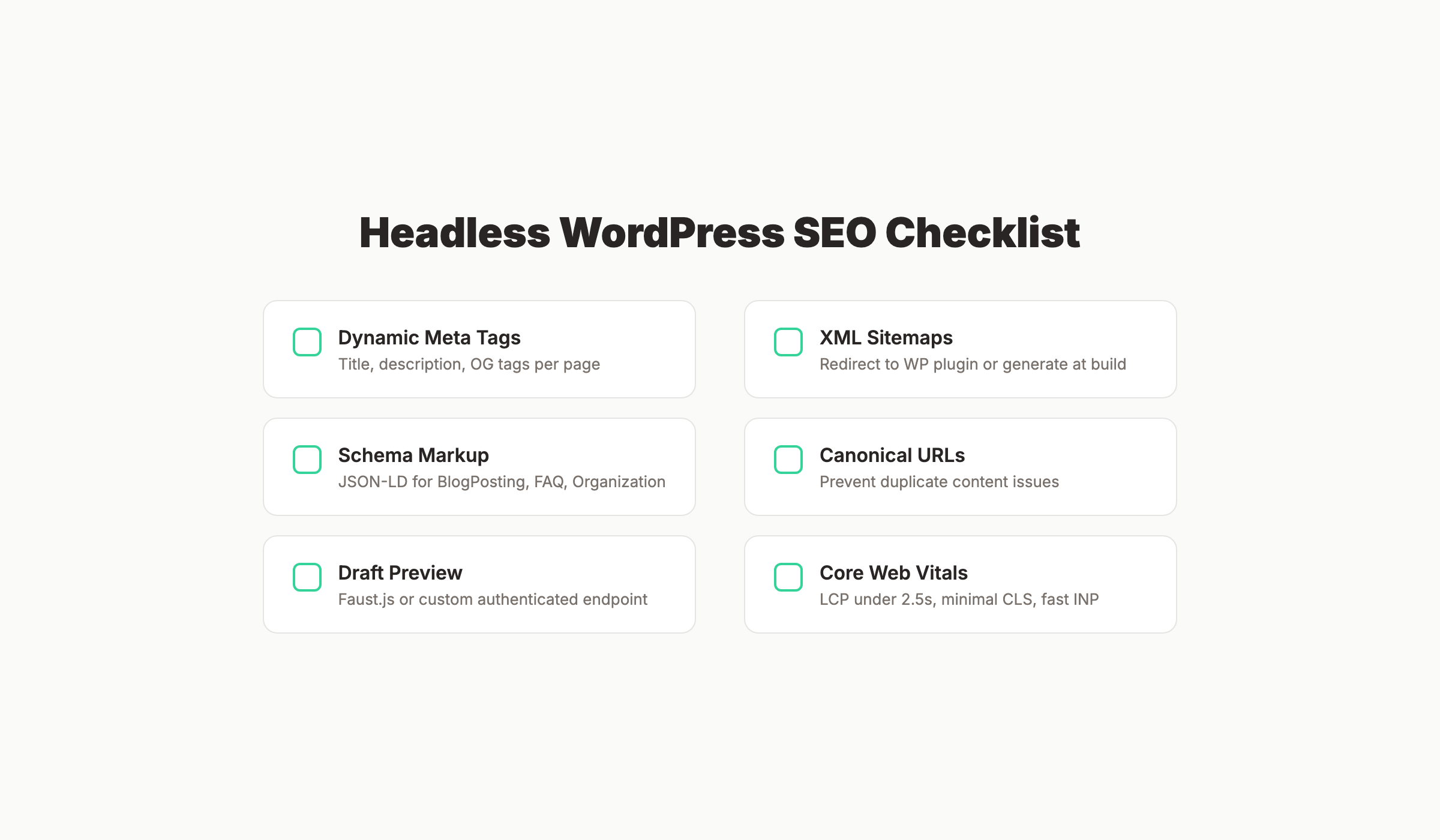
Meta Tags and Open Graph
Every page needs dynamically generated meta tags:
- Title tag: 50–60 characters, unique per page
- Meta description: 120–155 characters, unique per page
- Canonical URL: Prevents duplicate content issues
- Open Graph tags: Controls social sharing previews
- Twitter Card tags: Twitter-specific sharing format
Fetch these from your SEO plugin via WPGraphQL or REST API. Most headless frameworks have SEO components that inject these into the HTML <head>.
Next.js example:
export async function generateMetadata({ params }) {
  const post = await getPost(params.slug);
  return {
    title: post.seo.title,
    description: post.seo.metaDesc,
    openGraph: {
      title: post.seo.opengraphTitle,
      description: post.seo.opengraphDescription,
      images: [{ url: post.featuredImage.node.sourceUrl }],
    },
  };
}
XML Sitemaps
Traditional WordPress plugins generate sitemaps automatically. In headless, you have three options:
- Use the WordPress plugin sitemap — Redirect sitemap requests to the WordPress backend
- Generate sitemaps at build time — Create sitemap files during static generation
- Use a headless-specific sitemap generator — Some frameworks have plugins or integrations
Option 1 is simplest for most sites. Option 2 gives you full control but requires maintenance.
Structured Data (Schema Markup)
Schema markup helps search engines understand your content. In headless, you must inject JSON-LD scripts into each page.
Common schema types for headless WordPress:
- BlogPosting — For articles and blog posts
- Organization — For business information
- BreadcrumbList — For navigation breadcrumbs
- FAQPage — For FAQ sections
- LocalBusiness — For location-based businesses
Fetch schema data from WordPress custom fields or generate it from post data in your frontend.
The Preview Problem
Content editors need to preview posts before publishing. In headless, this is not automatic. You need a preview mechanism.
Solutions:
- Faust.js (Next.js) — Provides draft post preview out of the box
- Custom preview endpoint — Build a route that fetches draft posts via authenticated API
- Static preview builds — Rebuild a staging site when drafts are saved
Core Web Vitals and Headless Advantage
Headless sites built with modern frameworks typically score higher on Core Web Vitals than traditional WordPress sites. Here is why:
| Metric | Traditional WordPress | Headless (Astro/Next.js) |
|---|---|---|
| LCP | Often 2.5–5s | Typically 1.0–2.0s |
| FID/INP | Plugin JS delays interaction | Minimal or deferred JS |
| CLS | Theme-dependent | Framework-controlled |
| TTFB | PHP + database query time | Static or edge-rendered |
Why headless SEO requires attention: The performance advantage is real, but only if you implement the fundamentals. Meta tags, sitemaps, schema, and previews do not happen automatically. Plan for 20–30 hours of SEO implementation work in your headless project timeline.
Hosting, Costs, and Deployment
Headless WordPress has different cost structures than traditional WordPress. You are paying for two environments instead of one.
Cost Breakdown
| Component | Traditional WP | Headless WP |
|---|---|---|
| Backend hosting | $10–$50/month | $10–$50/month |
| Frontend hosting | Included in backend | $0–$20/month (Vercel/Netlify free tiers) |
| CDN | Often included | Included with frontend host |
| Developer time (setup) | Minimal | 40–80 hours |
| Developer time (maintenance) | Low | Medium |
| Plugin costs | $100–$500/year | $100–$300/year (fewer plugins needed) |
| Total first-year cost | $220–$1,100 | $2,500–$8,000+ (includes development) |
The hidden cost: Developer availability. Headless requires JavaScript framework expertise, which commands higher rates than WordPress PHP development. Expect to pay 30–50% more per hour for headless-capable developers.
Deployment Strategies
Static Generation (SSG) Build all pages at deploy time. Best for content that does not change frequently.
- Pros: Fastest possible load times, lowest hosting cost, highest security
- Cons: Requires rebuild to update content, not suitable for dynamic features
Server-Side Rendering (SSR) Render pages on each request. Best for personalized or dynamic content.
- Pros: Real-time content, user-specific pages, no rebuild delay
- Cons: Higher hosting cost, slower than static, server dependency
Incremental Static Regeneration (ISR) Next.js-specific approach that updates static pages in the background.
- Pros: Static speed with dynamic freshness
- Cons: Next.js only, requires careful cache configuration
Edge Rendering Render at CDN edge locations close to the user.
- Pros: Low latency globally, no server management
- Cons: Limited execution time, framework-dependent
2026 recommendation: Start with static generation for blogs and marketing pages. Add ISR or edge rendering for pages that need frequent updates. Use SSR only for truly dynamic pages (user dashboards, personalized content).
Headless does not have to mean expensive. Stacc publishes to WordPress through the REST API, optimizing content for both traditional and headless architectures. You get performance-focused content without the headless development overhead. See Stacc’s WordPress content service
Security Considerations for Decoupled Sites
Headless WordPress changes the security picture. Some risks decrease. Others emerge.
Reduced Attack Surface
The biggest security benefit: your WordPress backend is not publicly accessible. Visitors interact with the frontend, not wp-admin. This eliminates the most common WordPress attack vectors:
- Brute-force login attempts against wp-admin
- Plugin vulnerability exploitation on the public site
- Comment spam and form abuse
- Theme file injection
New Security Requirements
API authentication: Your frontend must authenticate with the WordPress API. Use application passwords (WordPress 5.6+) or JWT tokens. Never hardcode credentials in client-side code.
CORS configuration: Configure Cross-Origin Resource Sharing to allow only your frontend domain to access the API. Restrict all other origins.
Backend hardening: Even though the backend is hidden, it still needs protection:
- Keep WordPress core, plugins, and themes updated
- Use strong passwords and two-factor authentication
- Limit login attempts with a plugin
- Consider IP restriction for wp-admin access
- Regular security scans with tools like Wordfence or Sucuri
Frontend security: Modern frontend frameworks have their own security considerations:
- Sanitize all user input to prevent XSS
- Use framework-provided routing, not manual URL parsing
- Implement Content Security Policy headers
- Keep npm dependencies updated
Security Checklist
- WordPress backend on subdomain with restricted access
- SSL certificates on both frontend and backend
- API authentication using application passwords or JWT
- CORS configured to allow only frontend domain
- WordPress core, plugins, and themes updated monthly
- Two-factor authentication for all admin accounts
- Regular automated backups of WordPress database and uploads
- Content Security Policy headers on frontend
- Dependency scanning for frontend packages
- Security monitoring and alerting configured
Why security matters in headless: The decoupled architecture reduces some risks but introduces new ones. API exposure, CORS misconfiguration, and frontend vulnerabilities are unique to headless setups. A security breach in either layer compromises the entire system.
When to Go Headless (and When Not To)
Headless WordPress is not the right choice for every project. Here is an honest assessment of when it wins and when traditional WordPress is the better option.
Go Headless If:
- Performance is critical — You need sub-2-second loads and near-perfect Core Web Vitals
- You have developer resources — Headless requires JavaScript framework expertise
- Multi-channel publishing — You distribute content to mobile apps, IoT devices, or AI platforms
- Frontend flexibility matters — Your design team wants total control without theme constraints
- Security is paramount — You need to isolate the content backend from public access
- Scale is a concern — You expect traffic that would strain traditional WordPress architecture
Stay Traditional If:
- Budget is tight — Traditional WordPress is cheaper to build and maintain
- No developer on staff — Headless requires ongoing technical expertise
- Simple content site — A blog or brochure site does not need decoupling
- Plugin-dependent features — Membership sites, complex e-commerce, or form builders work better in traditional WordPress
- SEO plugin reliance — If your workflow depends heavily on Yoast or Rank Math’s full feature set, headless requires rebuilding those capabilities
- Frequent content updates by non-technical editors — The preview and publishing workflow is simpler in traditional WordPress
The Hybrid Middle Ground
Some sites benefit from a partial headless approach:
- Headless blog with traditional pages — Keep landing pages in WordPress, run the blog headless
- Static marketing site with dynamic app — Marketing pages are static, user-facing features are dynamic
- API-only for mobile — Traditional WordPress site with API feeds to a mobile app
The 2026 decision framework:
| Factor | Headless | Traditional |
|---|---|---|
| Setup cost | $2,500–$8,000 | $500–$2,000 |
| Monthly hosting | $10–$70 | $10–$50 |
| Developer requirement | JavaScript + WordPress | WordPress only |
| Performance ceiling | Excellent | Good (with optimization) |
| Content editor experience | Good (with preview setup) | Excellent |
| Plugin ecosystem | Limited | Extensive |
| Security | Strong (isolated backend) | Moderate |
| Multi-channel delivery | Native | Requires plugins |
Our honest take: For 80% of WordPress sites, traditional WordPress with good caching and optimization is sufficient. Headless shines for the 20% where performance, security, or multi-channel delivery justifies the added complexity.
Not sure if headless is right for you? Stacc works with both traditional and headless WordPress setups. We optimize content for whichever architecture you choose — no forced migration required. Talk to Stacc about your WordPress setup
Frequently Asked Questions
What is headless WordPress?
Headless WordPress is a decoupled architecture where WordPress serves as the content management backend only. The frontend — what visitors see — is built as a separate application using a modern JavaScript framework like Next.js or Astro. Content flows from WordPress to the frontend via API.
Is headless WordPress faster than traditional WordPress?
Yes, typically. Headless sites built with modern frameworks achieve better Core Web Vitals scores because they render pages as static HTML or server-side rendered content without the database queries and plugin overhead of traditional WordPress. However, a well-optimized traditional WordPress site with good caching can be nearly as fast.
Does headless WordPress hurt SEO?
Headless WordPress does not hurt SEO if implemented correctly. The performance advantage can actually improve rankings. However, you must manually implement SEO features that traditional WordPress plugins handle automatically: meta tags, XML sitemaps, structured data, and canonical URLs. Missing any of these will hurt rankings.
How much does headless WordPress cost?
First-year costs range from $2,500 to $8,000+ including development, compared to $500–$2,000 for traditional WordPress. Ongoing costs are similar: $10–$70/month for hosting. The main cost difference is development time, not infrastructure.
Can I use Elementor or Divi with headless WordPress?
No. Page builders like Elementor and Divi generate HTML that is tied to the WordPress frontend theme. In a headless setup, the frontend is a separate application that cannot interpret page builder output. You must rebuild layouts in your frontend framework or use a headless-compatible page builder like Builder.io or Sanity Studio.
What is the best frontend framework for headless WordPress in 2026?
Next.js is the most popular and has the most mature headless WordPress tooling (Faust.js). Astro is the fastest for content sites and grew 340% in starter template adoption. Choose Next.js for dynamic sites, Astro for content sites where speed is critical.
Do I need a developer to maintain headless WordPress?
Yes. Headless WordPress requires JavaScript framework expertise for both initial setup and ongoing maintenance. Unlike traditional WordPress, where non-technical users can update themes and plugins, headless changes require code deployment. Budget for ongoing developer support.
Can I migrate my existing WordPress site to headless?
Yes, but it is a rebuild, not a migration. Your content (posts, pages, media) transfers via the WordPress API. Your theme, layouts, and plugins do not. You must rebuild the frontend design and functionality in your chosen framework. Plan for 4–12 weeks depending on site complexity.
Is WPGraphQL better than REST API for headless WordPress?
For most 2026 projects, yes. WPGraphQL allows efficient data fetching with single queries, strong typing that prevents errors, and better performance for complex content relationships. The REST API is simpler to learn and has broader plugin support, but requires multiple requests for complex pages.
Will headless WordPress work with my existing plugins?
Most frontend-focused plugins (page builders, sliders, form builders) will not work in headless. Backend plugins (SEO, custom fields, security) often have headless extensions. Check each plugin for API compatibility before committing to headless.
Conclusion
Headless WordPress grew 23% in 2025–2026 and now powers 8.3% of all WordPress sites. WPGraphQL crossed 2 million installations. Astro emerged as the fastest content framework. AI search engines now favor the performance and structure that headless provides.
But headless is not a universal upgrade. It adds complexity, cost, and developer dependency. For performance-critical sites with technical teams, the trade-off is worth it. For simple blogs and brochure sites, traditional WordPress with good optimization remains the smarter choice.
Here is what to remember:
- WPGraphQL is now the default API choice for new headless builds
- Astro leads for content sites; Next.js leads for dynamic applications
- SEO fundamentals must be rebuilt manually in headless — meta tags, sitemaps, schema
- Budget $2,500–$8,000 for first-year headless development
- Security improves with backend isolation but requires API hardening
- 80% of sites do not need headless; optimize traditional WordPress first
Which path will you take? If headless fits your project, start with the backend setup and API configuration before touching the frontend. If traditional WordPress is the better fit, focus on caching, image optimization, and Core Web Vitals improvements.
Stacc publishes optimized content for both headless and traditional WordPress. Whether you run Next.js, Astro, or a classic PHP theme, our articles are structured for speed, SEO, and AI search visibility from day one. Start publishing with Stacc

Written by
Siddharth GangalSiddharth is the founder of theStacc and Arka360, and a graduate of IIT Mandi. He spent years watching great businesses lose organic traffic to competitors who simply published more. So he built a system to fix that. He writes about SEO, content at scale, and the tactics that actually move rankings.
30 SEO blog articles published every month
Keyword-optimized, scheduled, and live on your site. Automatically.
30-day trial · Cancel anytime
theStacc
Stop writing SEO content manually
30 blog articles, 30 GBP posts, and social media content. Published every month. Automatically.
Try for free$1 for 3 days · Cancel anytime