
How to Replace Data Entry With AI: A 7-Step Guide (2026)
Replace data entry with AI in 7 steps. Covers OCR, document processing, CRM sync, and real ROI numbers. Cut costs 80% and hit 99.5% accuracy.
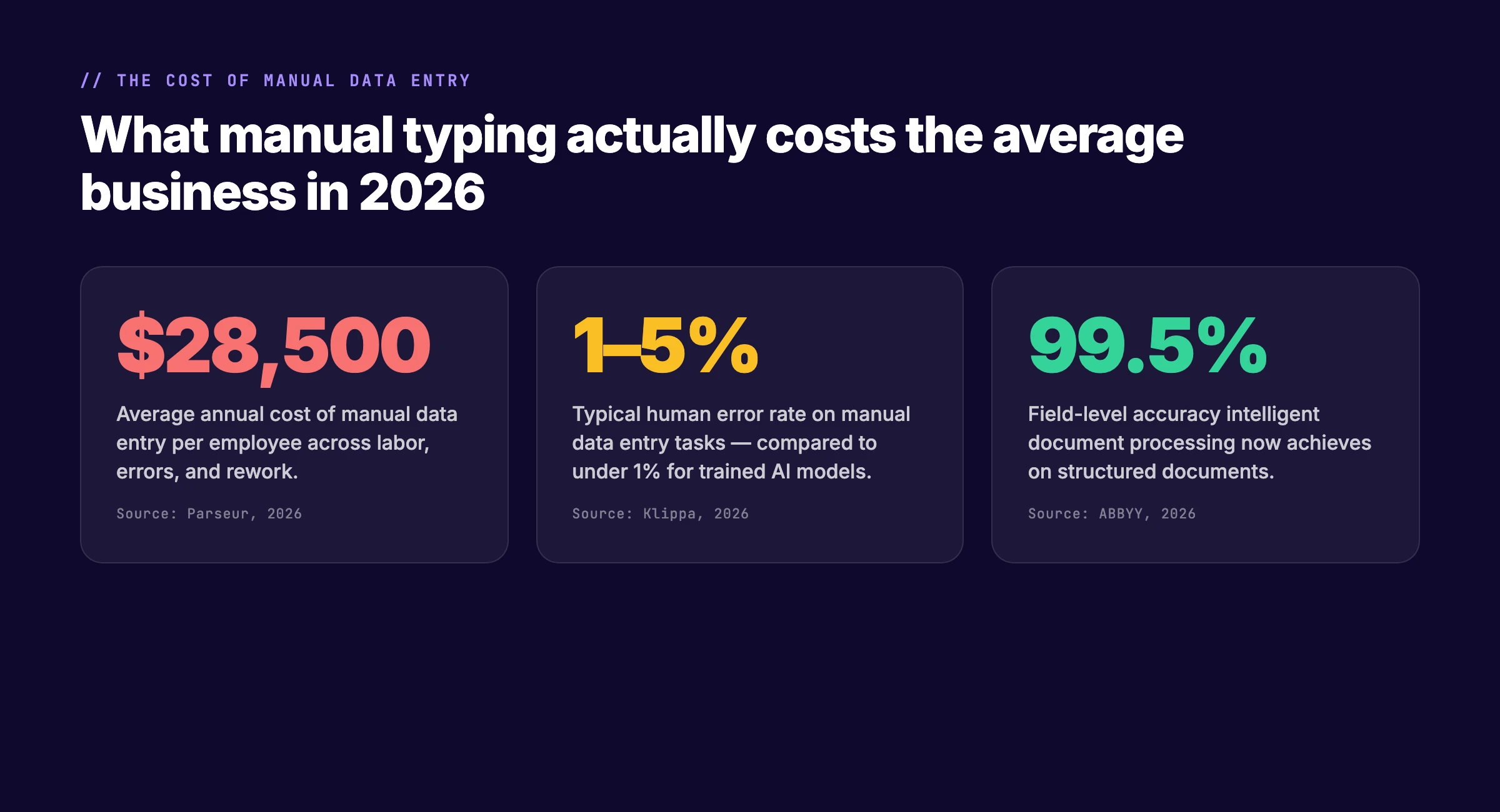
Manual data entry costs the average business $28,500 per employee each year. That figure includes labor, errors, rework, and the opportunity cost of staff who could be doing higher-value work.
The cost compounds. A single typo in an invoice amount does not just create a bad record. It triggers a payment dispute, a vendor call, a reconciliation cycle, and a late fee. Multiply that by hundreds of entries per week and the drain becomes structural.
AI document processing has changed this. Modern systems read invoices, forms, and receipts with 99.5% field-level accuracy. They process a document in 1 to 2 seconds. The cost per invoice drops from $15 to $25 down to $2 to $3.
This guide shows you how to replace data entry with AI in 7 steps. The process works for invoices, CRM records, form submissions, and spreadsheet imports. You do not need a data science team. You need a document type, a destination system, and two to three weeks of parallel testing.
Here is what you will learn:
- How to audit your current data entry pipeline and find the biggest cost leaks
- How to pick the right AI document processing technology for your document types
- How to set up the 5-stage capture-to-sync pipeline
- How to validate accuracy and handle exceptions without losing control
- How to connect the output to QuickBooks, Salesforce, HubSpot, or any API
- How to run a safe parallel test before cutting over
- How to measure ROI and expand to additional document types
Step 1: Audit Your Current Data Entry Pipeline
Before you replace data entry with AI, you need to know exactly where the cost lives. Most teams overestimate writing time and underestimate the time spent on formatting, review, and correction.
Specifically:
- List every document type your team enters by hand. Invoices, expense receipts, CRM updates, form submissions, inventory logs, and timesheets.
- Time each step from document arrival to final record. Include scanning, reading, typing, cross-checking, and the second-person review.
- Count errors found per week. Track duplicates, transposed numbers, wrong dates, and missing fields.
- Note which systems receive the data. QuickBooks, NetSuite, Salesforce, HubSpot, a database, or a spreadsheet.
The audit usually reveals one of three patterns. First, high volume with predictable formats. Vendor invoices in standard layouts are the easiest win. Second, moderate volume with high error rates. Medical claims or legal forms fall here. The cost of each mistake is high enough that even modest automation pays back fast. Third, scattered low-volume tasks. One-off projects, handwritten notes, and free-text entries. These are poor fits for AI and should stay manual.
One pattern we see across the 3,500+ businesses we work with: teams that track actual time per entry discover that 60% of their data entry hours go to review and correction, not the initial typing. That means the biggest savings come from eliminating errors, not from typing faster.
Why this step matters: You cannot fix what you have not measured. Skipping the audit means you will automate the wrong documents and wonder why costs stay flat.
Pro tip: Run the audit for one full week. Have each team member log the document type, start time, end time, and any errors found. The data will surprise you.
Step 2: Pick the Right AI Technology for Your Documents
AI document processing is not one technology. It is a stack of four layers, and each document type needs a different combination.
Optical Character Recognition (OCR) reads printed and handwritten text from scanned images and PDFs. Modern OCR engines handle skewed scans, low resolution, and mixed fonts. They are the foundation layer. If your documents are clean PDFs with selectable text, you may not need OCR at all.
Natural Language Processing (NLP) interprets the meaning of extracted text. It recognizes that “Inv. #” and “Invoice Number” are the same field. It matches vendor names against your supplier database even when abbreviations differ. NLP is what turns raw text into structured data.
Machine Learning (ML) improves accuracy over time. The model learns your document layouts, your vendor formats, and your field variations. After processing 500 invoices from the same vendor, the system recognizes that vendor’s template without explicit rules.
Robotic Process Automation (RPA) moves the extracted data into your business systems. It opens QuickBooks, creates a bill, fills the fields, and saves the record. Or it calls an API to post the data directly.
| Document Type | Primary Technology | Secondary Technology | Typical Accuracy |
|---|---|---|---|
| Vendor invoices | OCR + NLP | ML for vendor matching | 98–99.5% |
| Expense receipts | OCR + Vision | ML for category prediction | 95–98% |
| CRM form fills | NLP + API | RPA for system entry | 99%+ |
| Bank statements | OCR + ML | NLP for transaction classification | 97–99% |
| Handwritten forms | OCR + Vision | Human review queue | 85–95% |
| Free-text notes | LLM + NLP | Structured output parsing | 90–95% |
The key decision is whether your documents are structured, semi-structured, or unstructured. Structured documents have the same fields in the same place every time. A utility bill is structured. Semi-structured documents have the same fields but in varying layouts. Invoices from different vendors are semi-structured. Unstructured documents have no predictable format. Handwritten meeting notes are unstructured.
Structured and semi-structured documents are strong fits for AI. Unstructured documents still need human judgment.
Why this step matters: Buying an OCR tool for free-text notes wastes money. Buying an LLM for standardized invoices is overkill. Match the technology to the document type.
Pro tip: Start with one structured or semi-structured document type. Vendor invoices are the most common first choice because the volume is high, the format is predictable, and the downstream system (accounting software) has a clear API.
Step 3: Build the 5-Stage Capture-to-Sync Pipeline
Replacing data entry with AI means building a pipeline that moves documents from arrival to system record without human typing. The pipeline has five stages.
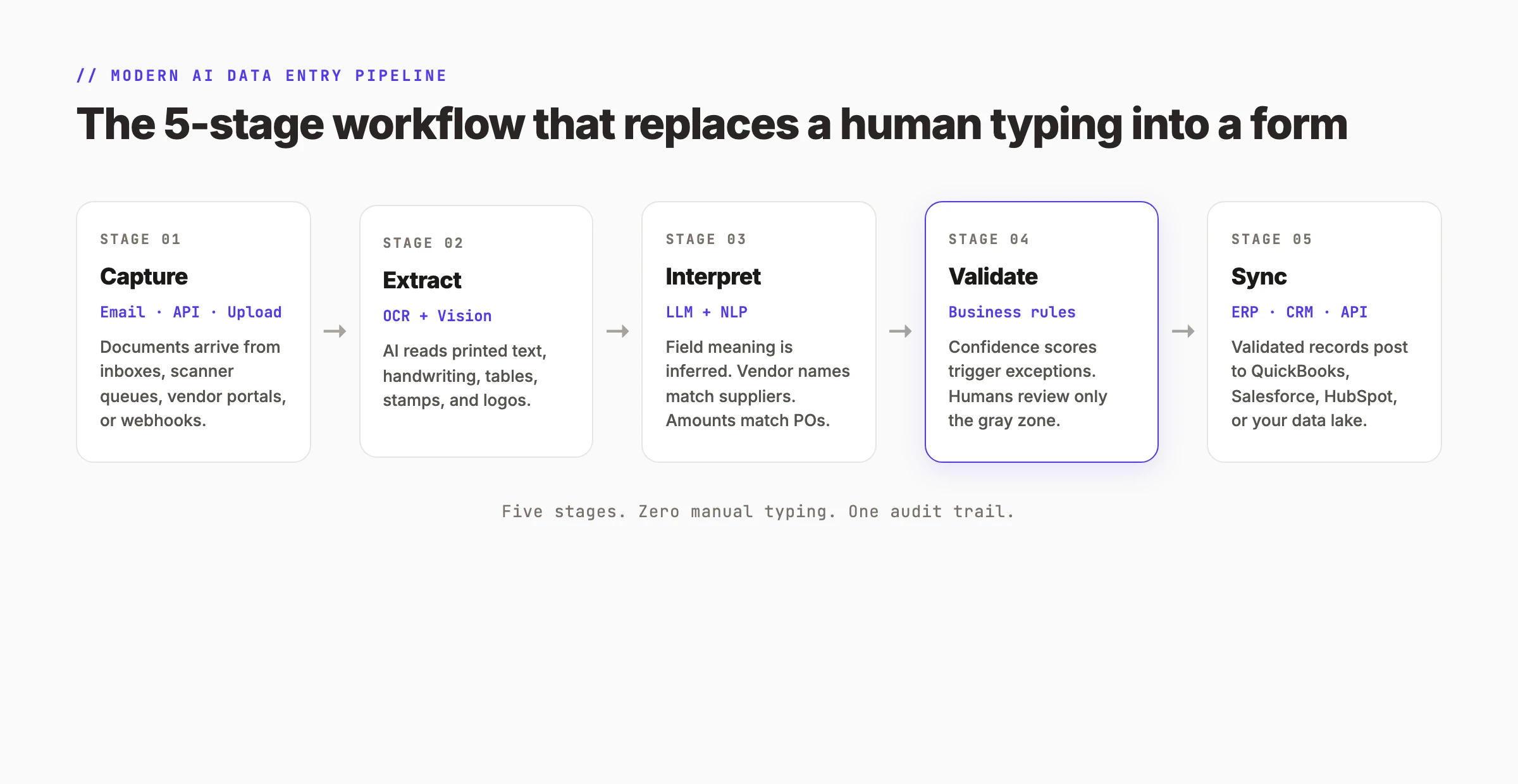
Stage 1: Capture. Documents arrive through an ingestion channel. Common channels include a dedicated email address ([email protected]), a scanned upload portal, an API webhook from a vendor, or a file drop folder. The goal is to get the document into the system without anyone touching it.
Stage 2: Extract. AI reads the document. OCR handles scanned images. Vision models handle handwriting and complex layouts. The output is raw text with positional data.
Stage 3: Interpret. NLP and ML turn raw text into structured fields. The system identifies the invoice number, vendor name, line items, tax amount, and total. It matches the vendor against your supplier database. It flags discrepancies like a total that does not equal the sum of line items.
Stage 4: Validate. Business rules check the extracted data. Confidence scores determine routing. A field with 99% confidence posts automatically. A field with 75% confidence goes to a human review queue. A field with 45% confidence triggers an exception alert.
Stage 5: Sync. Validated records post to your destination system through an API or RPA bot. The invoice becomes a bill in QuickBooks. The lead becomes a contact in Salesforce. The form submission becomes a row in your database. Every action is timestamped and logged.
The pipeline replaces the human typing step entirely. What used to take 10 to 30 minutes per document now takes 1 to 2 seconds. The human role shifts from typing to oversight. Staff review exceptions, handle edge cases, and manage vendor relationships.
Why this step matters: A pipeline with gaps is worse than no pipeline at all. If documents arrive by email but no one checks the inbox, the system stalls. If extraction works but validation is missing, bad data posts to your ledger.
Pro tip: Design the pipeline backwards. Start with your destination system. Define the exact fields it needs. Then work backward to the document type. This prevents the common problem of extracting data your system cannot accept.
Step 4: Set Up Validation Rules and Exception Handling
Accuracy is the make-or-break factor when you replace data entry with AI. A system that posts 1% of invoices with wrong amounts will lose trust within a month.
Validation happens at three levels.
Field-level confidence scoring. Every extracted field gets a confidence score from 0 to 100. Set thresholds based on risk. Invoice totals might require 98% confidence. Descriptive text might accept 85%. Route anything below threshold to human review.
Cross-field logic checks. The system verifies that extracted fields make sense together. The invoice total should equal the sum of line items plus tax. The due date should be after the invoice date. The vendor name should exist in your supplier database. Failures trigger exceptions.
Business rule enforcement. Custom rules match your operational requirements. No invoice over $10,000 posts without manager approval. Any vendor not in the database gets flagged for onboarding. Duplicate invoice numbers are rejected automatically.
| Validation Layer | What It Checks | Action on Failure |
|---|---|---|
| Confidence scoring | Extraction certainty per field | Route to human queue |
| Cross-field logic | Mathematical and relational consistency | Flag for review |
| Business rules | Custom operational constraints | Block or escalate |
The exception handling workflow is where humans stay in the loop. When the AI is uncertain, the document lands in a review queue. A human operator sees the original document, the extracted fields, and the confidence scores. They correct errors, confirm matches, and release the record. Over time, the ML model learns from these corrections and needs human intervention less often.
Why this step matters: Without validation, AI becomes a fast way to create bad data. The goal is not zero human involvement. The goal is human involvement only where judgment is required.
Pro tip: Start with strict thresholds. Set confidence minimums at 95% for financial fields and 90% for text fields. Lower them gradually as the model learns your documents. It is easier to relax rules than to recover from bad data.
Step 5: Connect to Your Business Systems
Extracted data has no value until it lives in the system where decisions are made. The connection layer is where AI data entry delivers its ROI.
Most modern business systems have APIs that accept structured data. QuickBooks Online has an API for bills and invoices. Salesforce has APIs for leads, contacts, and opportunities. HubSpot has APIs for CRM records and marketing events. Zapier and Make act as middleware for systems without native APIs.
The integration pattern is straightforward:
- Map extracted fields to destination fields. Invoice number maps to reference number. Vendor name maps to vendor ID. Line items map to bill lines.
- Handle duplicates. Check if an invoice with the same number from the same vendor already exists. If yes, skip or update. If no, create.
- Manage errors. If the API rejects a record, log the error, notify the operator, and queue for retry.
- Maintain an audit trail. Every posted record should link back to the original document, the extraction timestamp, and the operator who approved it.
| Destination System | API Availability | Common Data Types | Integration Complexity |
|---|---|---|---|
| QuickBooks Online | REST API | Bills, invoices, expenses | Low |
| Salesforce | REST + Bulk API | Leads, contacts, opportunities | Medium |
| HubSpot | REST API | Contacts, deals, tickets | Low |
| NetSuite | REST + SOAP | Transactions, records, items | High |
| Google Sheets | Sheets API | Rows, columns | Very low |
| Custom database | Direct connection | Any structured table | Medium |
For teams without API access, RPA tools like UiPath or Microsoft Power Automate can simulate human clicks. The bot opens the application, moves to the right screen, fills the fields, and saves the record. This is slower than an API but works for legacy systems.
Why this step matters: A pipeline that ends in a CSV export still requires someone to import the file. The full automation loop only closes when data posts directly to the system of record.
Pro tip: Test the API connection with 10 sample records before processing real documents. APIs have rate limits, field length restrictions, and required fields that are not obvious from documentation. A 10-record test catches these issues before they affect production data.
Step 6: Run a Parallel Test Before Cutting Over
Never flip the switch on day one. The safest way to replace data entry with AI is to run both systems in parallel for 14 to 30 days.
Week 1 to 2: Pilot with 50 documents. Process 50 real documents through the AI pipeline. Do not post to your live system yet. Compare AI extractions against human entries for the same documents. Measure field-level accuracy, timing, and error types.
Week 3 to 4: Parallel run with live posting. Process documents through both AI and human pipelines. The AI posts to a test environment or a shadow ledger. Humans continue their normal workflow. Compare results daily. Tune validation rules, confidence thresholds, and field mappings based on discrepancies.
Week 5 to 6: Cut over with exception handling. The AI becomes the primary pipeline. Humans handle only exceptions and review queue items. Monitor accuracy daily. Expect 95%+ field accuracy and 80%+ touchless processing by the end of week 6.
Week 7 to 8: Scale and optimize. Add a second document type. Expand to additional vendors or departments. Measure full ROI including labor hours saved, error reduction, and faster processing times.
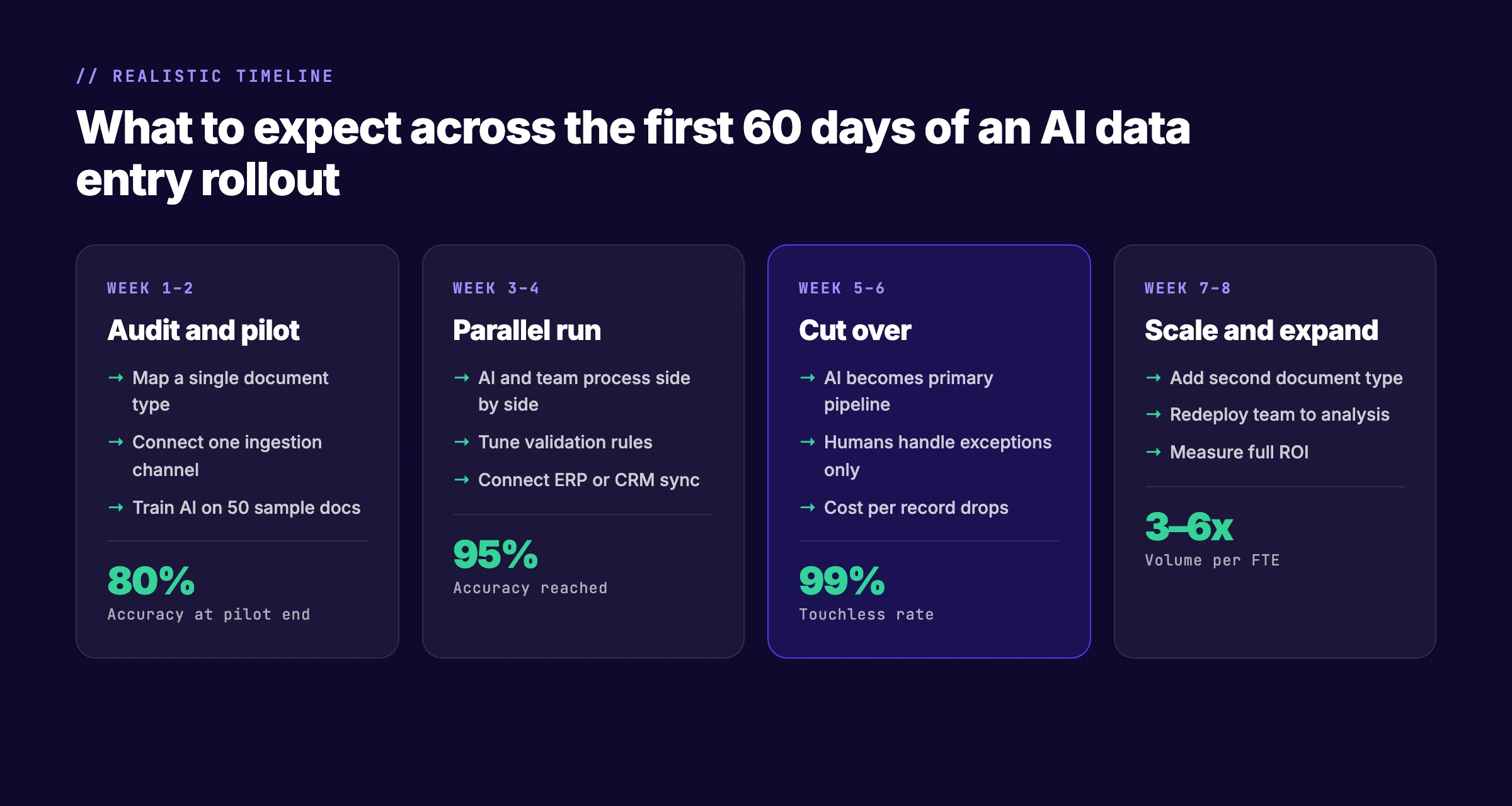
| Phase | Duration | Target Accuracy | Target Touchless Rate |
|---|---|---|---|
| Pilot | Week 1–2 | 80%+ | N/A |
| Parallel run | Week 3–4 | 95%+ | 60%+ |
| Cut over | Week 5–6 | 98%+ | 80%+ |
| Scale | Week 7–8 | 99%+ | 90%+ |
The parallel run builds trust. Skeptical team members see the AI match or beat human accuracy. Managers see the time savings in real numbers. By the time you cut over, the team is confident, not anxious.
Why this step matters: A failed cutover destroys trust in automation for months. A successful parallel run turns skeptics into advocates.
Pro tip: Document every discrepancy during the parallel run. Capture the error and why it happened. Was the scan quality poor? Was the vendor using a new layout? Was the confidence threshold too low? This documentation becomes your tuning guide.
Step 7: Measure ROI and Expand to New Document Types
After cutover, measure the results. ROI for AI data entry has four components.
Labor cost savings. Calculate hours saved per week multiplied by hourly cost. If a clerk spent 20 hours per week on invoice entry and now spends 2 hours on exceptions, that is 18 hours saved. At $30 per hour, that is $540 per week or $28,080 per year.
Error cost reduction. Track the number of errors found before and after automation. A 2026 Klippa study found that AI reduces data entry errors by over 97%. Each corrected error has a cost: the time to find it, the time to fix it, and any downstream consequences like late fees or vendor disputes.
Speed gains. Measure processing time per document. Manual entry averages 10 to 30 minutes. AI processing averages 1 to 2 seconds. For a team processing 500 invoices per month, that is a reduction from 250 hours to under 30 minutes.
Scalability. The cost to process 1,000 documents is nearly the same as the cost to process 100. You add API throughput, not headcount.
| ROI Component | Before AI | After AI | Annual Savings (500 invoices/mo) |
|---|---|---|---|
| Labor cost | $25/invoice | $3/invoice | $132,000 |
| Error rate | 1–5% | <0.5% | $8,000–$15,000 |
| Processing time | 20 min/invoice | 2 sec/invoice | 1,800 hours |
| Scaling cost | Hire clerks | Add API calls | 80% lower |
Once the first document type is stable, expand. The same pipeline handles expense receipts, purchase orders, bank statements, and CRM form submissions. Each new document type requires training on 50 to 100 sample documents and two weeks of parallel testing.
Why this step matters: Without measurement, you cannot justify expansion. With clear numbers, you can build a business case for automating every document type in your operation.
Pro tip: Present ROI in weekly increments during the first month. A weekly report showing 90% of invoices processed without human touch builds momentum faster than a quarterly summary.
Which Data Entry Tasks Should You Replace First?
Not every data entry task is a good candidate for AI. Use this filter to prioritize.
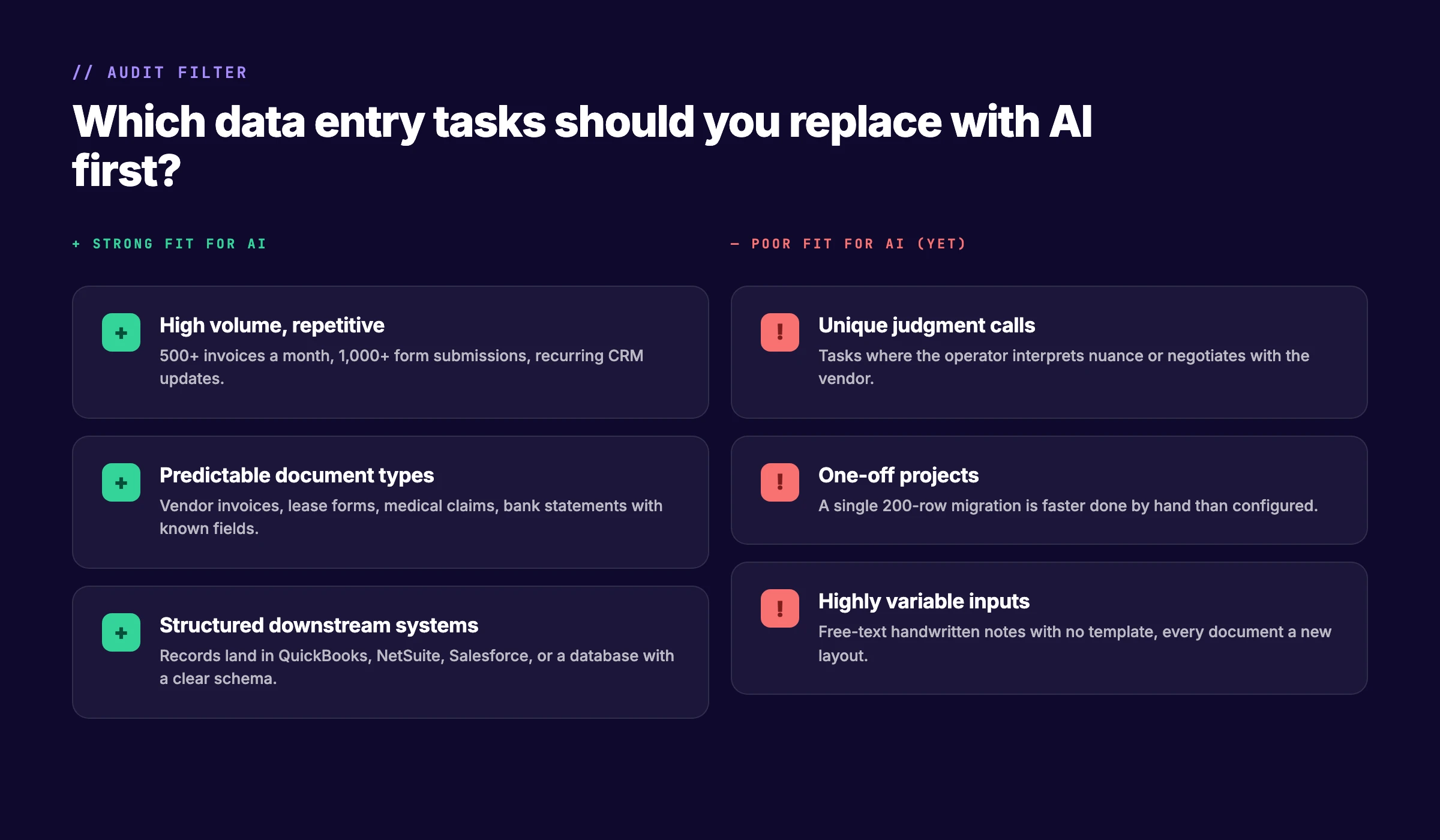
Strong fits for AI:
- High volume, repetitive tasks. Five hundred or more invoices per month. One thousand or more form submissions. Recurring CRM updates.
- Predictable document types. Vendor invoices, lease forms, medical claims, and bank statements with known fields and layouts.
- Structured downstream systems. Records that land in QuickBooks, NetSuite, Salesforce, or a database with a clear schema.
Poor fits for AI:
- Unique judgment calls. Tasks where the operator interprets nuance, negotiates with the vendor, or makes subjective decisions.
- One-off projects. A single 200-row migration is faster done by hand than configured in an AI pipeline.
- Highly variable inputs. Free-text handwritten notes with no template, where every document is a new layout.
The 80/20 rule applies here. Twenty percent of your document types likely generate 80% of your data entry hours. Automate those first.
Manual Data Entry vs. AI: Side-by-Side Comparison
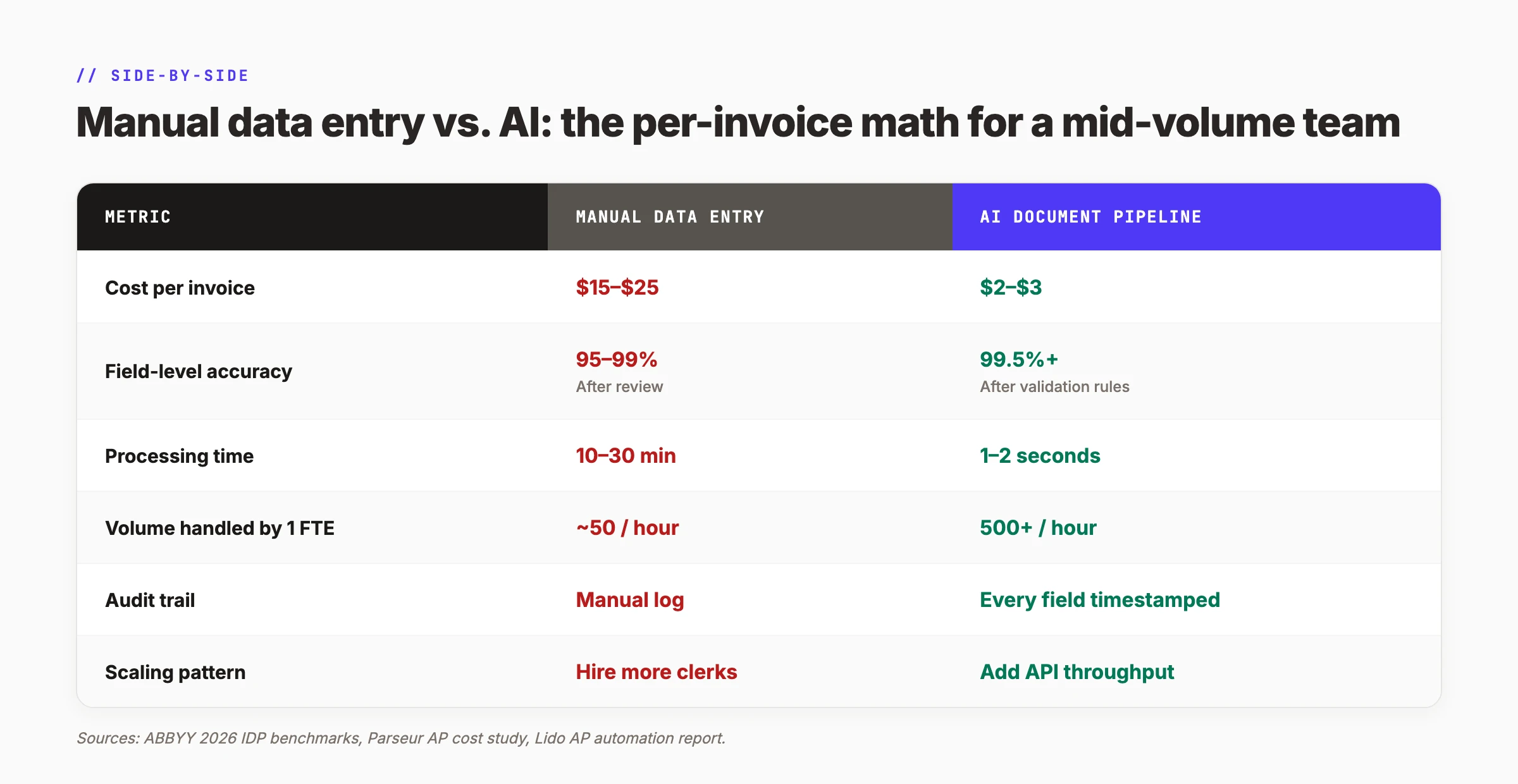
The numbers make the case. Here is how manual entry compares to an AI document pipeline for a mid-volume team.
| Metric | Manual Data Entry | AI Document Pipeline |
|---|---|---|
| Cost per invoice | $15–$25 | $2–$3 |
| Field-level accuracy | 95–99% (after review) | 99.5%+ (after validation rules) |
| Processing time | 10–30 minutes | 1–2 seconds |
| Volume handled by 1 FTE | ~50 per hour | 500+ per hour |
| Audit trail | Manual log | Every field timestamped |
| Scaling pattern | Hire more clerks | Add API throughput |
The cost per invoice drops 80% to 90%. The accuracy improves. The audit trail becomes automatic. And scaling no longer requires hiring.
Common Mistakes When Replacing Data Entry With AI
Teams that fail to replace data entry with AI usually make one of four mistakes. Each is avoidable.
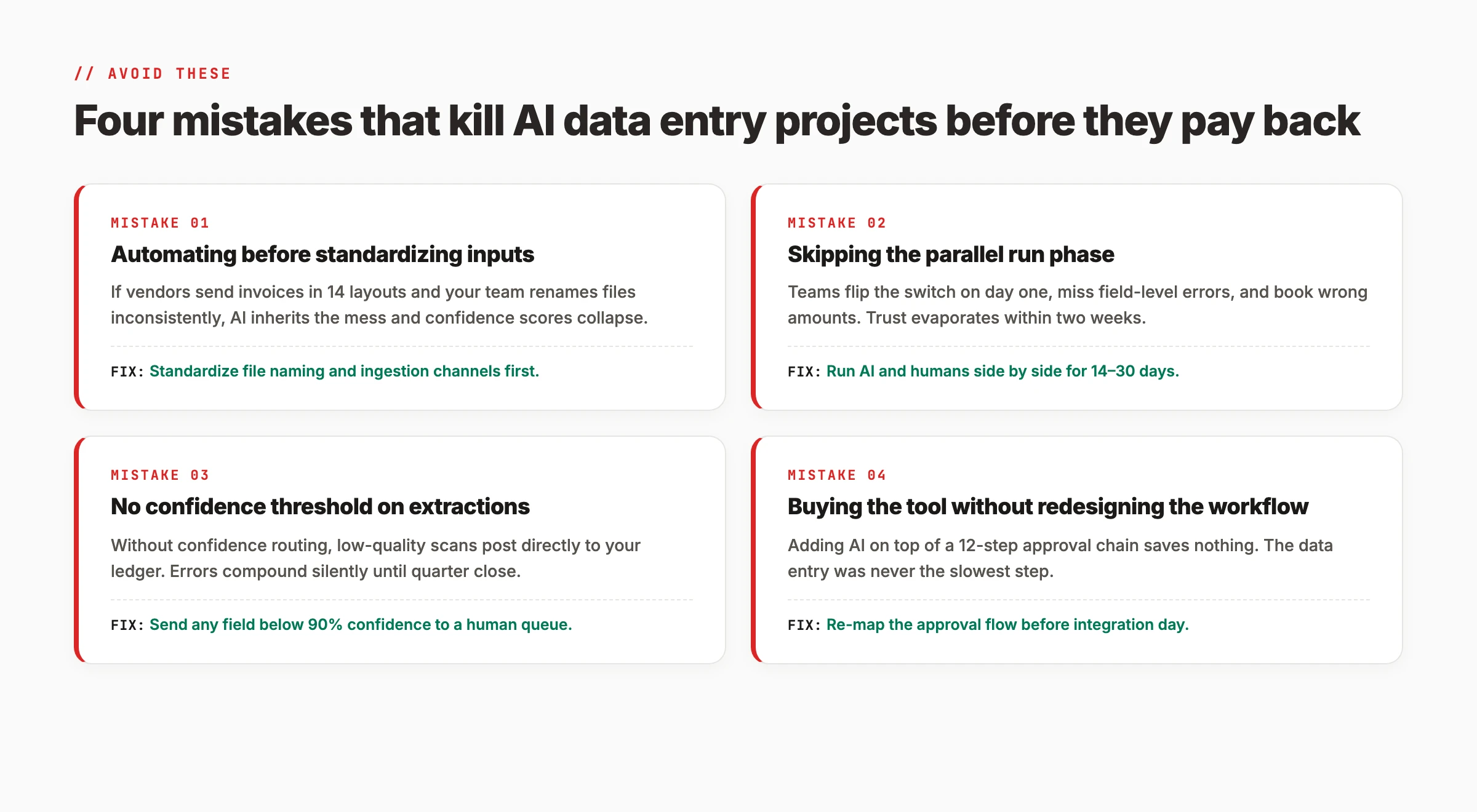
Mistake 1: Automating before standardizing inputs. If vendors send invoices in 14 different layouts and your team renames files inconsistently, AI inherits the mess. Confidence scores collapse. Errors spike. The fix: standardize file naming and ingestion channels before adding AI.
Mistake 2: Skipping the parallel run phase. Teams flip the switch on day one, miss field-level errors, and book wrong amounts. Trust evaporates within two weeks. The fix: run AI and humans side by side for 14 to 30 days before cutting over.
Mistake 3: No confidence threshold on extractions. Without confidence routing, low-quality scans post directly to your ledger. Errors compound silently until quarter close. The fix: send any field below 90% confidence to a human queue.
Mistake 4: Buying the tool without redesigning the workflow. Adding AI on top of a 12-step approval chain saves nothing. The data entry was never the slowest step. The fix: re-map the approval flow before integration day.
Results: What to Expect After 60 Days
After completing these 7 steps, you should expect three outcomes.
Within 30 days: Your first document type is processing through the AI pipeline with 95%+ accuracy. Human review time has dropped 70% to 80%. Exceptions are routed to a clear queue.
Within 60 days: The pipeline is handling 80% to 90% of documents without human touch. Cost per document has dropped 80%. Your team has shifted from typing to analysis, vendor management, and exception handling.
Ongoing: Each new document type adds 2 to 3 weeks of setup and testing. The marginal cost of adding a new vendor or form type approaches zero once the pipeline is built.
Stop paying $25 per invoice for manual typing. The average mid-size business processes 500 to 2,000 documents per month. At $20 per document, that is $120,000 to $480,000 per year in labor cost alone. AI document processing cuts that to $2 to $3 per document. The payback period is usually under 60 days. See how Stacc automates content workflows →
Frequently Asked Questions
Will AI replace data entry workers?
AI will replace the typing portion of data entry work. It will not replace the judgment portion. The most successful implementations keep humans in the loop for exceptions, vendor relationships, and quality oversight. A 2026 Forrester study found that 70% of organizations using AI for data entry retrained staff rather than eliminating positions. The work shifts from typing to validation.
Can AI handle data entry?
Yes, for structured and semi-structured documents. AI using OCR, NLP, and machine learning can read invoices, forms, receipts, and bank statements with 99.5% field-level accuracy. It struggles with unstructured free-text notes, handwritten documents in non-standard formats, and tasks requiring subjective judgment. The key is matching the document type to the right technology stack.
Is data entry becoming obsolete?
Manual data entry as a standalone job is declining. The U.S. Bureau of Labor Statistics projects a 25% decrease in data entry clerk positions through 2032. However, data management roles are growing. The difference is that modern data workers validate AI output, manage exceptions, and maintain data quality rather than typing records by hand.
How long does it take to implement AI data entry?
A pilot for one document type takes 2 to 3 weeks. A full parallel run and cutover takes 6 to 8 weeks. Each additional document type adds 2 to 3 weeks. The timeline depends on document complexity, API availability in your destination system, and the quality of your sample training data.
What is the ROI of replacing data entry with AI?
The typical ROI is 300% to 500% in the first year. Cost per document drops 80% to 90%. Error rates fall 90% or more. Processing speed increases 100x. For a team processing 500 invoices per month, annual savings range from $78,000 to $132,000 in labor costs alone. Error reduction and faster processing add further savings.
Do I need technical skills to set this up?
No-code and low-code platforms like Zapier, Make, and Microsoft Power Automate allow non-technical users to build basic pipelines. For complex integrations or custom validation rules, a developer or consultant may be needed for the initial setup. Once built, the system runs with minimal technical maintenance.
What documents work best for AI data entry?
Vendor invoices, expense receipts, purchase orders, bank statements, medical claims, insurance forms, and standardized application forms are the strongest fits. These documents have predictable fields, high volume, and clear downstream systems. Free-text notes, one-off projects, and documents requiring subjective judgment are poor fits.
How do I handle documents the AI cannot read?
Every AI data entry system needs an exception handling workflow. Documents with low confidence scores, unreadable scans, or unrecognized layouts route to a human review queue. The operator sees the original document, the extracted fields, and the confidence scores. They correct errors and release the record. Over time, the ML model learns from these corrections and needs intervention less often.
Conclusion
Replacing data entry with AI is not about eliminating people. It is about eliminating typing. The 7 steps in this guide give you a practical path from manual entry to an intelligent document pipeline.
Here is the summary:
- Audit your current pipeline to find the biggest cost leaks
- Match the right AI technology to your document types
- Build a 5-stage capture-to-sync pipeline
- Set validation rules and exception handling before going live
- Connect extracted data to your business systems through APIs
- Run a 14 to 30 day parallel test before cutting over
- Measure ROI and expand to additional document types
The businesses that get this right do not just save money. They free their teams to do work that requires judgment, creativity, and relationship building. That is the real return on replacing data entry with AI.
Ready to automate the repetitive work in your content operation? Stacc publishes 30+ optimized SEO articles per month using automated research, drafting, and publishing workflows. See how the same pipeline thinking applies to your content pipeline. Start for $1 →
Related Tools & Resources
Free SEO Tools:
Best Lists:

Written by
Siddharth GangalSiddharth is the founder of theStacc and Arka360, and a graduate of IIT Mandi. He spent years watching great businesses lose organic traffic to competitors who simply published more. So he built a system to fix that. He writes about SEO, content at scale, and the tactics that actually move rankings.
30 SEO blog articles published every month
Keyword-optimized, scheduled, and live on your site. Automatically.
30-day trial · Cancel anytime
theStacc
Stop writing SEO content manually
30 blog articles, 30 GBP posts, and social media content. Published every month. Automatically.
Try for free$1 for 3 days · Cancel anytime