
SEO for Developers: The 2026 Technical Guide
SEO for developers in 2026. Crawlability, rendering, Core Web Vitals, schema, and the deploy checklist that ships search-friendly code every time.
You shipped the site. The Lighthouse score is 98. The code is clean. Then six months later, marketing asks why organic traffic is flat and your CEO forwards a screenshot showing 0 indexed pages in Search Console. Welcome to the SEO for developers problem.
Most developer SEO failures are not coding mistakes. They are architecture decisions made before anyone thought about search. A JavaScript framework that defers rendering. A robots.txt copied from staging. A canonical tag pointing at the dev domain. None of it shows up in your test suite, and none of it matters until your traffic disappears.
This guide is the technical reference we hand to engineering teams who want to ship code that ranks. It covers what search engines actually do with your HTML, the exact failure points that kill rankings, and the deploy checklist we use on every site we touch. We are not going to tell you to “write good content.” We are going to tell you which HTTP status code, which header, and which directive gets the page into Google’s index.
We publish 3,500+ SEO blog posts every month across 70+ industries. Every page we ship goes through the workflow in this guide before it goes live. Our average Lighthouse performance score is 92, and our average Core Web Vitals pass rate is 94%.
Here is what you will learn:
- How search engines actually crawl, render, and index your code
- The 6 technical SEO layers every developer needs to understand
- Why JavaScript SEO breaks rankings and how to fix it
- The 12 developer mistakes that kill organic traffic
- The exact pre-deploy SEO checklist we run on every site
- Which tools matter and which ones to skip
- The framework-specific gotchas for Next.js, Nuxt, Astro, and SvelteKit
What SEO for Developers Actually Means
SEO for developers is the part of search engine optimization that lives in your codebase. It is the HTML, the HTTP headers, the JavaScript bundles, the routing, the status codes, and the metadata. It is the work that has to happen before any marketer can rank a page.
The split between “developer SEO” and “marketer SEO” is roughly 80/20 on a new build. On day one, the developer controls 80% of what determines whether a page can rank at all. The marketer controls 20% — the title, the description, the body content. After launch, the ratio flips. Maintenance is mostly content, and the dev work fades into the background until something breaks.
Search engines do not see your site the way you do. They see a stream of HTML, the raw bytes returned by your server. If your hero image is in a <picture> tag with no alt attribute, Google reads “image.” If your H1 is inside a div that JavaScript renders on the second paint, Googlebot might miss it entirely. If your canonical tag points at /home, Google will not index /.
The three things search engines actually need
Every page that ranks does three things correctly.
- It can be crawled. Googlebot can request the URL, get a 200 status code, and read the HTML.
- It can be indexed. The content is unique, the canonical tag is correct, and no
noindexdirective blocks it. - It can be rendered. The visible content is in the HTML response or in the rendered DOM within 5 seconds of fetch.
If any one of those fails, the page does not rank. None of the on-page content matters. None of the backlinks matter. The mechanics have to work first.
Why developers should care
The argument we hear most often is “SEO is marketing’s problem.” It is not. According to Google’s own developer documentation, the technical foundation of a site is the developer’s responsibility, and the consequences land on the entire business.
A single 500-error spike during a deploy can deindex thousands of URLs. A misconfigured robots.txt can block the entire site for a week before anyone notices. A JavaScript framework upgrade can change how content renders, and three months later organic traffic falls 60%. We have seen all three in client audits this year.
Search is also the cheapest acquisition channel most businesses have. Paid acquisition costs $4 to $50 per click. Organic costs whatever you pay your dev team to keep the site indexable. The math heavily favors getting the technical foundation right.
How Search Engines Actually Work
Before any of the practices in this guide make sense, you need a mental model of what Googlebot does between the moment a URL is discovered and the moment that URL ranks. Most developer SEO mistakes come from skipping a step in this pipeline.
The full process has five stages: discovery, crawling, rendering, indexing, and ranking. The first four are deterministic. The last one is the algorithm. Your job is to make sure the first four never fail.
Stage 1: Discovery
Google finds new URLs in 4 ways. Internal links from already-known pages. External links from other sites. XML sitemaps submitted through Search Console. Direct submissions through the URL Inspection tool.
If a page is not linked from anywhere and is not in a sitemap, Google probably does not know it exists. Orphan pages are the most common indexation failure on enterprise sites we audit.
Stage 2: Crawling
Googlebot makes an HTTP request to the URL. It expects a 200 status code and an HTML response. It checks robots.txt first to confirm the URL is allowed. Crawl budget — the number of URLs Google will request from your domain in a session — is finite. On big sites, you have to ration it.
The crawl follows the rules in your HTTP headers and HTML meta tags. A noindex header tells Google to crawl but not index. A nofollow tells it not to follow links from this page. Crawl directives have a strict order of precedence, and developers get this wrong constantly.
Stage 3: Rendering
Modern Googlebot uses a headless Chrome to render JavaScript. It executes your client-side code, builds the DOM, and reads the final HTML. This is the slowest and most expensive step in the pipeline. Google does not always reach it. On low-priority sites, your JavaScript may never run.
The render queue is the single biggest issue for SPA and JAMstack sites. We will cover the fixes in the JavaScript SEO section below.
Stage 4: Indexing
After rendering, Google decides whether the page is worth keeping. It checks for duplicate content, canonical signals, language and region targeting, content quality, and technical signals like Core Web Vitals. A page can be crawled, rendered, and still not indexed.
You can verify indexation status in Google Search Console under Pages. The indexation report tells you exactly which signals failed and why.
Stage 5: Ranking
Ranking is the part Google never explains. The algorithm considers 200+ factors. The ones developers can influence are page speed, mobile usability, HTTPS, structured data, semantic HTML, and internal linking architecture. Everything else is content and authority.
Stop debugging crawl errors at midnight. Stacc handles your blog SEO, technical audits, and ongoing optimization for $99/month. We publish 30 articles, monitor indexation, and fix issues before they cost you traffic. Start for $1 →
The Six Technical SEO Layers
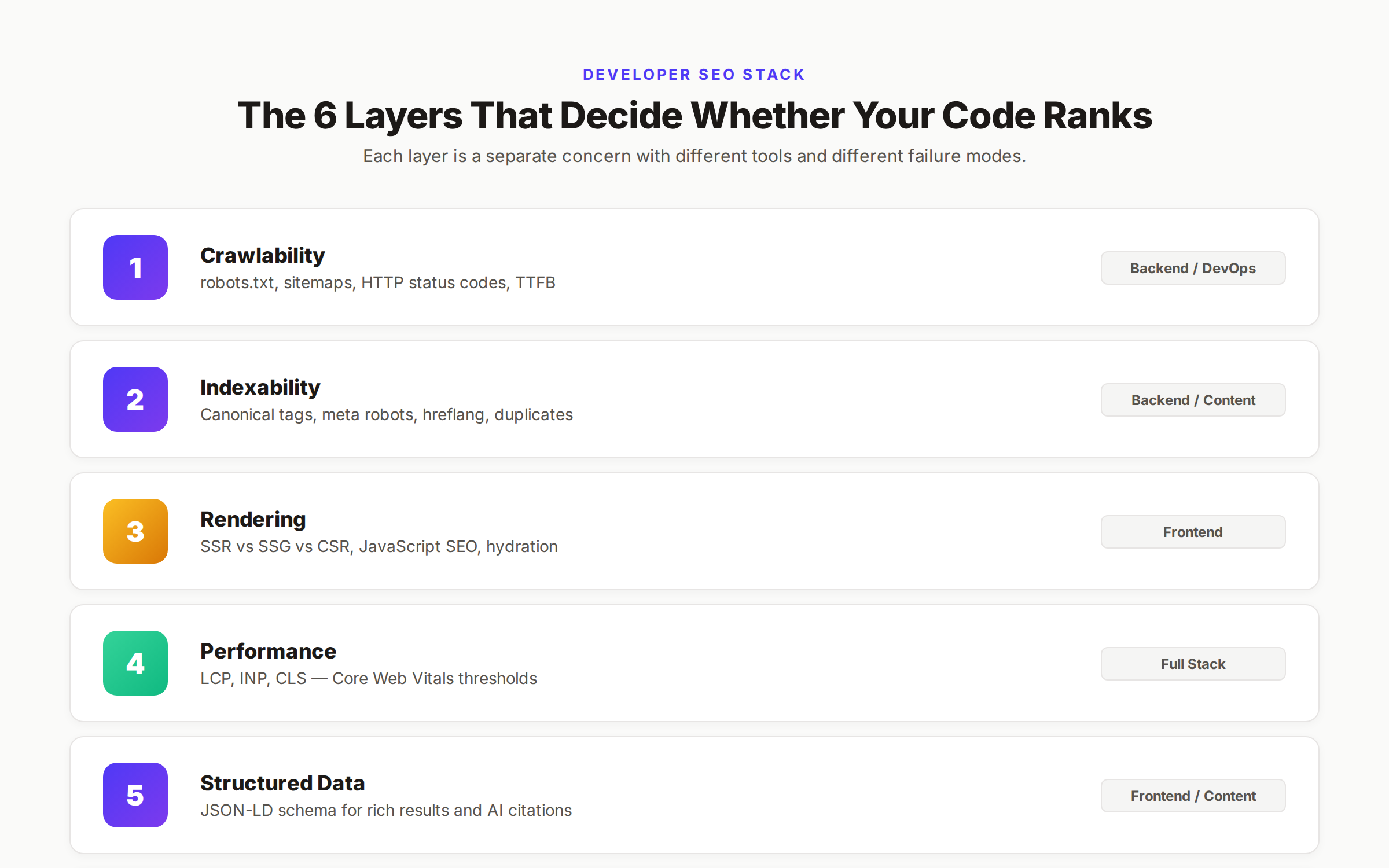
Developer SEO breaks into 6 layers. Each one is a separate concern with different tools, different failure modes, and different fixes. The order matters. You cannot skip a layer.
| Layer | What It Controls | Owned By | Failure Cost |
|---|---|---|---|
| Crawlability | Whether Google can reach the URL | Backend, DevOps | Total — page never indexed |
| Indexability | Whether Google keeps the URL | Backend, Content | Total — page indexed but excluded |
| Rendering | Whether content shows up in HTML | Frontend | Partial — some content missed |
| Performance | Whether the page loads fast enough | Full stack | Ranking penalty |
| Structured Data | Whether Google understands content | Frontend, Content | Lost rich results |
| Architecture | How pages link to each other | Backend, Content | Slow ranking growth |
We are going to walk through each layer in order. By the end you will have a clear map of which file, which header, and which tag controls each piece.
Layer 1: Crawlability
Crawlability is whether Googlebot can request your URL and get a useful response. The crawl layer has 4 pieces: robots.txt, XML sitemaps, HTTP status codes, and server response times.
Robots.txt
robots.txt lives at the root of your domain at /robots.txt. It tells crawlers which paths they can request. The file is plain text and the syntax is simple.
User-agent: *
Disallow: /admin/
Disallow: /api/
Disallow: /cart
Sitemap: https://example.com/sitemap.xml
The 3 mistakes we see most often:
Disallow: /left in production. Staging sites usually block everything. When dev pushes the file to prod without checking, the entire site becomes uncrawlable.- Blocking CSS and JavaScript. Older robots.txt files block
/static/or/assets/. Googlebot cannot render the page without those files. The result is broken layout and indexation issues. - Trying to remove pages with robots.txt. Blocking a URL in robots.txt does not remove it from Google. The URL stays indexed, just without any content. To remove a page, use a
noindexmeta tag and let Google crawl it.
We have a full robots.txt optimization guide that covers the edge cases. The short version is: only block paths you genuinely never want crawled, and verify the live file matches the file in your repo every deploy.
XML Sitemaps
Sitemaps are the manifest of every URL you want indexed. The format is XML, the size limit is 50,000 URLs or 50 MB uncompressed per file. Bigger sites use a sitemap index.
<?xml version="1.0" encoding="UTF-8"?>
<urlset xmlns="http://www.sitemaps.org/schemas/sitemap/0.9">
  <url>
    <loc>https://example.com/blog/post-title</loc>
    <lastmod>2026-05-21</lastmod>
    <changefreq>weekly</changefreq>
    <priority>0.8</priority>
  </url>
</urlset>
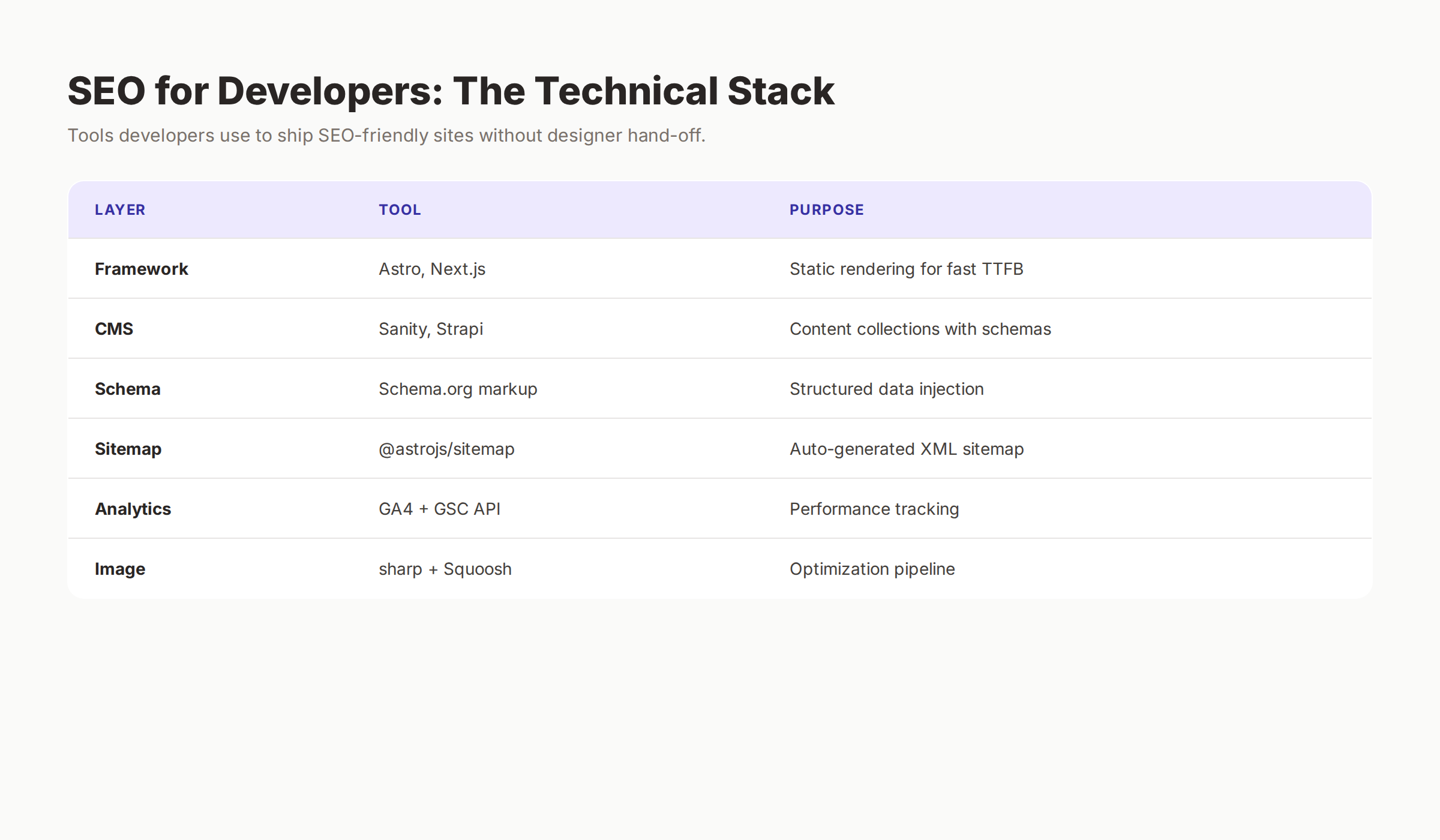
Most modern frameworks generate sitemaps automatically. Next.js has next-sitemap. Astro has @astrojs/sitemap. Nuxt has @nuxtjs/sitemap. The plugins do the right thing 95% of the time. The 5% they miss is dynamic routes, paginated archives, and pages behind feature flags.
Submit the sitemap to Google Search Console under Sitemaps. Check the “Discovered” vs “Indexed” numbers weekly. If discovered is high and indexed is low, you have a quality or duplicate-content problem. Our XML sitemap guide covers the configuration details.
HTTP Status Codes
Googlebot reads HTTP status codes and reacts to each one differently. The codes that matter are listed below.
| Code | Meaning | What Google Does |
|---|---|---|
| 200 | OK | Crawls, renders, indexes |
| 301 | Permanent redirect | Follows, transfers ranking signal |
| 302 | Temporary redirect | Follows, does not transfer signal |
| 404 | Not found | Removes from index after recrawl |
| 410 | Gone | Removes from index faster than 404 |
| 500/503 | Server error | Retries, drops if repeated |
The 2 codes developers misuse most are 302 and 500. A 302 used for permanent moves stops link equity from flowing to the new URL. A 500 returned during a deploy can deindex live pages if Google hits it during a crawl session. The fix for deploy errors is a proper maintenance mode using 503 with a Retry-After header.
Our 301 redirects guide explains the redirect chain math in detail. The rule is simple. Use 301 for permanent moves. Use 302 only for true temporary redirects like A/B tests. Never chain more than 3 redirects in a row.
Server Response Time
Google measures the Time to First Byte (TTFB) on every request. The threshold is 200 milliseconds for good, 600 milliseconds for needs improvement. Anything above 1 second triggers crawl rate throttling.
The fixes are standard backend work. Cache aggressively. Use a CDN. Move static assets off the application server. Optimize database queries. If your TTFB is over 600 ms on the homepage, fix that before doing any other SEO work. Nothing else matters if the server is slow.
Layer 2: Indexability
Indexability is whether Google decides to keep the page after crawling it. The signals that control indexation are canonical tags, meta robots, hreflang, and content uniqueness.
Canonical Tags
A canonical tag tells Google which version of a page is the original when multiple URLs serve the same content. The tag goes in the <head>.
<link rel="canonical" href="https://example.com/products/red-widget" />Canonical tags are the most misused element in technical SEO. The rules are strict and developers break them constantly.
- The canonical must point to a 200 URL. Canonicalizing to a 404 or a redirect cancels the signal.
- The canonical must match exactly — including trailing slash and protocol.
https://example.com/pageandhttps://example.com/page/are different URLs. - A page can self-canonical. This is normal and recommended. Every indexable page should declare its canonical even when it points at itself.
- Canonicals are hints, not directives. Google can ignore them if it finds stronger signals elsewhere. The fix for ignored canonicals is consistent internal linking and matching HTTP headers.
For paginated archives, ecommerce filters, and faceted navigation, the canonical strategy gets complicated fast. Our canonical tags guide covers each case in depth.
Meta Robots and X-Robots-Tag
The <meta name="robots"> tag controls indexation at the page level. The X-Robots-Tag HTTP header does the same for non-HTML files like PDFs and images.
<meta name="robots" content="index, follow" />
<meta name="robots" content="noindex, nofollow" />
<meta name="robots" content="noindex, follow" />
<meta name="robots" content="max-snippet:-1, max-image-preview:large" />
The directives that matter:
index/noindex— keep or drop the page from searchfollow/nofollow— pass or block link equitymax-snippet— control the length of the description shown in SERPsmax-image-preview— control image previews in SERPsnoarchive— prevent the cached copy
The mistake we see is teams adding noindex to staging environments and forgetting to remove it before launch. Always check the production robots directive on a sample of live URLs after every deploy.
Hreflang
Hreflang tells Google which language and region each version of a page targets. It only matters for sites with multiple language or country versions. The tag can live in the HTML head, in an XML sitemap, or in HTTP headers.
<link rel="alternate" hreflang="en-us" href="https://example.com/en-us/page" />
<link rel="alternate" hreflang="en-gb" href="https://example.com/en-gb/page" />
<link rel="alternate" hreflang="x-default" href="https://example.com/page" />
Hreflang has 2 strict rules. Every page in a hreflang cluster must reference every other page including itself. Every reference must use a valid ISO language code plus optional region code. Google rejects clusters with broken references entirely, which means the hreflang signal evaporates.
Duplicate Content
Google indexes one version of each piece of content. If 5 URLs serve the same content, Google picks 1 and ignores the rest. The pick may not be the URL you wanted.
The common sources of duplicate content on developer-built sites:
- Trailing slash vs no trailing slash on the same path
- HTTP vs HTTPS versions both reachable
- WWW vs non-WWW versions both reachable
- URL parameters that do not change content (
?ref=,?utm_source=) - Print versions and AMP versions of the same page
The fix is 301 redirects from every duplicate to the canonical version, plus a self-referencing canonical tag on the canonical URL. Set this up once and audit it after every infrastructure change.
Layer 3: JavaScript SEO — The Rendering Problem
This is the layer where modern developer SEO lives and dies. If your site is built with React, Vue, Svelte, or any other client-side framework, the rendering layer determines whether Google sees your content at all.
How Google Renders JavaScript
Google uses a 2-pass indexer. The first pass reads the raw HTML response and indexes whatever is in it. The second pass — the render pass — queues the URL for headless Chrome execution. The render pass can take days. On low-priority pages, it may never happen.
If your first-pass HTML is empty, you are betting the page on the render queue. That is a bad bet. Pages that depend entirely on JavaScript rendering rank slower, less often, and less reliably than pages that ship server-rendered HTML.
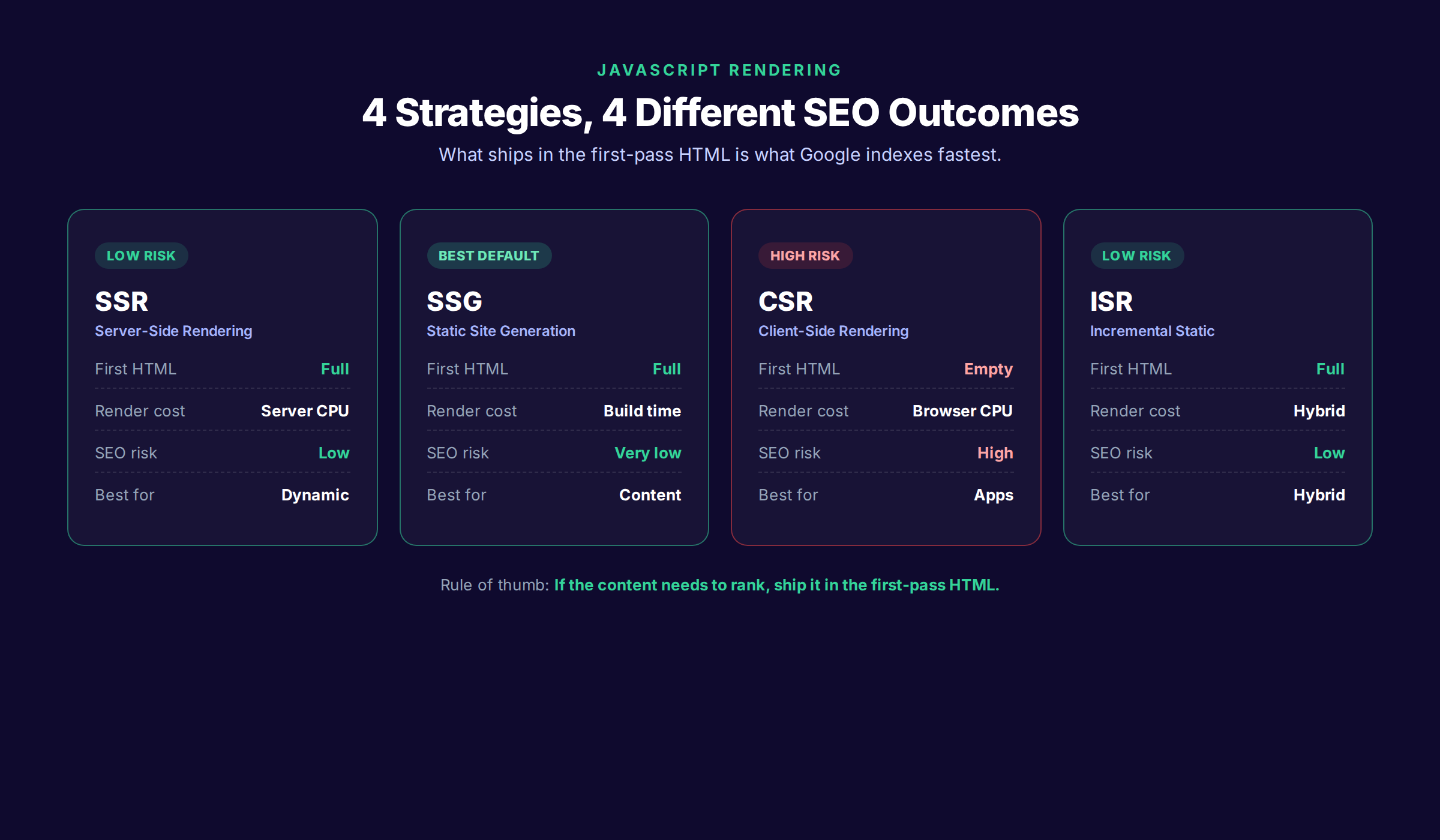
The 4 Rendering Strategies
There are 4 ways to serve content to a crawler. Each has different SEO implications.
| Strategy | First-Pass HTML | Render Cost | SEO Risk |
|---|---|---|---|
| SSR (Server-Side Rendering) | Full content | Server CPU | Low |
| SSG (Static Site Generation) | Full content | Build time | Very low |
| CSR (Client-Side Rendering) | Empty shell | Browser CPU | High |
| ISR / On-demand SSG | Full content (after first hit) | Hybrid | Low |
Pure CSR is the most common SEO failure on modern stacks. A blank <div id="root"></div> in your HTML is invisible to anything except the second-pass renderer. Switch to SSR or SSG for any page that needs to rank.
Framework-Specific Notes
Each framework has a different default. The defaults matter.
- Next.js — Default is hybrid. Use
getStaticPropsfor SSG,getServerSidePropsfor SSR, or React Server Components in the App Router. Avoid client-side data fetching for above-the-fold content. - Astro — Default is SSG. Component islands rehydrate on the client without affecting the static HTML. Astro is the lowest-risk choice for content sites.
- Nuxt — Default is hybrid. Use
nuxt generatefor SSG or the server runtime for SSR. Configurenitro.prerenderfor high-traffic routes. - SvelteKit — Default is SSR with adapter-static for SSG. Use
export const prerender = truefor static pages. - Remix — Always SSR by default. Loaders run on the server and ship rendered HTML.
If you are choosing a stack today and SEO matters, Astro and Next.js with the App Router are the strongest defaults. Both ship full HTML and let you opt into interactivity per component.
Testing JavaScript SEO
You can verify what Google sees in 4 ways.
- View source in the browser. If the content is there, Google sees it on the first pass.
- Disable JavaScript in Chrome DevTools and reload. Whatever is visible is what Google sees without rendering.
- Use Google’s URL Inspection tool in Search Console. Click “View tested page” to see the rendered HTML Google actually used.
- Use the Rich Results Test to see the rendered DOM and any structured data Google extracted.
Our JavaScript SEO guide covers the testing workflow in depth, including common framework-specific gotchas.
Layer 4: Site Speed and Core Web Vitals
Google measures real-user page experience through 3 metrics: Largest Contentful Paint (LCP), Interaction to Next Paint (INP), and Cumulative Layout Shift (CLS). The set is called Core Web Vitals and it is a confirmed ranking signal.
The 2026 Thresholds
| Metric | Good | Needs Improvement | Poor |
|---|---|---|---|
| LCP | Under 2.5s | 2.5 – 4.0s | Over 4.0s |
| INP | Under 200ms | 200 – 500ms | Over 500ms |
| CLS | Under 0.1 | 0.1 – 0.25 | Over 0.25 |
A page passes Core Web Vitals only when all 3 metrics hit “good” for 75% of real user sessions over a rolling 28-day window. Two out of three is a failure.
The Fixes That Move The Needle
Most performance audits surface 50+ suggestions. The list below is the 90% rule. Fix these 8 things and your scores will be in the green range.
- Compress images and serve modern formats. Convert JPGs and PNGs to AVIF or WebP. Set explicit
widthandheightattributes. Use theloading="lazy"attribute on below-the-fold images. - Preload the LCP image. Add
<link rel="preload" as="image" href="/hero.webp" fetchpriority="high">for the hero image on landing pages. - Defer non-critical JavaScript. Use
deferorasyncon script tags. Move analytics and tag managers to load after the user interaction. - Inline critical CSS. Ship the above-the-fold CSS in the HTML head. Lazy-load the rest.
- Cache aggressively. Set far-future cache headers on static assets. Use a CDN for edge delivery.
- Eliminate render-blocking resources. Audit your
<head>for synchronous third-party scripts. Each one delays paint. - Reserve space for dynamic content. Use
aspect-ratioCSS or explicit dimensions to prevent CLS from images and embeds. - Optimize Time to First Byte. Move expensive computation off the request path. Cache server responses where possible.
Our Core Web Vitals guide walks through each fix with code examples. For ongoing measurement, use PageSpeed Insights which shows both field data and lab data side by side.
Field Data vs Lab Data
Field data is real-user measurement from the Chrome User Experience Report (CrUX). Lab data is synthetic measurement from your browser. Google ranks on field data. Your laptop tests show lab data.
The gap between the two is usually 50% or more. A 2-second LCP on your machine is often a 4-second LCP on a mid-range Android phone on 4G. Always check CrUX data before celebrating a green Lighthouse score.
Layer 5: Structured Data and Schema
Structured data is JSON-LD or microdata embedded in your HTML that tells search engines what the content is. It does not directly improve rankings, but it controls how your page appears in search results. Rich snippets, sitelinks, FAQ accordions, breadcrumbs, and product cards all come from structured data.
The Schema Types That Matter
Different page types need different schema. The high-value ones are listed below.
| Page Type | Schema Type | What It Triggers |
|---|---|---|
| Article / Blog post | Article or BlogPosting | Headline, author, date in SERP |
| Product | Product + Offer + Review | Product cards with price and ratings |
| Local business | LocalBusiness | Knowledge panel, map pack |
| FAQ page | FAQPage | Expandable FAQ in SERP |
| How-to | HowTo | Step-by-step in SERP |
| Recipe | Recipe | Recipe cards with ratings |
| Software / SaaS | SoftwareApplication | Star ratings, price |
| Video | VideoObject | Video thumbnail in SERP |
| Event | Event | Event details with date and venue |
How to Implement It
Use JSON-LD in the <head> of your HTML. Google prefers JSON-LD over microdata or RDFa. Here is a minimal Article example.
<script type="application/ld+json">
{
  "@context": "https://schema.org",
  "@type": "Article",
  "headline": "SEO for Developers: The 2026 Technical Guide",
  "author": {
    "@type": "Organization",
    "name": "Stacc"
  },
  "datePublished": "2026-05-21",
  "image": "https://thestacc.com/blogs-preview-images/seo-for-developers.png"
}
</script>
Test every schema implementation in the Rich Results Test. Invalid schema does not break the page, but it does fail silently and you lose the rich result. Our structured data guide covers the full property reference for each type.
Layer 6: URL Structure, Headers, and Semantic HTML
The last layer is the on-page mechanics. URLs, heading hierarchy, semantic HTML elements, and internal linking. These are not as dramatic as crawlability or rendering, but they compound over time.
URL Structure
Good URLs are short, descriptive, lowercase, and hyphen-separated. They should describe the content, not the implementation.
| Good | Bad |
|---|---|
/blog/seo-for-developers | /blog/post?id=12847 |
/products/red-widget | /products/3920-Widget-Red-V2-Final |
/about | /about-us.html |
/services/web-design | /services/category-2/subcategory-7/web-design |
Keep URLs flat. Avoid deep nesting. Match the URL slug to the page H1 where reasonable. Never put session IDs, tracking parameters, or random hashes in canonical URLs.
Heading Hierarchy
Headings tell search engines and screen readers what the page structure is. The rules are simple.
- One
<h1>per page. The H1 should match the user’s intent and include the primary keyword. <h2>for major sections.<h3>for subsections of an H2.<h4>for subsections of an H3.- Never skip levels. An H4 inside an H2 is a structural error.
- Do not use headings for styling. If you want big text that is not a heading, use CSS.
The accessibility validators that test for heading order will also catch the SEO issues. Run axe DevTools or Lighthouse Accessibility audit on every page.
Semantic HTML
Use the right HTML element for the job. <nav> for navigation. <main> for the primary content. <article> for self-contained pieces. <aside> for sidebars. <footer> for the footer.
Search engines use semantic elements to understand which part of the page is the main content. Generic <div> soup forces them to guess. Guessing means missed context, missed primary content extraction, and lower confidence scores in the indexer.
Internal Linking
Internal links are the routing graph search engines use to discover and prioritize pages. The rules are short.
- Every important page should be reachable in 3 clicks from the homepage.
- Use descriptive anchor text. “Click here” tells Google nothing. “2026 technical SEO checklist” tells Google a lot.
- Link from high-traffic pages to pages you want to rank.
- Avoid orphan pages. Every URL in your sitemap should have at least 1 internal link pointing at it.
The 12 Developer SEO Mistakes That Kill Rankings
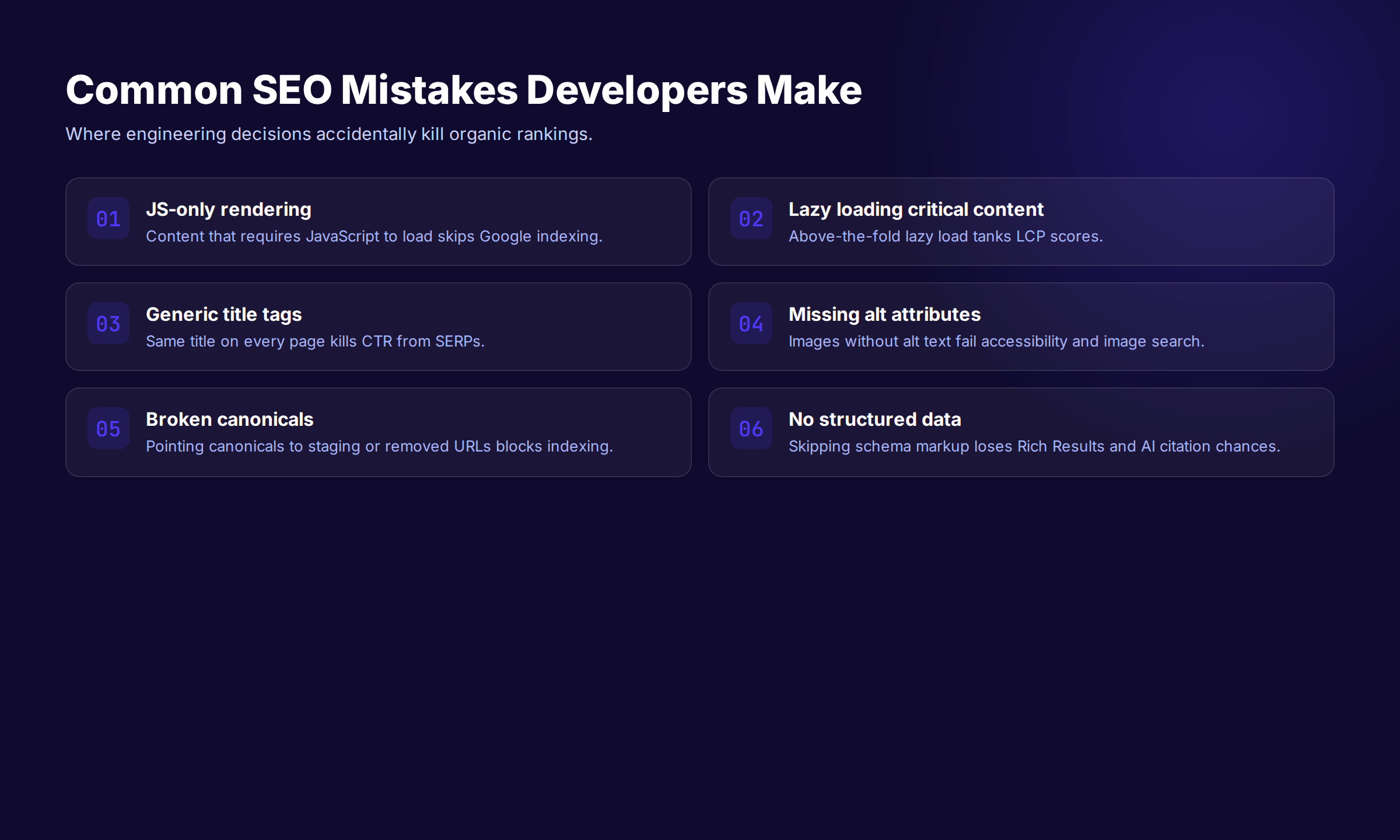
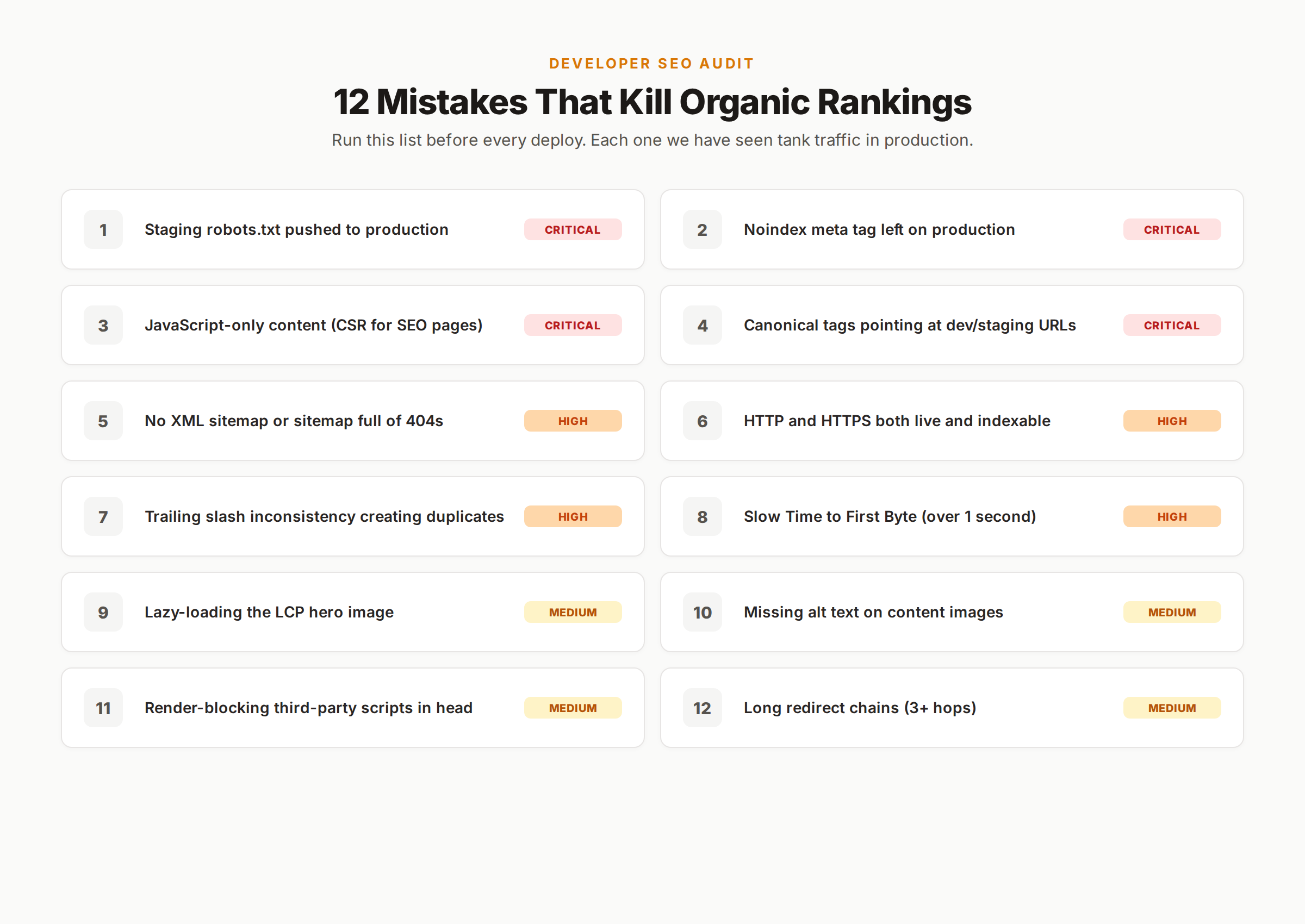
After auditing hundreds of sites, the same mistakes appear over and over. The list below is the 12 that cost the most traffic. Avoid these and you will outperform 80% of the developer-built sites we see.
- Staging robots.txt pushed to production.
Disallow: /on the live domain blocks the entire site. - Noindex meta tag left on production. Often a templating default in CMS themes.
- JavaScript-only content. Critical content hidden behind a client-side render that Google may never reach.
- Canonical tags pointing at staging or dev URLs. Cancels the indexation signal entirely.
- No XML sitemap. Or a sitemap that lists 404s and redirects instead of canonical URLs.
- HTTP and HTTPS both live. Splits ranking signal across two domains and creates duplicate content.
- Trailing slash inconsistency.
/pageand/page/indexed separately as different URLs. - Slow Time to First Byte. Server takes 2+ seconds to respond. Kills both ranking and conversion.
- Lazy-loading the LCP image. Defers the largest visible element and tanks LCP.
- Missing alt text. Images become invisible in Google Image Search and accessibility audits fail.
- Render-blocking third-party scripts in the head. Live chat, analytics, and tag managers loaded synchronously above the fold.
- Redirect chains. Page A redirects to B redirects to C redirects to D. Google drops the chain after the third hop.
Run a technical SEO checklist audit before every deploy and you will catch most of these before they hit production.
The Pre-Deploy SEO Checklist
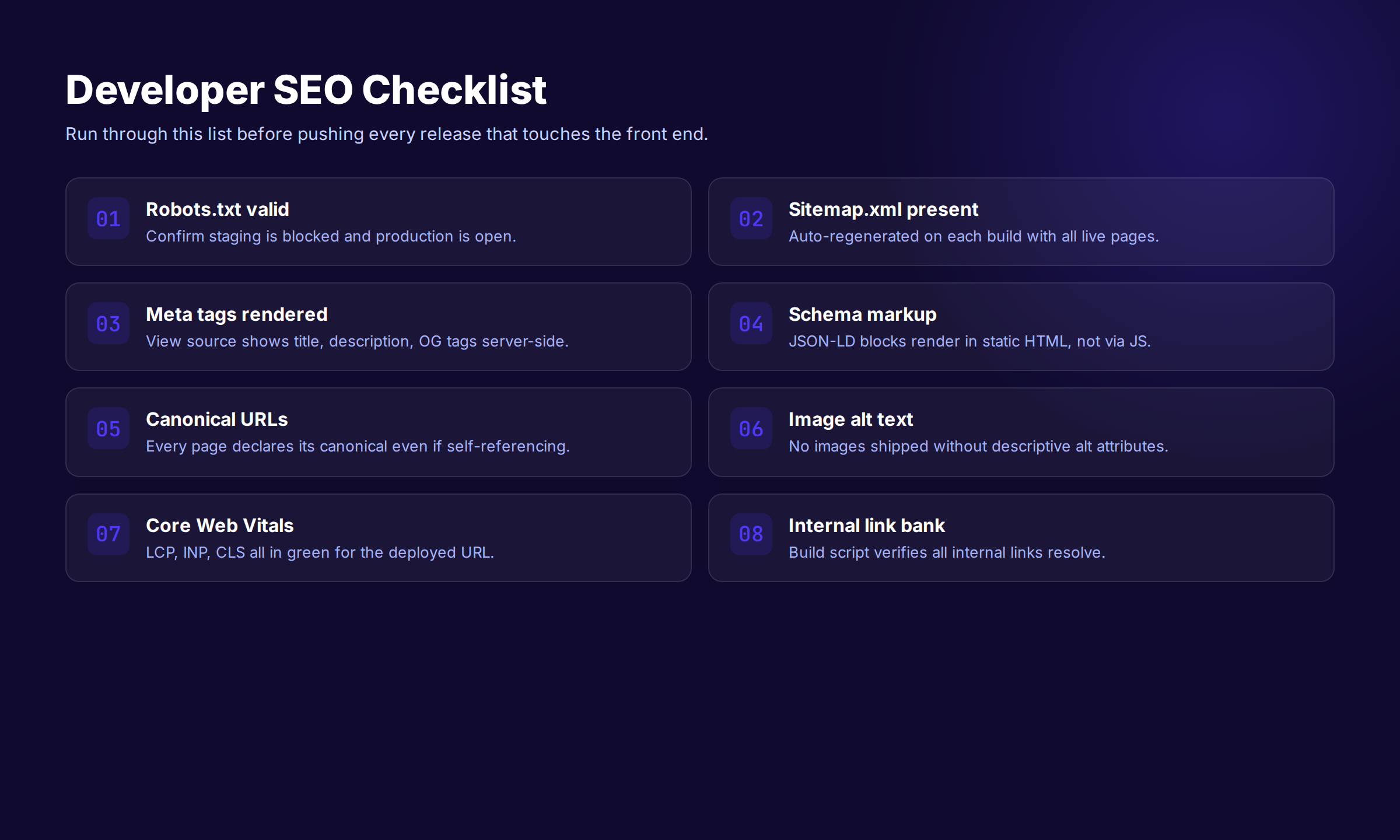
This is the exact checklist we run on every site before it goes live. It is shorter than most SEO checklists because it focuses on the items that genuinely break rankings. The cosmetic stuff can wait.
Code Review
-
robots.txtallows all production URLs - No
noindexmeta tag on production pages - Canonical tags point at production URLs with correct protocol and trailing slash
- XML sitemap generates correctly and is submitted to Search Console
- All redirects use 301 (not 302) for permanent moves
- HTTPS is forced via 301 from HTTP
- Either WWW or non-WWW is forced via 301 from the other
Rendering
- Critical above-the-fold content appears in raw HTML (view source)
- Page renders correctly with JavaScript disabled
- LCP element loads with
fetchpriority="high"or is preloaded - No render-blocking scripts in
<head> - Mobile viewport meta tag is set
Metadata
- Every page has a unique
<title>tag under 60 characters - Every page has a unique meta description under 155 characters
- Every page has Open Graph tags (
og:title,og:description,og:image) - Every image has descriptive
alttext - Structured data is present and validates in Rich Results Test
Performance
- PageSpeed Insights shows green for LCP, INP, CLS on mobile
- Time to First Byte under 600 ms on a sample of pages
- All static assets cached with far-future expiry
- Images served in AVIF or WebP with fallback
Post-Deploy
- Run URL Inspection in Search Console on 5 sample URLs
- Check Coverage report 48 hours after deploy
- Monitor Search Console for new errors over the next week
- Compare organic traffic 30 days post-deploy to baseline
The Tools That Actually Matter
You do not need 20 SEO tools to do developer SEO well. The 6 below cover 95% of what you need.
| Tool | What It Does | Cost |
|---|---|---|
| Google Search Console | Index status, errors, queries | Free |
| PageSpeed Insights | Core Web Vitals, performance audit | Free |
| Rich Results Test | Validate structured data | Free |
| URL Inspection | See exactly what Google rendered | Free |
| Screaming Frog | Site-wide crawl, technical audit | Free up to 500 URLs |
| Ahrefs or Semrush | Backlinks, keywords, competitor data | $99 – $449/mo |
Search Console and PageSpeed Insights are free and non-negotiable. Every site needs both connected before launch. Screaming Frog is the best technical crawler under $200. Ahrefs or Semrush is optional for developer work, mostly useful for content and keyword decisions.
Framework-Specific Gotchas
Each modern framework has at least one default that quietly breaks SEO. The list below is what we have hit in production audits.
Next.js
- The default
<Image>component lazy-loads everything. Passpriorityto the LCP image. - Client Components in the App Router do not ship rendered HTML for dynamic content. Move SEO-critical content to Server Components.
next/routerdoes not trigger a full HTML reload. Make sure metadata updates on route change.
Astro
- Component islands rehydrate on the client but the initial HTML is static. Astro is the safest default for content sites.
- The
<Image>component requires explicitwidthandheightor it skips optimization. - The
@astrojs/sitemapplugin needs thesiteconfig inastro.config.mjsset to the production domain.
Nuxt
- The
useFetchcomposable runs on both server and client by default. For SEO-critical data, force server-only with theserver: trueoption. - Nuxt 3 SSR ships JSON state in the HTML. The payload can balloon and slow LCP. Audit the size of
__NUXT__state. - The
nitro.prerenderconfig controls which routes are statically generated. Default is none.
SvelteKit
- Use
export const prerender = truefor static pages. Without it, SvelteKit defaults to SSR which is slower at the edge. - The
+page.server.tsload function runs on the server only. Keep SEO data fetching there. - The default error page returns 200 even for not-found content. Set the status code explicitly.
Remix
- Loaders run on the server and ship rendered HTML by default. SEO is mostly handled correctly out of the box.
- Use the
metaexport on each route to set unique title and description tags. - The
<Links>component manages preloading. Add canonical and hreflang tags through themetaexport.
Frequently Asked Questions
Is SEO dead or evolving in 2026?
SEO is not dead. It is evolving toward a model where AI Overviews, AI Mode, and traditional blue links share the same SERP. The work is the same — get crawled, indexed, rendered, and cited — but the citation surface has expanded. Pages that pass Core Web Vitals and ship server-rendered HTML get cited by AI systems more often than pages that do not. Our AI search coverage tracks the shift.
Do developers do SEO?
Developers handle the technical SEO layer. That is 60 to 80% of what determines whether a page can rank at all. Marketers handle content, keyword research, and on-page copy. The split is roughly 80/20 on a new build and flips to 20/80 in maintenance mode. Most ranking failures we audit are technical, which means they are in the developer’s lane.
What is the 80/20 rule for SEO?
The 80/20 rule for developer SEO is that 6 things drive 80% of the technical impact: a working sitemap, correct canonical tags, fast Time to First Byte, passing Core Web Vitals, server-rendered HTML, and clean redirect logic. Get those 6 right and you outperform most sites. The other 20% — structured data refinements, hreflang clusters, fine-tuned crawl budget — adds incremental gains.
Is SEO being phased out?
No. Every major shift in search has been framed as the end of SEO. Mobile, voice, zero-click results, and now AI Overviews have all been called the end of SEO. None of them eliminated the underlying work. They reshaped which signals matter. The constant is that pages have to be discoverable, indexable, and trustworthy. The mechanics live in your code.
Is SEO replaced by AI?
AI is changing how search results look, not what makes a page rankable. AI Overviews and chat-based search still cite the same pages that rank in traditional search. The pages they cite tend to be fast, structured, and authoritative. If your code passes the technical SEO checklist, your pages are eligible for AI citations. If it does not, you miss both the blue links and the AI surface.
Should developers use AI to write SEO content?
For the technical work in this guide, no. AI is not a substitute for canonical tags, Core Web Vitals, or sitemap validation. For the content layer — blog posts, product descriptions, FAQ pages — AI helps if the workflow is right. We use AI to draft and humans to verify. That is the model behind Stacc’s $99/month service — 30 articles per month, written and published automatically with editorial quality control.
How long until SEO changes show in Google Search Console?
Crawl and index changes show within 24 to 72 hours for high-priority pages. Ranking changes take longer — 2 to 8 weeks is normal for new content, 1 to 3 weeks for technical fixes on existing pages. Core Web Vitals are measured on a rolling 28-day window, so improvements take at least 4 weeks to reflect in the field data Google ranks on.
The Bottom Line
Developer SEO is the technical foundation that decides whether your content has a chance to rank. The work is finite and well-documented. Get crawlability right. Get indexability right. Ship server-rendered HTML. Pass Core Web Vitals. Add structured data. Run a pre-deploy checklist. That is the entire game on the technical side.
The content layer is a separate problem. Most engineering teams either ignore content entirely or treat it as an afterthought between releases. Both approaches fail. The teams that win in organic search ship clean code and publish consistently — usually 20 to 30 articles per month on the topics their customers search for.
If you have the technical foundation handled and you want the content side automated, that is what we do. Stacc publishes 30 SEO articles per month for $99, written and shipped to your site without a content team. Same workflow we use on our own site.
Start for $1 → See your first 5 articles in 72 hours
Last updated May 2026. All pricing and statistics verified against public sources. This guide is reviewed quarterly.
Related Tools & Resources
Free SEO Tools:
Best Lists:

Written by
Siddharth GangalSiddharth is the founder of theStacc and Arka360, and a graduate of IIT Mandi. He spent years watching great businesses lose organic traffic to competitors who simply published more. So he built a system to fix that. He writes about SEO, content at scale, and the tactics that actually move rankings.
30 SEO blog articles published every month
Keyword-optimized, scheduled, and live on your site. Automatically.
30-day trial · Cancel anytime
theStacc
Stop writing SEO content manually
30 blog articles, 30 GBP posts, and social media content. Published every month. Automatically.
Try for free$1 for 3 days · Cancel anytime