
Build a Social Media Pipeline in 2 Hours/Week
Build an AI social media content pipeline in 2 hours per week. 7 stages, exact tools, and a Monday-morning schedule. Updated May 2026.
Most operators spend 8 to 12 hours per week on social media and still post inconsistently. They write a caption in the morning, scramble for a visual at lunch, then forget Thursday entirely. The output is sporadic. The fatigue is constant. The engagement is flat.
An AI social media content pipeline fixes the math. A focused 2-hour weekly session produces 7 to 12 platform-native posts, scheduled in advance, with measurement built in. Buffer’s 2026 consistency data shows that brands posting in 5 or more of 26 weeks see a 340% engagement lift over sporadic posters. The pipeline is what makes 26-out-of-26 achievable without burning out.
We have published 3,500+ blog posts and tens of thousands of social posts across 70+ industries. This guide is the exact 7-stage AI social media content pipeline we recommend to small teams and solo operators. It runs in 2 hours every Monday morning. It uses tools you already have. It produces real engagement instead of vanity output.
Here is what you will learn:
- What an AI social media content pipeline actually is (and what it is not)
- Why the 2-hour weekly cadence beats both daily and monthly batching
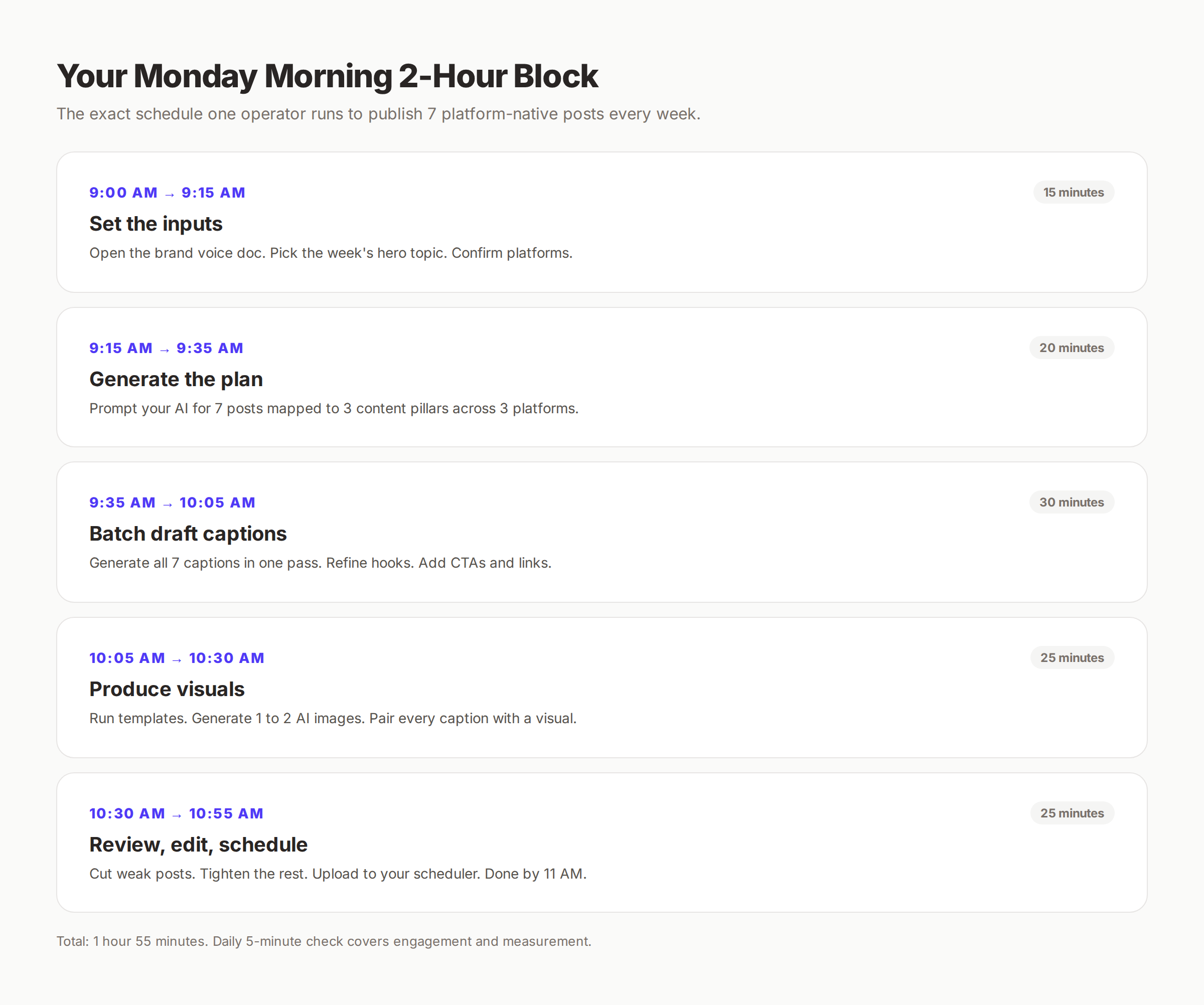
- The 7-stage workflow with exact time blocks for each stage
- The 6-tool stack that powers every stage on a $50 to $100 monthly budget
- The 6 mistakes that quietly destroy pipeline output in month one
- How to scale from one weekly session to 30 posts per month
What an AI Social Media Content Pipeline Actually Is
An AI social media content pipeline is a documented, repeatable sequence of stages that turns raw inputs (brand voice, topics, platforms) into finished, scheduled posts. The word “pipeline” matters. It is not a single tool. It is not a one-off AI prompt. It is a chain of stages where each stage hands off a specific output to the next.
The pipeline replaces three things at once: the planning meeting, the writing session, and the scrambled Monday-morning post. Instead of doing those tasks reactively across the week, the pipeline batches them into one focused session.
A working pipeline has 5 traits. Documented inputs (so anyone can run it). Defined stages (so output is predictable). AI at the labor-intensive steps (drafting, visuals, scheduling). A human checkpoint before publish (so brand voice survives). A measurement loop that feeds the next session.
What the Pipeline Replaces
| Old Workflow | Pipeline Workflow |
|---|---|
| Daily scramble for post ideas | Monday batch of 7 ideas mapped to pillars |
| Writing one caption per day | 30-minute batch draft of all captions |
| Hunting for a visual each post | 25-minute visual block using templates |
| Manual posting at peak times | 10-minute scheduler upload, runs all week |
| No measurement until “we should check” | 5-minute daily check, weekly insight loop |
| 8 to 12 hours per week, inconsistent output | 2 hours per week, consistent output |
The pipeline does not eliminate creative judgment. It moves judgment to the moments that need it (hook selection, brand fit, final edit) and removes it from the moments that do not (calendar wrangling, visual production, posting at 9 AM Tuesday).
Why the 2-Hour Weekly Cadence Works
The 2-hour weekly cadence sits at a specific productivity sweet spot. Daily posting fragments attention across 7 sessions per week. Monthly batching leaves content stale by week 3. Weekly batching hits both depth and freshness.
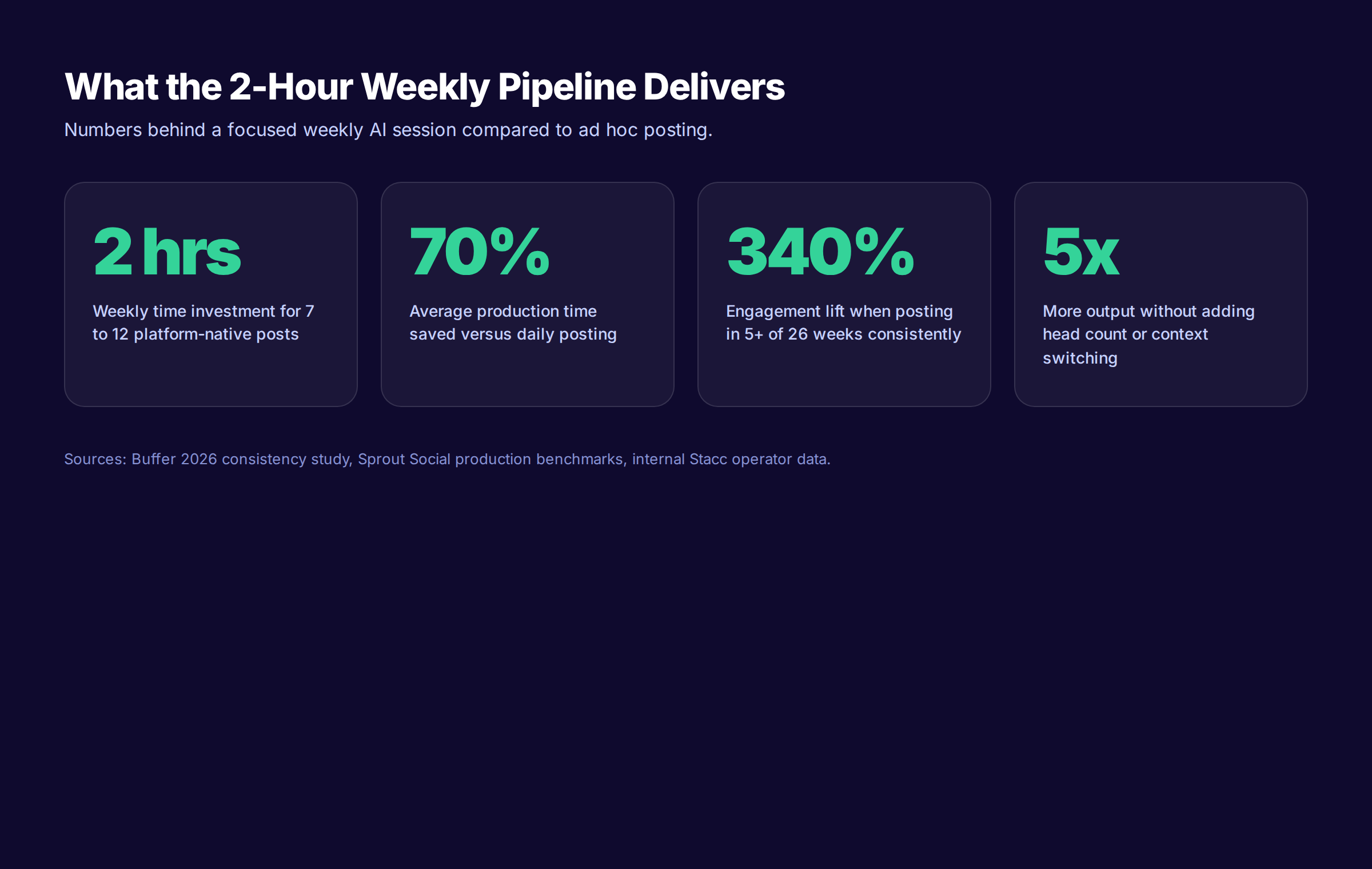
Research from social media operators backs this up. Most creators report saving 4 to 6 hours weekly through weekly batching, which adds up to 200+ hours annually. The savings come from eliminating context switching. Each switch between tasks costs about 20 minutes of focus-recovery time, according to UC Irvine research.
The Math Behind 2 Hours
A solo operator running this pipeline produces:
- 7 to 12 platform-native posts per week
- Across 3 platforms (rotate platforms by audience)
- With native visuals on every post
- Scheduled at platform-optimal times
- With a measurement loop feeding the next session
That is 30 to 50 posts per month on a 2-hour-per-week budget. The same volume from a freelancer costs $1,500 to $3,000 per month. From an agency, $3,000 to $7,500.
Why Not Monthly Batching
Monthly batching looks more efficient on paper. One 8-hour session per month replaces 4 weekly sessions. The problem is freshness. Anything tied to current events, recent posts, or last week’s engagement insights gets stale. By week 3 of a monthly batch, half the posts feel disconnected from what is happening in your audience.
The 2-hour weekly cadence keeps the content current without consuming the week. It is the same logic that makes weekly sprints work in software teams.
The 7-Stage AI Social Media Content Pipeline
The pipeline has 7 stages. Six of them run in one Monday morning block. The seventh runs as a 5-minute daily check. Every stage has a defined input, a defined output, and a defined time budget.
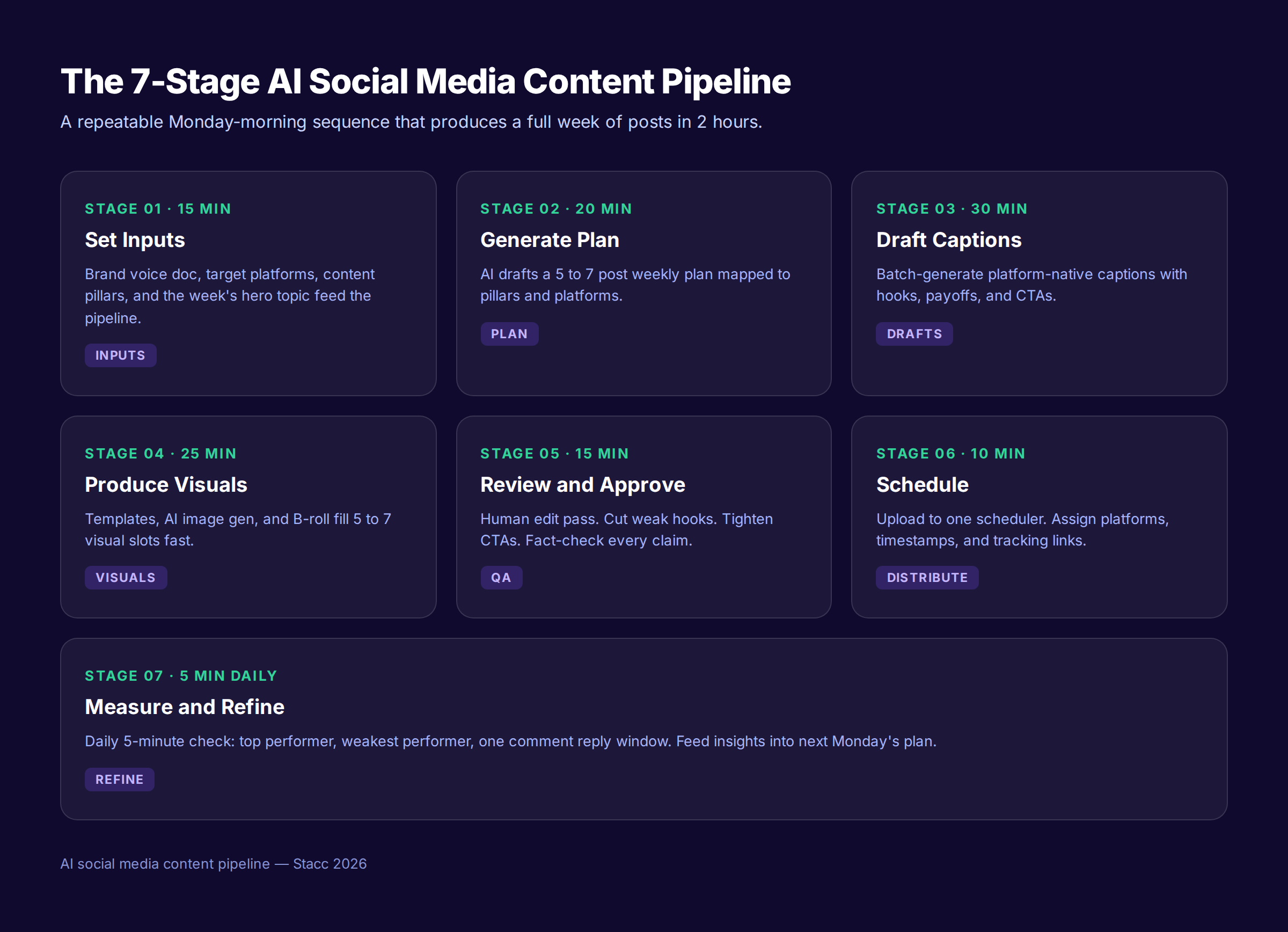
Read the full sequence before you start. The order matters. Skipping the inputs stage and jumping to drafting is the most common reason pipelines fail in month one. AI without inputs produces bland default output. Inputs are the moat.
The 7 Stages at a Glance
| Stage | Time | What You Do | What You Hand Off |
|---|---|---|---|
| 1. Set Inputs | 15 min | Confirm brand voice, platforms, pillars, hero topic | A planning brief |
| 2. Generate Plan | 20 min | Use AI to draft a 7-post weekly plan | A plan with 7 post stubs |
| 3. Batch Draft Captions | 30 min | Generate platform-native captions in bulk | 7 draft captions |
| 4. Produce Visuals | 25 min | Templates, AI images, or B-roll for each post | 7 visuals matched to captions |
| 5. Review and Approve | 15 min | Human pass: edit hooks, tighten CTAs, fact-check | 7 finished posts |
| 6. Schedule | 10 min | Upload to one scheduler, set platforms and times | A scheduled week |
| 7. Measure and Refine | 5 min daily | Note top performer, weakest performer, reply window | Insights for next Monday |
Total active time: 1 hour 55 minutes once per week, plus 35 minutes of daily 5-minute checks across the week. The system fits inside 2.5 hours total.
Stage 1: Set the Pipeline Inputs (15 Minutes)
The inputs stage is where the pipeline either compounds or collapses. AI cannot guess your brand voice, your audience, or what you posted last week. You have to feed it those inputs every Monday. The good news is you only build the inputs once. After that, you reuse and update.
The 4 Inputs You Need
1. Brand voice document. A 300 to 500 word doc that defines your tone (professional, casual, witty, blunt), vocabulary (words you use and words you avoid), and 3 example posts per platform. This is the single highest-impact document in the pipeline. Without it, AI defaults to corporate filler.
2. Target platforms. Pick 3 maximum. Most operators try to be on 6 platforms and fail at all of them. LinkedIn for B2B. Instagram for visual brands. X for thought leaders. TikTok for reach. Facebook for local. Pick 3.
3. Content pillars. Three to five themes that your audience expects from you. For a marketing consultant, pillars might be: SEO tactics, client wins, marketing news. Every post maps to a pillar.
4. The week’s hero topic. One theme drives all 7 posts. A blog post you published. A client story. A market shift. Build the week around it for consistency.
The 15-Minute Setup
| Minute | Task |
|---|---|
| 0 to 3 | Open brand voice doc. Skim for tone reminders. |
| 3 to 6 | Pull up content pillars. Confirm which 3 you will hit this week. |
| 6 to 10 | Choose the hero topic. Write it as a single sentence. |
| 10 to 15 | Review last week’s top and weakest posts from analytics. |
The output of Stage 1 is a 100-word planning brief. Brand voice link, 3 platforms, 3 pillars, 1 hero topic, 2 insights from last week. That brief is the input for Stage 2.
If you do not have a brand voice doc yet, build one first. Read our guide on creating a social media content calendar for a complementary planning system that pairs with this pipeline.
Stage 2: Generate the Content Plan with AI (20 Minutes)
Stage 2 turns the planning brief into a 7-post weekly plan. The AI does the heavy lifting. You curate.
The mistake most operators make in Stage 2 is generic prompting. “Give me 7 social media post ideas” produces 7 bland posts. The pipeline prompt is specific, structured, and grounded in your inputs.
The Stage 2 Prompt Template
Paste this into ChatGPT, Claude, or any capable AI:
You are my social media content planner.

Inputs:
- Brand voice: [paste 200 words from your brand voice doc]
- Target audience: [1 sentence persona]
- Platforms: [LinkedIn, Instagram, X]
- Content pillars: [Pillar 1, Pillar 2, Pillar 3]
- Hero topic for the week: [your sentence]
- Last week's top performer: [post + why]
- Last week's weakest: [post + why]

Generate 7 post stubs for the coming week.
Each stub includes:
- Platform
- Pillar
- Hook line (max 12 words)
- Payoff promise (what the reader learns or feels)
- Suggested format (text, carousel, single image, short video)
- One question or CTA at the end

Distribute the 7 posts as: 3 LinkedIn, 2 Instagram, 2 X.
What the AI Returns
You get 7 post stubs. Each stub is roughly 60 words. The AI has done the strategic mapping. You review for fit.
The 20-Minute Block
| Minute | Task |
|---|---|
| 0 to 5 | Paste the prompt with your inputs into the AI. |
| 5 to 10 | Read the 7 stubs. Mark the 5 strongest. |
| 10 to 15 | Replace the 2 weakest with new prompts or angles. |
| 15 to 20 | Lock the final 7 stubs into a document or spreadsheet. |
The output is a 7-row table: platform, pillar, hook, payoff, format, CTA. That table is the input for Stage 3.
This is where the pipeline differs from random AI prompting. You are not asking AI to write social media for you. You are asking it to plan a week of content within your strategic boundaries. The judgment stays with you.
Stage 3: Batch Draft Captions with AI (30 Minutes)
Stage 3 expands the 7 stubs into 7 full captions. This is the highest-volume stage. It is also the stage where AI delivers the most output gain.
The Batch Prompt Pattern
Do not draft one caption at a time. Batch. The prompt structure that works:
Expand the following 7 social post stubs into full captions.

Brand voice rules:
- [3 specific tone rules from your doc]
- [Words to avoid]
- [Words to favor]

For each post:
- Platform: [LinkedIn / Instagram / X]
- Length: LinkedIn 800-1200 chars, IG 1500-2000 chars, X 250 chars per tweet
- Open with the hook line provided
- Include 1 specific stat, claim, or example
- End with the CTA provided
- Match platform conventions (paragraph breaks for LinkedIn, line breaks for IG, threads for X)

Stubs:
1. [paste stub 1]
2. [paste stub 2]
... etc.
What Comes Back
7 platform-native captions in 1 to 2 minutes of AI runtime. They are 70% there. Your job in the remaining 28 minutes is the 30% that makes them yours.
The 30-Minute Block
| Minute | Task |
|---|---|
| 0 to 5 | Run the batch prompt. Get 7 captions back. |
| 5 to 20 | Read each caption. Edit hooks. Cut filler. Add specifics. |
| 20 to 25 | Add personal details, internal links, and brand-specific phrases. |
| 25 to 30 | Final read for voice consistency across all 7. |
What “Editing” Means in Stage 3
- Rewrite the hook. AI defaults to safe openers. Make yours specific or counterintuitive.
- Replace generic claims with specifics. “Many companies struggle” becomes “73% of SaaS companies miss their content goals.”
- Add one personal detail. A client name. A failed test. A weekly observation.
- Cut every banned word. AI loves filler like “synergy” and “ecosystem.” Strip them out.
- Test the CTA. Generic CTAs (“learn more”) kill conversion. Specific CTAs (“read the breakdown”) drive clicks.
The output of Stage 3 is 7 finished caption drafts ready for visuals. Each one is platform-native, voice-consistent, and specific.
For deeper technique on AI-assisted writing, read our guide on how to humanize AI content and our AI prompts for SEO articles.
Stage 4: Produce or Source Visuals (25 Minutes)
Visual platforms reward visuals. A LinkedIn post without an image gets 40% less reach than one with. An Instagram post without a strong visual does not exist in the algorithm. Stage 4 pairs every caption with one visual asset.
Three Visual Production Paths
Pick one path per post based on the format. Do not invent new paths every week.
Path A: Templates (fastest). Open Canva. Use a brand template. Swap text. Export. Each post takes 2 minutes. Best for quote cards, stat cards, and listicles.
Path B: AI image generation. Use Midjourney, Ideogram, or DALL-E for original visuals. Each generation takes 30 seconds plus refinement. Best for conceptual posts where stock photos feel generic.
Path C: B-roll and screenshots. Real photos from your business. Screenshots of work product. Behind-the-scenes shots. Best for credibility posts and process content.
The 25-Minute Block
| Minute | Task |
|---|---|
| 0 to 5 | Map each of 7 posts to a visual path (template, AI, B-roll). |
| 5 to 20 | Produce all 7 visuals in parallel. Templates first, AI second. |
| 20 to 25 | Export. Name files by post number. Save to a shared folder. |
What to Avoid in Stage 4
- Stock photos that scream “stock photo.” Diverse business team smiling at a laptop.
- AI-generated humans with 7 fingers or melted faces.
- Identical templates for every post (visual fatigue sets in by week 3).
- Visuals that do not match the caption’s emotional tone.
The output of Stage 4 is a folder of 7 visuals, named to match captions. Carry them into Stage 5.
If your business depends on local visibility, pair this with our guide on free social media tools for local business.
Stage 5: Review, Edit, and Approve (15 Minutes)
Stage 5 is the human-in-the-loop checkpoint. AI generated. You ship. This is the stage that separates pipelines that build trust from pipelines that erode it.
The 15-Minute Review Block
| Minute | Task |
|---|---|
| 0 to 3 | Read each caption out loud. Catch awkward phrasing. |
| 3 to 8 | Verify every stat or claim against a source. |
| 8 to 12 | Test each hook against the “would I stop scrolling” bar. |
| 12 to 15 | Confirm visual matches caption tone for all 7 posts. |
The 5 Things You Are Checking
- Voice consistency. Does this sound like your brand or like generic AI?
- Factual accuracy. Every number, every claim, every name verified.
- Hook strength. Would a stranger stop scrolling for this opener?
- CTA fit. Does the CTA match the post’s intent and platform?
- Visual pairing. Does the image add meaning or just fill space?
What to Cut in Stage 5
- Hooks that sound like every other LinkedIn post (“My take on this trend…”)
- Statistics without citations (if you cannot find the source, cut the stat)
- CTAs that ask for too much (“Comment, share, and follow”)
- Visuals that compete with the caption instead of reinforcing it
- Posts that do not belong to one of your 3 content pillars
The output of Stage 5 is 5 to 7 finished posts (you may cut 1 or 2 in review). They are ready to schedule.
This stage maps to the same human-edit principle behind our guide on using AI to write blog posts. The speed is in the batch. The trust is in the edit.
Stage 6: Schedule Across Platforms (10 Minutes)
Stage 6 ends the active session. By minute 10, you have a week of social media scheduled and you can close the laptop. The trick is using one scheduler, not three.
Tool Choice for Stage 6
| Scheduler | Best For | Starting Price |
|---|---|---|
| Buffer | Solo operators, simple UI | $6/mo |
| Later | Visual planning, Instagram first | $25/mo |
| Metricool | Multi-platform analytics included | $22/mo |
| Hootsuite | Larger teams, approvals | $99/mo |
| Native scheduling | Free, no third-party tool | $0 |
For most operators on this pipeline, Buffer or Metricool are the right call. Native scheduling works but fragments the measurement step.
The 10-Minute Block
| Minute | Task |
|---|---|
| 0 to 3 | Upload all 7 posts to the scheduler (caption + visual). |
| 3 to 6 | Assign each post to its target platform. |
| 6 to 8 | Set times using platform-optimal windows (see below). |
| 8 to 10 | Add UTM tags to every link for analytics tracking. |
Platform-Optimal Posting Times
Use these as defaults. Refine after 30 days of your own data.
- LinkedIn: Tuesday through Thursday, 8 AM to 10 AM in your audience’s time zone
- Instagram: Monday through Friday, 11 AM to 1 PM, or 7 PM to 9 PM
- X: Weekdays 9 AM to 12 PM, with a second window 4 PM to 6 PM
- Facebook: Tuesday through Friday, 9 AM to 12 PM
- TikTok: Tuesday and Thursday evenings, 6 PM to 10 PM
The output of Stage 6 is a fully scheduled week. The active part of the pipeline is done.
For the deeper logic on platform-specific posting, read our guides on LinkedIn for local business and TikTok for local business.
Publishing 30 posts per month across 3 platforms — automatically? That is the Stacc Social Media module. $49/mo. We write, design, and publish for you. Start for $1 →
Stage 7: Measure and Refine (5 Minutes Daily)
Stage 7 is the only stage that does not happen on Monday morning. It runs as a 5-minute daily check across the week. The output feeds Monday’s next session.
The Daily 5-Minute Routine
| Minute | Task |
|---|---|
| 0 to 1 | Open the scheduler or platform analytics. |
| 1 to 2 | Note today’s top-performing post and weakest. |
| 2 to 4 | Reply to comments and DMs on yesterday’s posts. |
| 4 to 5 | Log one insight in a running doc. |
What to Track Weekly
Open the analytics every Friday for 10 minutes. Track:
| Metric | Why It Matters |
|---|---|
| Impressions per post | Shows reach. Compare to last week. |
| Engagement rate | Engagement divided by reach. Above 3% is strong. |
| Click-through rate | Did the CTA work? Below 1% means rewrite CTAs. |
| Top hook by engagement | Which opener stopped the scroll? Replicate it. |
| Weakest post | What killed it? Hook, visual, timing, or pillar fit? |
The Refinement Loop
After 4 weeks of data, you will see patterns. A specific hook style outperforms others. A platform produces 80% of your engagement. A pillar drives all the clicks. Feed those patterns back into Stage 1 next Monday.
Over 90 days, the pipeline becomes more accurate than guesswork. You stop publishing weak posts because the data tells you what works.
For deeper measurement frameworks, read our guide on how to measure content marketing ROI and our content marketing statistics for benchmarks.
Tools That Power Each Stage
The right tool stack is the one you can actually use. We have watched operators stack 9 tools, lose 30 minutes per session to tool switching, then abandon the pipeline. Limit yourself to 6 tools maximum. One per stage.
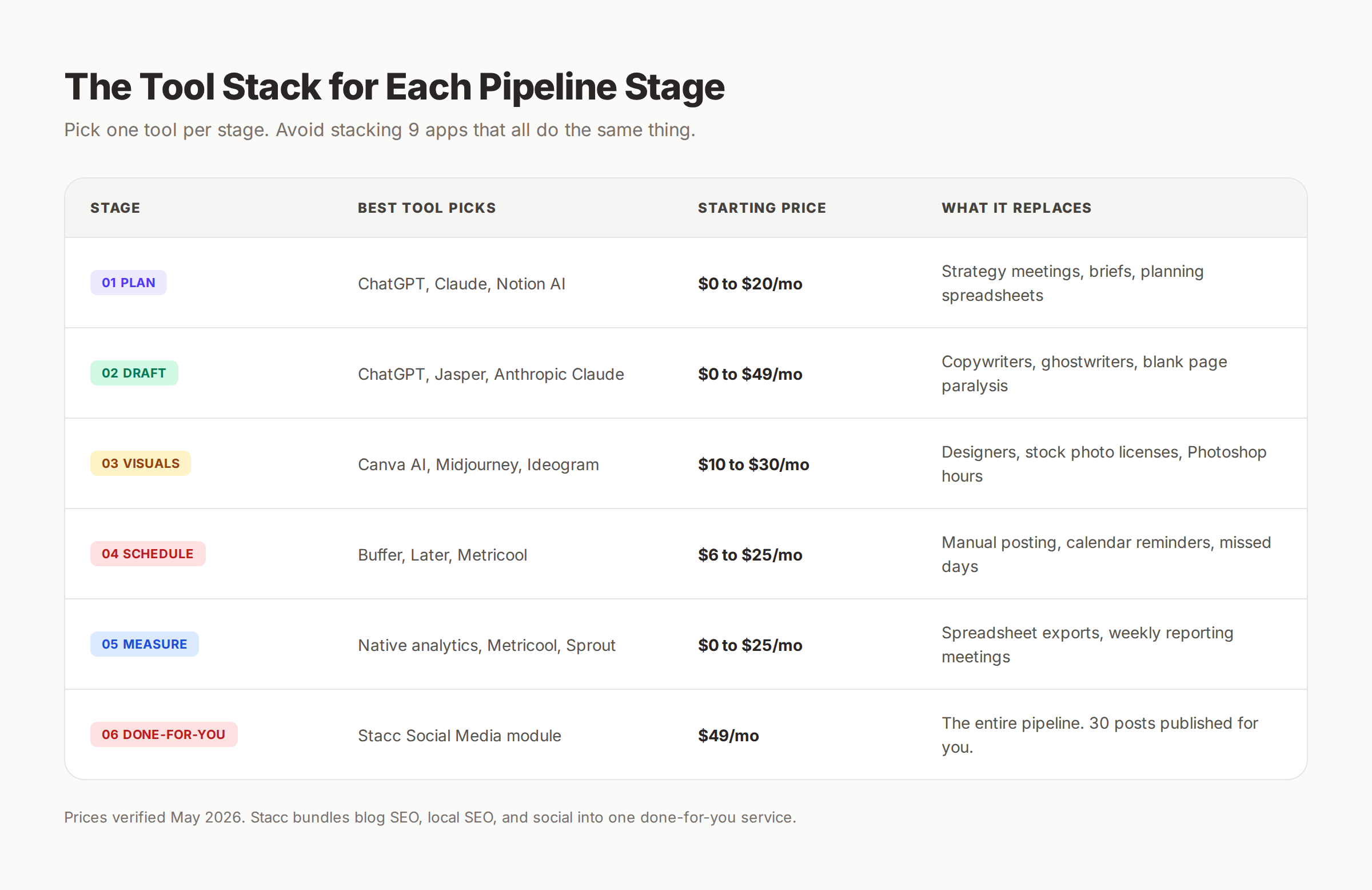
The Recommended Stack ($50 to $100 Monthly)
Stage 1 (Inputs): Notion or Google Docs. Free. Your brand voice doc lives here.
Stage 2 (Plan): ChatGPT Plus or Claude Pro. $20 per month. Use one. Switching between them costs more time than it saves.
Stage 3 (Draft): Same AI as Stage 2. No extra cost. Same context window. Same prompt patterns.
Stage 4 (Visuals): Canva Pro or Midjourney. $10 to $30 per month. Templates handle 5 of 7 visuals. AI image gen handles the remaining 2.
Stage 5 (Review): Your own eyes. Free. No tool replaces this.
Stage 6 (Schedule): Buffer or Metricool. $6 to $25 per month. Pick one. Migrate everything to it.
Stage 7 (Measure): Native analytics + a spreadsheet. Free. Or use Metricool’s built-in reporting.
Total Monthly Tool Cost
| Stack | Monthly Cost | Output Capacity |
|---|---|---|
| Minimum viable | $30 | 7 posts/week (single user) |
| Recommended | $55 | 12 posts/week (3 platforms) |
| Power user | $99 | 20+ posts/week (5 platforms) |
| Done-for-you (Stacc) | $49 | 30 posts/month (3 platforms) |
When to Pick “Done-for-You” Instead
The pipeline takes 2 hours per week. That is 8 hours per month. If your time is worth $100 per hour, the pipeline costs you $800 per month in opportunity cost plus $55 in tools. The Stacc Social Media module runs the entire pipeline for $49 per month with 30 posts published across 3 platforms.
The pipeline is the right call if you have brand voice expertise you cannot delegate. The done-for-you path is the right call if you want the output without the operating overhead.
For a deeper comparison, read our breakdown on in-house vs. outsource content team and our list of social media automation tools.
Common Mistakes That Break the Pipeline
Every operator we have coached hit at least 3 of these mistakes in their first month. Catching them early is the difference between a pipeline that compounds and one that gets abandoned by week 4.
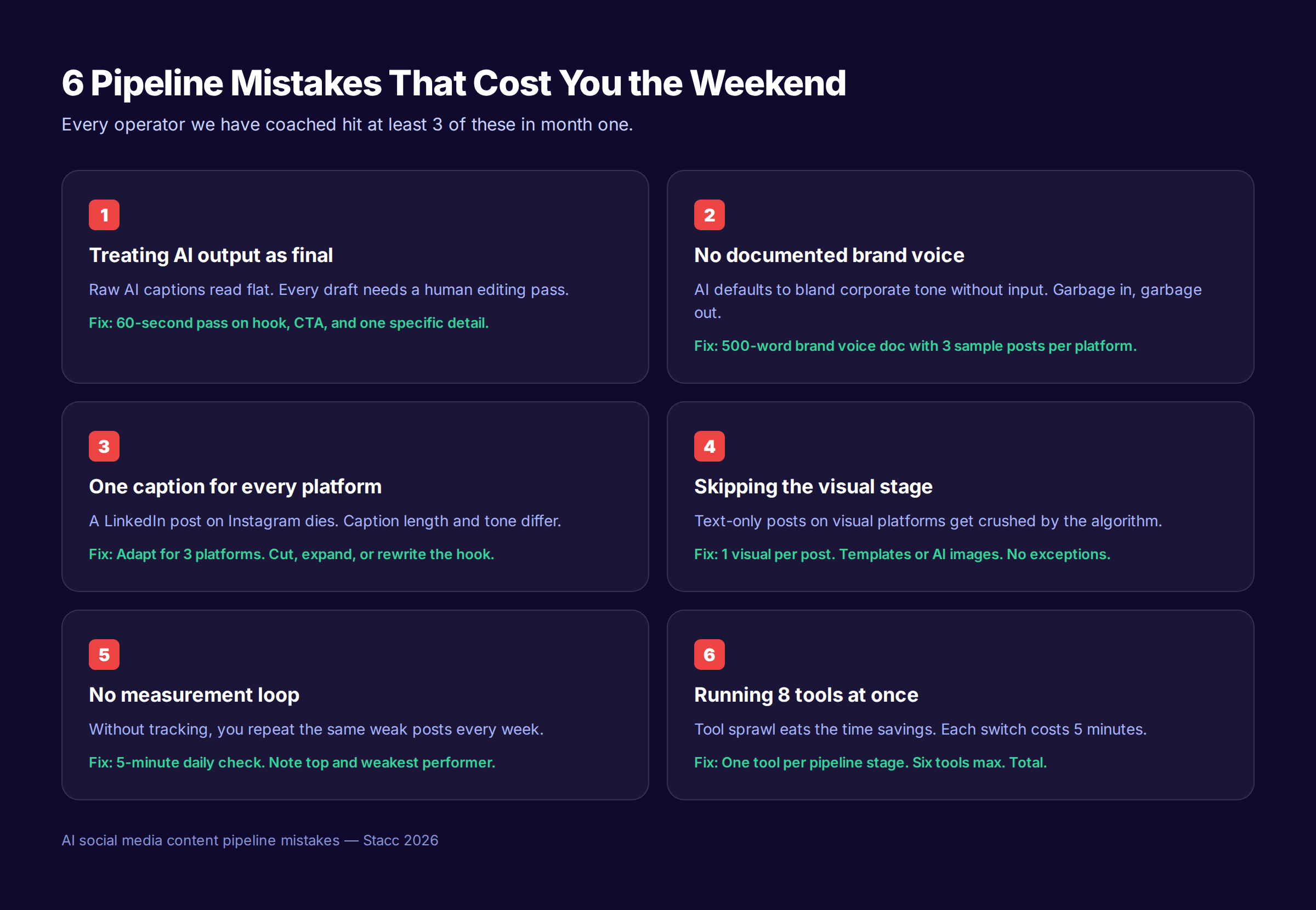
Mistake 1: Treating AI Output as Final
Raw AI captions read flat. They sound like every other AI-generated post on LinkedIn. The pipeline only works if Stage 5 is a real human edit, not a rubber-stamp review.
Fix: Allocate the full 15 minutes for Stage 5. Read every caption out loud. If it sounds like AI, rewrite the hook and one body line.
Mistake 2: No Documented Brand Voice
AI defaults to bland corporate tone without specific input. “Make it sound like our brand” is not a useful instruction. The AI does not know your brand.
Fix: Spend 90 minutes once to build a 500-word brand voice doc. Include 3 sample posts per platform. Reuse forever.
Mistake 3: One Caption Posted to Every Platform
A LinkedIn-length caption dies on Instagram. An X-length tweet looks underweight on LinkedIn. The pipeline only works when each post is platform-native.
Fix: Stage 3 generates separate captions per platform. Do not skip this. The 30 minutes is non-negotiable.
Mistake 4: Skipping the Visual Stage
Text-only posts on visual platforms get crushed by the algorithm. Instagram is the obvious case. LinkedIn, X, and Facebook all favor posts with images too.
Fix: Stage 4 produces one visual per post. Templates handle most of them. Do not publish a text-only post on a visual platform.
Mistake 5: No Measurement Loop
Without tracking, you repeat the same weak posts week after week. The pipeline runs, but the output does not improve.
Fix: Stage 7’s 5-minute daily check. Notes go in one doc. Patterns surface within 30 days.
Mistake 6: Tool Sprawl
Eight tools at once destroys the time savings. Each tool switch costs 5 minutes of context recovery. By the time you finish, the 2-hour session is a 4-hour session.
Fix: One tool per stage. Six total. Resist the urge to try every new AI tool that launches.
How to Scale the Pipeline Beyond 2 Hours
The pipeline produces 7 to 12 posts per week. If you need more, scale in two ways.
Path 1: Add a Second Session
A second 2-hour session mid-week doubles output to 14 to 24 posts. Run the second session for a different content pillar or a different platform. Best for brands building two distinct audiences.
Path 2: Extend the Hero Topic
Use the same hero topic across 4 weeks. Generate 28 posts in a month with the same brief. Each Monday is faster because the inputs barely change. Best for brands going deep on a campaign.
Path 3: Repurpose Blog Content
Pair the pipeline with a blog content repurposing flow. One blog post becomes 10 to 15 social posts. Read our guide on repurposing blog content for social media for the full system.
Path 4: Move to Done-For-You
At some point, the time savings of doing the pipeline yourself stop being worth the operator overhead. The Stacc Social Media module handles the full pipeline for $49 per month. We document your brand voice once, then publish 30 posts per month across 3 platforms automatically.
The Weekly Pipeline Checklist
Print this. Tape it next to your monitor. Run it every Monday.
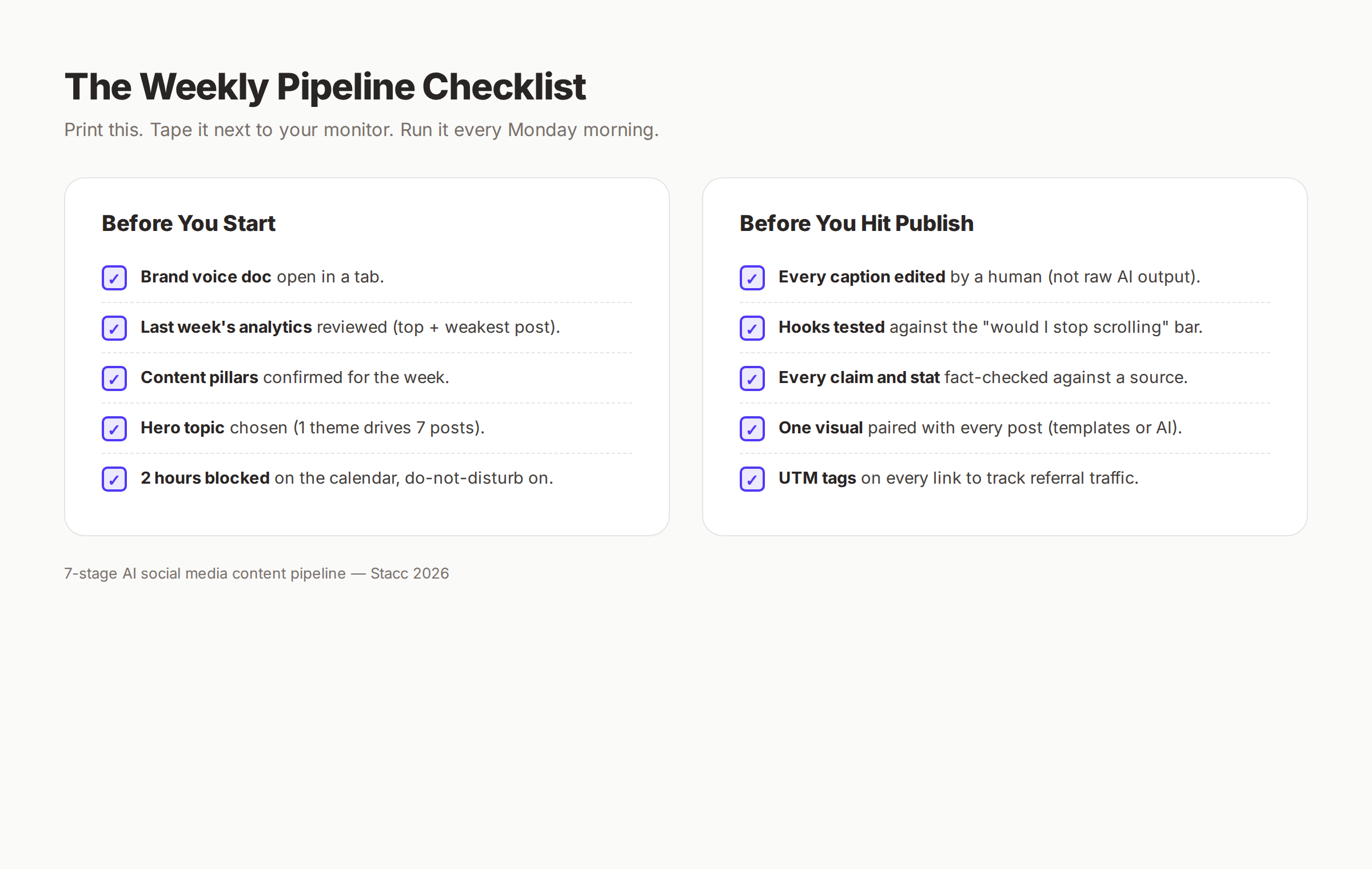
Before You Start
- Brand voice doc open in a tab
- Last week’s analytics reviewed (top + weakest post noted)
- Content pillars confirmed for the week
- Hero topic chosen (one theme drives 7 posts)
- 2 hours blocked on the calendar with do-not-disturb on
During the Session
- Stage 1 inputs locked in 15 minutes
- Stage 2 plan generated and curated in 20 minutes
- Stage 3 captions drafted and edited in 30 minutes
- Stage 4 visuals paired with every caption in 25 minutes
- Stage 5 human review pass in 15 minutes
- Stage 6 scheduled with UTM tags in 10 minutes
Before You Hit Publish
- Every caption edited by a human (not raw AI output)
- Hooks tested against the “would I stop scrolling” bar
- Every claim and stat fact-checked against a source
- One visual paired with every post
- UTM tags on every link to track referral traffic
Daily for the Rest of the Week
- 5-minute check on engagement
- Top performer logged
- Weakest performer logged
- Comments and DMs replied to within 24 hours
What Realistic Results Look Like
After 4 weeks of running the pipeline:
- 28 to 48 posts published (vs. 4 to 8 in a pre-pipeline month)
- Time per post drops from 60 minutes to 15 minutes
- Engagement rate stabilizes between 2% and 5% on professional platforms
- Referral traffic from social begins to appear in analytics
After 90 days:
- 84 to 144 posts in your archive
- Clear pillar-by-pillar performance data
- A repeatable brand voice across every post
- The pipeline runs on muscle memory in 90 to 110 minutes per week
After 6 months:
- The compounding effect kicks in. Older posts continue to surface and earn engagement.
- Audience size grows by 30% to 80% on the primary platform.
- The 5-minute daily check becomes the highest-return activity in your week.
Frequently Asked Questions
What is the difference between an AI social media content pipeline and social media automation?
Automation refers to tools that schedule and publish posts (Buffer, Later, Hootsuite). A pipeline is the broader workflow that includes planning, drafting, visuals, review, scheduling, and measurement. Automation handles one stage. The pipeline orchestrates all 7 stages.
Can the pipeline really run in 2 hours per week?
Yes, after the first 2 to 3 weeks of practice. The first run takes 3 to 4 hours because you are building the brand voice doc and learning the prompt patterns. Sessions 2 and 3 drop to 2.5 hours. By session 4, the 2-hour budget is realistic. Operators we have coached settle into 90 to 110 minutes per week.
Which AI tool is best for the pipeline?
ChatGPT and Claude are the strongest general-purpose options for Stages 2 and 3. Both handle the planning prompts and batch caption generation well. Jasper and Copy.ai work too but feel more constrained for non-marketing content. Pick one, learn its quirks, and stay with it for at least 90 days.
Does the pipeline work for B2B and B2C?
Yes. The structure is identical. The brand voice doc and content pillars change. B2B operators typically run 70% on LinkedIn with X as a secondary platform. B2C operators typically run on Instagram, TikTok, and Facebook. The 7 stages stay the same.
How is this different from done-for-you social media services?
The pipeline is DIY with AI assistance. You retain full editorial control and brand voice ownership. The Stacc Social Media module handles the entire pipeline for you at $49 per month. The math: 2 hours per week of operator time at $100 per hour equals $800 per month in opportunity cost. Done-for-you at $49 per month is the right call if your time is more valuable than the editorial control.
What happens if I miss a Monday session?
Two options. Run an emergency 60-minute session on Tuesday morning (Stages 1, 2, 3, and 6 only — skip detailed visuals and use templates for everything). Or run the standard 2-hour session on Tuesday and accept that the week starts on Wednesday. Do not skip a full week. Consistency drives the 340% engagement lift.
Can a small team share the pipeline?
Yes. Split it. One person runs Stages 1 and 2 (planning and prompting). A second person runs Stages 3 and 4 (drafting and visuals). A third person runs Stages 5 and 6 (review and schedule). Stage 7 is shared (daily checks rotate). Total team time drops to 40 minutes per person.
Do I need a separate pipeline for each platform?
No. The pipeline handles up to 3 platforms in one session. Stage 2 distributes posts across platforms. Stage 3 generates platform-native captions in one batch prompt. The single pipeline produces multi-platform output.
What if I do not have a brand voice doc yet?
Build it before the first pipeline run. Spend 90 minutes drafting a 500-word doc with 3 sample posts per platform. Use ChatGPT to help: paste your 10 best historical posts and ask it to extract the voice patterns. Refine. Reuse forever.
How do I handle replies and DMs in the pipeline?
Stage 7’s daily 5-minute check includes a reply window. Reply to comments and DMs from the previous 24 hours. Do not let the inbox build up beyond 48 hours. Engagement compounds faster when you reply within the first day.
The Bottom Line
An AI social media content pipeline turns social media from a daily scramble into a 2-hour weekly system. Seven stages. One Monday morning block. Six tools. One brand voice doc that you build once.
The pipeline works because it batches the labor-intensive stages (planning, drafting, visuals) and reserves human judgment for the moments that need it (editing, fact-checking, hook selection). Operators running this pipeline produce 7 to 12 platform-native posts per week and reclaim 6 to 10 hours that previously went to ad hoc posting.
If you want the output without the operator overhead, Stacc publishes 30 social media posts per month across 3 platforms for $49. We document your brand voice once, then run the pipeline for you every week.
Start the Stacc Social Media module for $1 →
This article was researched and published by Stacc. We run this exact pipeline for clients across 70+ industries. Tool prices and platform data verified May 2026.
Related Reading
- How to Create a Social Media Calendar (6 Steps)
- How to Repurpose Blog Content for Social Media
- 217 Social Media Content Ideas (By Category)
- Best Social Media Automation Tools
- How to Humanize AI Content
- AI Prompts for SEO Articles
Related Tools & Resources
Free SEO Tools:
Best Lists:

Written by
Siddharth GangalSiddharth is the founder of theStacc and Arka360, and a graduate of IIT Mandi. He spent years watching great businesses lose organic traffic to competitors who simply published more. So he built a system to fix that. He writes about SEO, content at scale, and the tactics that actually move rankings.
30 SEO blog articles published every month
Keyword-optimized, scheduled, and live on your site. Automatically.
30-day trial · Cancel anytime
theStacc
Stop writing SEO content manually
30 blog articles, 30 GBP posts, and social media content. Published every month. Automatically.
Try for free$1 for 3 days · Cancel anytime