
How to Train AI on Your Writing Style (2026 Guide)
Train ChatGPT, Claude, or any LLM to write in your exact voice. 8-step system with prompts, samples, and a reusable style block. Updated May 2026.
You can train AI on your writing style in under an hour. Most people fail because they paste two samples and hope. That is not training. That is wishful thinking. Generic AI output bleeds your authority. Reader trust drops by nearly 50% when content feels AI-generated, and search engines now reward distinct voice as a quality signal.
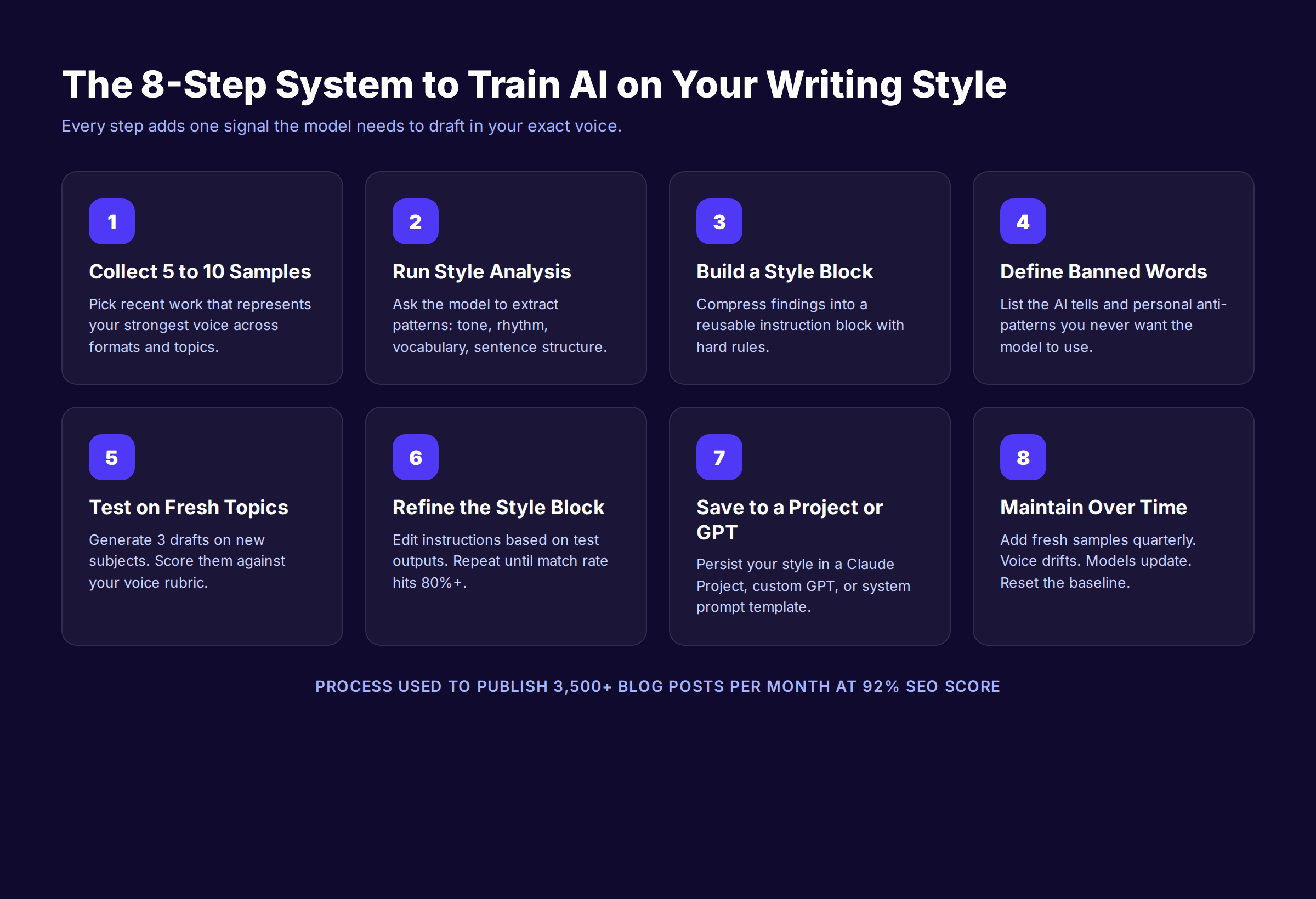
This guide walks you through the actual system. Eight steps. Three methods ranked by effort. A reusable style block you can save once and load forever. The same playbook we use to ship 3,500+ blog posts per month at a 92% average SEO score.
We publish across 70+ industries. Every draft starts in an LLM. Every piece reads like a human wrote it because the model is trained on the brand voice before a single sentence gets generated.
Here is what you will learn:
- Why most AI style training fails after the first prompt
- The 3 methods to train AI on writing style, ranked by effort
- How to pick the right 5 to 10 writing samples
- The exact prompt that extracts your voice patterns
- How to build a reusable style block that works in any LLM
- The 10-point voice scorecard for grading AI drafts
- How to maintain your trained model as your voice evolves
What You Will Need
Time required: 2 to 4 hours for a working setup. 15 minutes for ongoing use.
Difficulty: Beginner to Intermediate. No code required.
What you will need:
- 5 to 10 pieces of your best writing (each 600 to 1,500 words)
- Access to ChatGPT Plus, Claude Pro, or Gemini Advanced
- A document or notes app to store your style block
- 30 minutes of focused testing time
Optional but helpful:
- A voice or tone scorecard from a past brand exercise
- Past feedback from editors or readers describing your style
- A list of words and phrases you actively avoid
Why Most AI Style Training Fails
Three patterns cause 90% of style training failures. Knowing them up front saves you a week of disappointing drafts.
Sample selection is too narrow. Most people paste one or two articles and expect a personality transplant. The model needs spread. It needs to see how you handle different topics, formats, and emotional registers. One sample teaches one pattern. Seven samples teach a system.
Instructions are too abstract. “Write like me, but professional and casual” is not a style guide. It is a vibe. Models need concrete rules. Maximum 20 words per sentence. Never use the word “use.” Open with a stat, not a setup. Specificity is what shapes output.
Style fades after the first prompt. Without a persistent system prompt or project, your style instructions die at the end of the chat. Every new conversation starts from baseline. The fix is a reusable style block stored in a Claude Project, custom GPT, or Gemini Gem. Set once. Load forever.
86.5% of top-ranking pages now use AI assistance according to Ahrefs research. The difference between content that ranks and content that flops is not whether AI helped write it. It is whether the AI was trained to sound like a real person before the first word hit the page.
The 3 Methods to Train AI on Writing Style
Before walking through the steps, pick the method that fits your volume and budget. All three work. They trade setup time for fidelity and persistence.
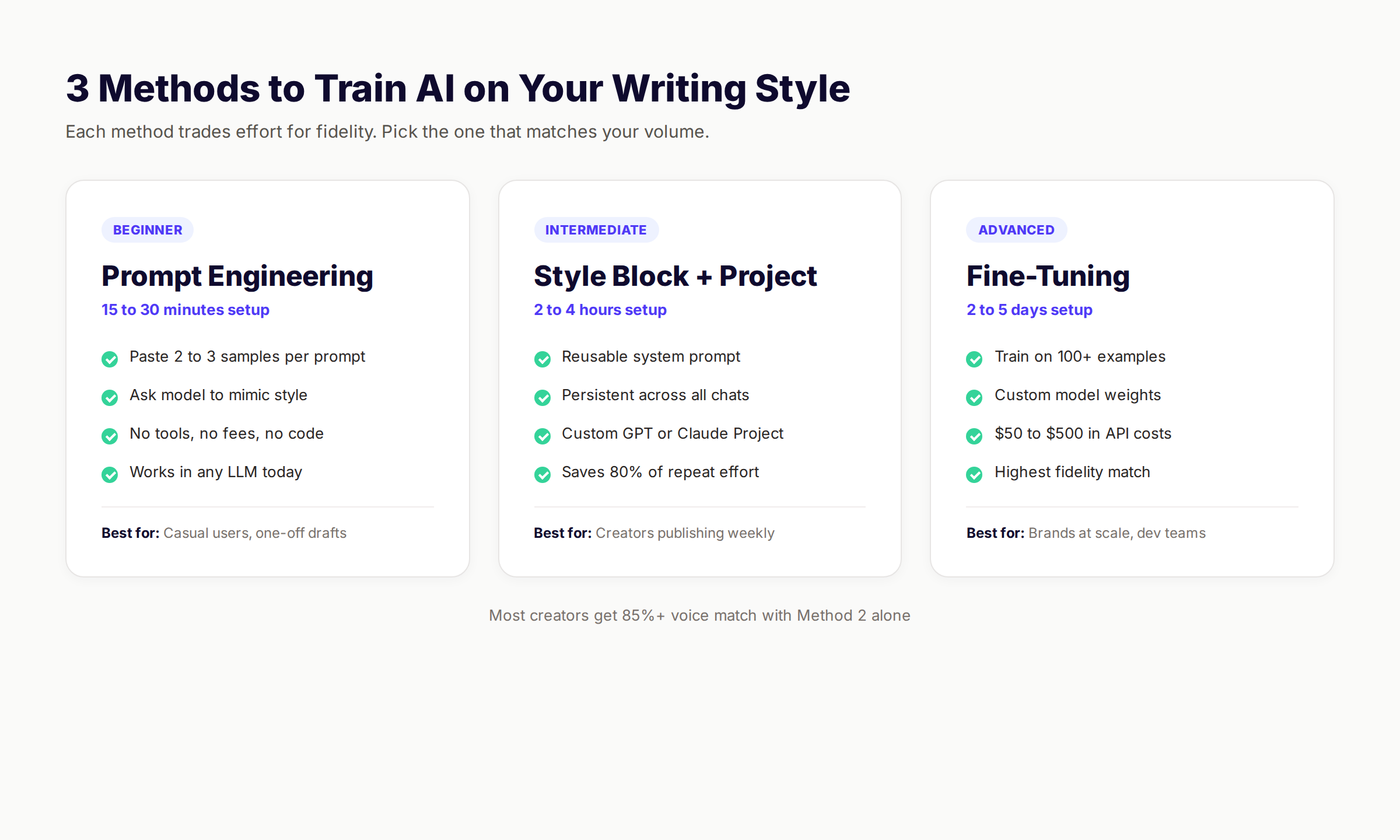
| Method | Setup Time | Cost | Voice Match | Best For |
|---|---|---|---|---|
| Prompt Engineering | 15 to 30 min | Free | 60 to 70% | One-off drafts, casual users |
| Style Block + Project | 2 to 4 hours | Free | 80 to 90% | Weekly publishers, brands |
| Fine-Tuning | 2 to 5 days | $50 to $500 | 90 to 95% | High-volume teams, agencies |
Most readers should use Method 2. Prompt engineering is too brittle for repeat use. Fine-tuning is overkill until you are generating thousands of pieces per month. The style block approach gives you 85%+ voice match with a one-time setup. The remaining steps in this guide focus on Method 2 specifically.
For teams generating 30+ articles per month, our scale blog content with AI playbook shows how to run Method 2 across an entire content team without losing brand consistency.
Step 1: Collect 5 to 10 Writing Samples
The samples you choose define the voice the AI learns. Get this step wrong and every step after fails.
1A. Choose Recent, Edited Work
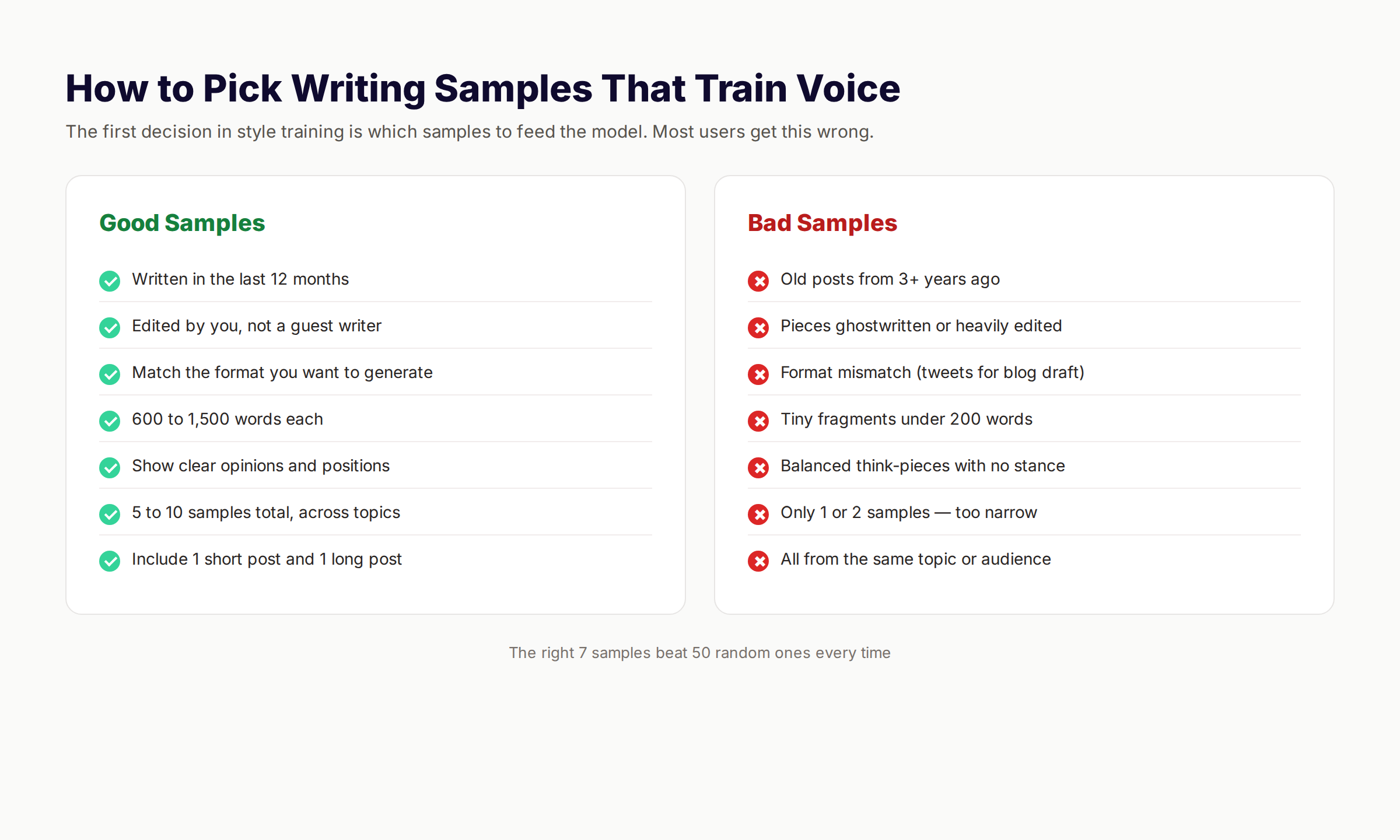
Pick samples from the last 12 months. Your voice changes. The model should learn the version of you that publishes today, not the version that wrote a LinkedIn post in 2022. Avoid pieces that were heavily edited by someone else. The model will learn the editor, not you.
1B. Spread Across Topics and Formats
Pick 5 to 10 samples, not 2. Each one should be 600 to 1,500 words. Include at least 2 long-form pieces and 1 short post. Cover 2 to 3 different topics if your range is wide. If you only write about one topic, vary the format. A how-to. An opinion piece. A breakdown. The spread teaches the model your patterns, not just your subject matter.
1C. Skip the Generic Drafts
Do not include posts where your voice was muted by client tone, ghostwriting, or aggressive editing. Pick the pieces you would send a hiring manager as proof of your voice. If you would not publish it again today, it does not belong in the training set.
Why this step matters: Models extract patterns from examples. Bad samples teach bad patterns. The single most common reason style training fails is sample contamination. Five strong samples beat 50 mixed ones every time.
Pro tip: Save the chosen samples in a single document with format tags like [Blog Post], [LinkedIn], [Email]. The model uses these as context when generating in each format.
Step 2: Run Style Analysis on Your Samples
The model can describe your voice better than you can. Let it. Your job is to ask the right question.
2A. Use the Style Extraction Prompt
Open a fresh chat in your LLM of choice. Paste this prompt, then paste your samples:
You are an editor who studies writer voice.

I am going to paste 5 to 10 writing samples below. Read all of them carefully. Then produce a detailed style analysis covering:

1. Voice and tone — what attitude does the writer carry?
2. Sentence mechanics — average length, variation, opening patterns
3. Paragraph structure — typical length, single-sentence frequency
4. Vocabulary preferences — frequent words, avoided words, Latinate vs. plain
5. Rhetorical moves — how does the writer open, transition, close?
6. Banned or rare words — what does the writer never use?
7. Signature patterns — what makes this voice identifiable in 3 sentences?

Be specific. Use examples from the samples. Do not summarize the topics.
2B. Review and Refine the Analysis
Read the output critically. Mark anything that does not feel right. Models sometimes overweight a single sample or miss a recurring pattern. Push back with corrections. “You said I use long sentences. Most of my sentences are under 18 words. Re-run the analysis with that correction.”
2C. Ask for Concrete Rules, Not Vibes
The first analysis tends to be too abstract. Force it into rules. Ask: “Turn every observation into a hard rule the AI must follow when drafting in this voice.” Now you have instructions a model can act on.
Why this step matters: The analysis becomes the foundation of your style block. A vague analysis produces a vague style block. A specific analysis produces output you would publish.
Pro tip: Run this analysis through 2 different models. ChatGPT and Claude will catch slightly different patterns. Merging both analyses gives you a more complete map.
Step 3: Build a Reusable Style Block
The style block is the document you will paste at the top of every future prompt. It is the operating system for your trained AI.
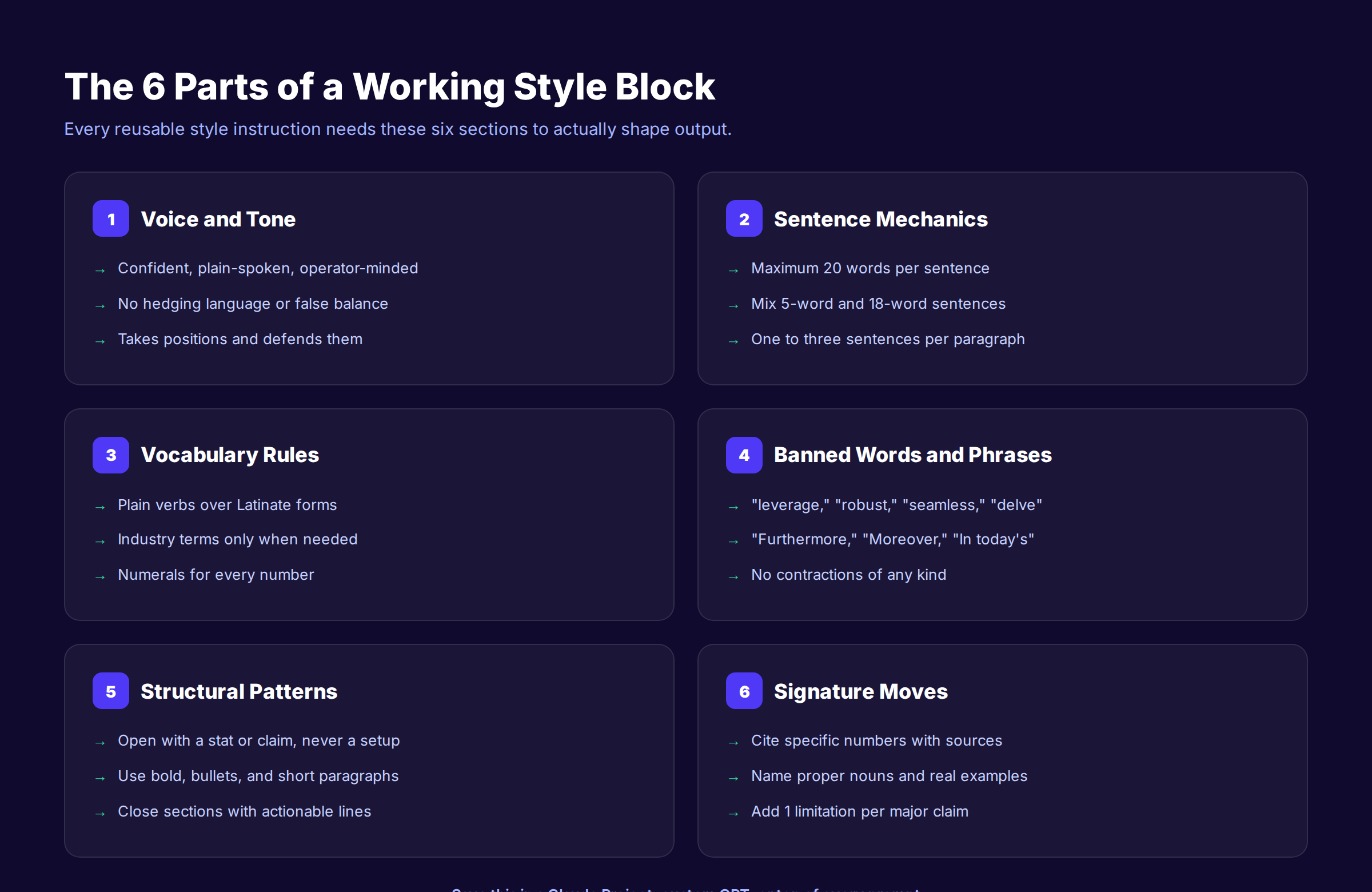
3A. Structure the Block in 6 Sections
Every working style block has the same six parts. Use this template:
## VOICE AND TONE
[2 to 4 sentences describing the attitude]

## SENTENCE MECHANICS
- Maximum [X] words per sentence
- Mix [short] and [medium] sentences
- [Y] sentences per paragraph maximum

## VOCABULARY RULES
- Prefer: [plain verbs over Latinate forms]
- Use [numerals or words] for numbers
- [Industry term policy]

## BANNED WORDS AND PHRASES
- Words: [list every word]
- Phrases: [list every banned phrase]
- Patterns: [list AI tells to avoid]

## STRUCTURAL PATTERNS
- Openings: [how each section starts]
- Closings: [how each section ends]
- Formatting: [bold, lists, blockquotes rules]

## SIGNATURE MOVES
- [List 3 to 5 patterns unique to your voice]
3B. Compress to Under 500 Words
A 2,000-word style block dilutes signal. Trim every rule until you cannot remove a word without losing meaning. The best style blocks are 300 to 500 words. They fit at the top of any prompt without crowding the actual task.
3C. Test the Block on a Fresh Draft
Paste the block into a new chat. Add a topic prompt: “Draft a 400-word section on [TOPIC] using the style above.” Read the output. If it sounds like you, the block works. If not, the block needs more concrete rules and fewer abstract descriptions.
Why this step matters: The style block is the asset you reuse forever. Time invested here compounds across every future draft. Most users skip this step and re-explain their voice in every chat. That is exhausting and inconsistent.
Stop writing. Start ranking. Stacc publishes 30 SEO articles per month for $99. Start for $1 →
Step 4: Define Your Banned Words List
The banned list does more work than any other section of the style block. It is the fastest way to strip AI tells and personal anti-patterns from output.
4A. Start With the Universal AI Tells
Every AI model gravitates toward the same tired phrases. Ban these by default:
| Category | Banned Phrases |
|---|---|
| Filler openers | ”In today’s digital scene,” “When it comes to,” “At its core” |
| Hedge language | ”It is worth noting that,” “It is important to note” |
| Robotic transitions | ”Furthermore,” “Moreover,” “Additionally,” “In conclusion” |
| Inflated verbs | ”Leverage,” “Utilize,” “Facilitate,” “Empower” |
| AI buzzwords | ”Strong,” “Seamless,” “Innovative,” “Cutting-edge,” “Game-changer” |
| Stage directions | ”Let us dive in,” “Without further ado,” “Strap in” |
| Fake balance | ”Both sides have merit,” “It depends” |
4B. Add Your Personal Anti-Patterns
Read your own writing. Find the 3 to 5 words you overuse. Add them to the banned list. If you start every section with “So,” ban “So” as a section opener. If you say “really” too often, ban “really” as a modifier. The banned list is where you upgrade your own voice while training the AI.
4C. Add Contraction Rules If Relevant
Some writers never use contractions. Others use them in every sentence. Decide and document. If you do not use contractions, add a line: “Never use contractions. Write ‘do not’ instead of ‘don’t,’ ‘it is’ instead of ‘it’s,’ ‘cannot’ instead of ‘can’t.’ Apply to every word in this category.”
Why this step matters: Banned words are the fastest detectable AI signal. Removing them lifts your draft above 80% of unedited AI content immediately. A 200-word banned list does more for voice than a 2,000-word tone description.
Pro tip: Update the banned list whenever you spot a new AI tell. The list is a living document. Models change. New patterns emerge. Yours should evolve.
For a deeper breakdown of AI patterns to remove from drafts, our humanize AI content guide covers the 12 most common ones with before-and-after examples.
Step 5: Test on Fresh Topics
Most users skip testing and discover the style block does not work mid-deadline. Testing now saves embarrassment later.
5A. Generate 3 Test Drafts
Pick 3 topics you have never written about but match your usual subject matter. Load the style block. Generate a 400 to 600-word draft for each topic. Save them.
5B. Score Each Draft Against the Voice Rubric
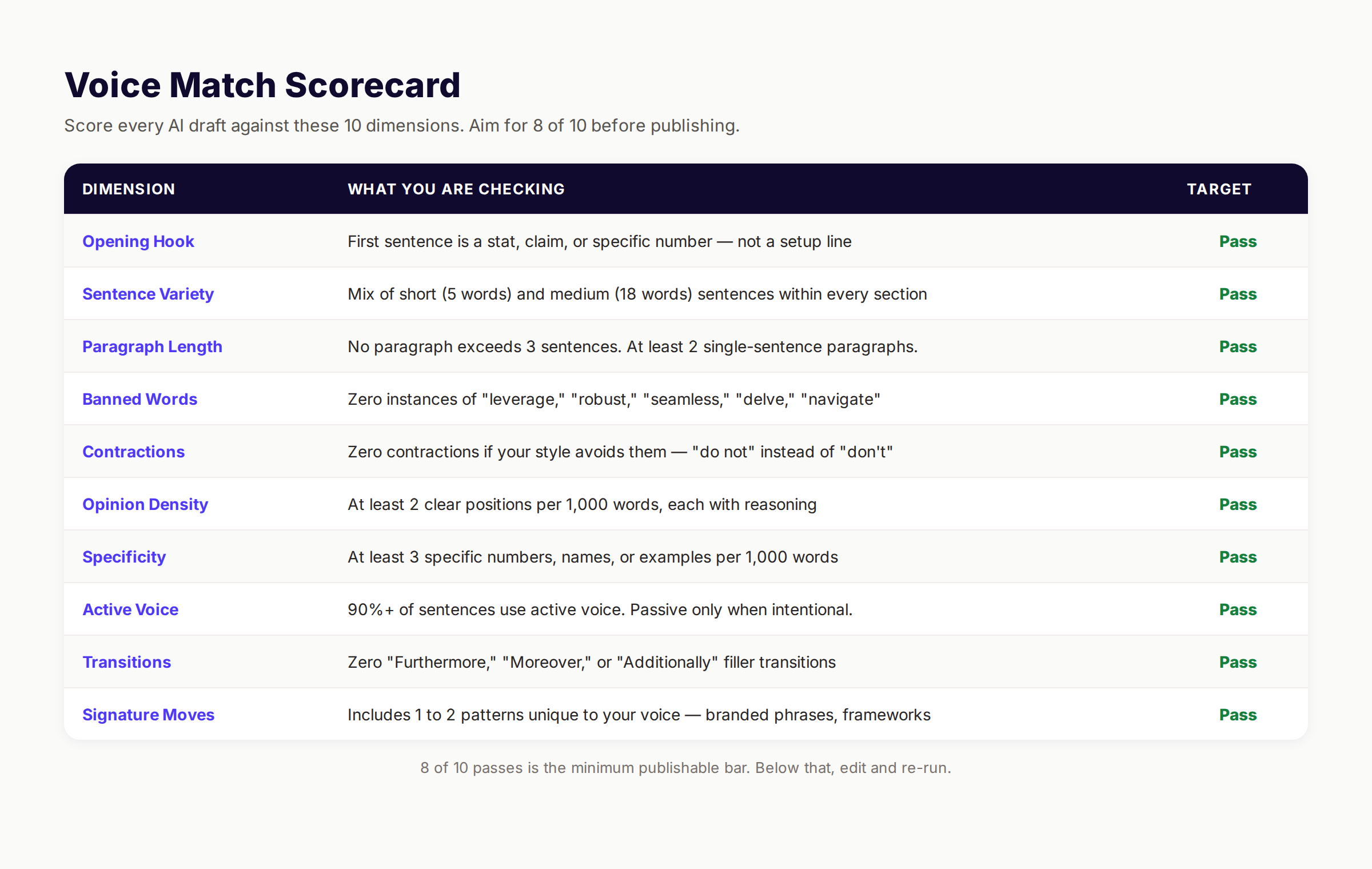
Read each draft once. Score it on the 10-point voice rubric:
- Opens with a specific stat or claim
- Sentence length variation (mix of 5-word and 18-word)
- No paragraph exceeds 3 sentences
- Zero banned words present
- Contraction rule respected
- At least 2 clear positions per 1,000 words
- At least 3 specific numbers or examples
- Active voice in 90%+ of sentences
- No filler transitions used
- At least 1 signature move present
Score 8 of 10 or higher and the style block is publishable. Below 8, the block needs refinement.
5C. Read the Drafts Out Loud
Read each test draft aloud. Mark sentences that sound robotic, stiff, or unlike you. The read-aloud test catches what scorecards miss. Voice is partly rhythm. Rhythm only shows when spoken.
Why this step matters: Testing forces honest feedback before the style block goes live across hundreds of drafts. A weekend of testing prevents months of mediocre content.
Step 6: Refine the Style Block
Testing produces a feedback loop. Refining closes it.
6A. Patch the Gaps the Tests Exposed
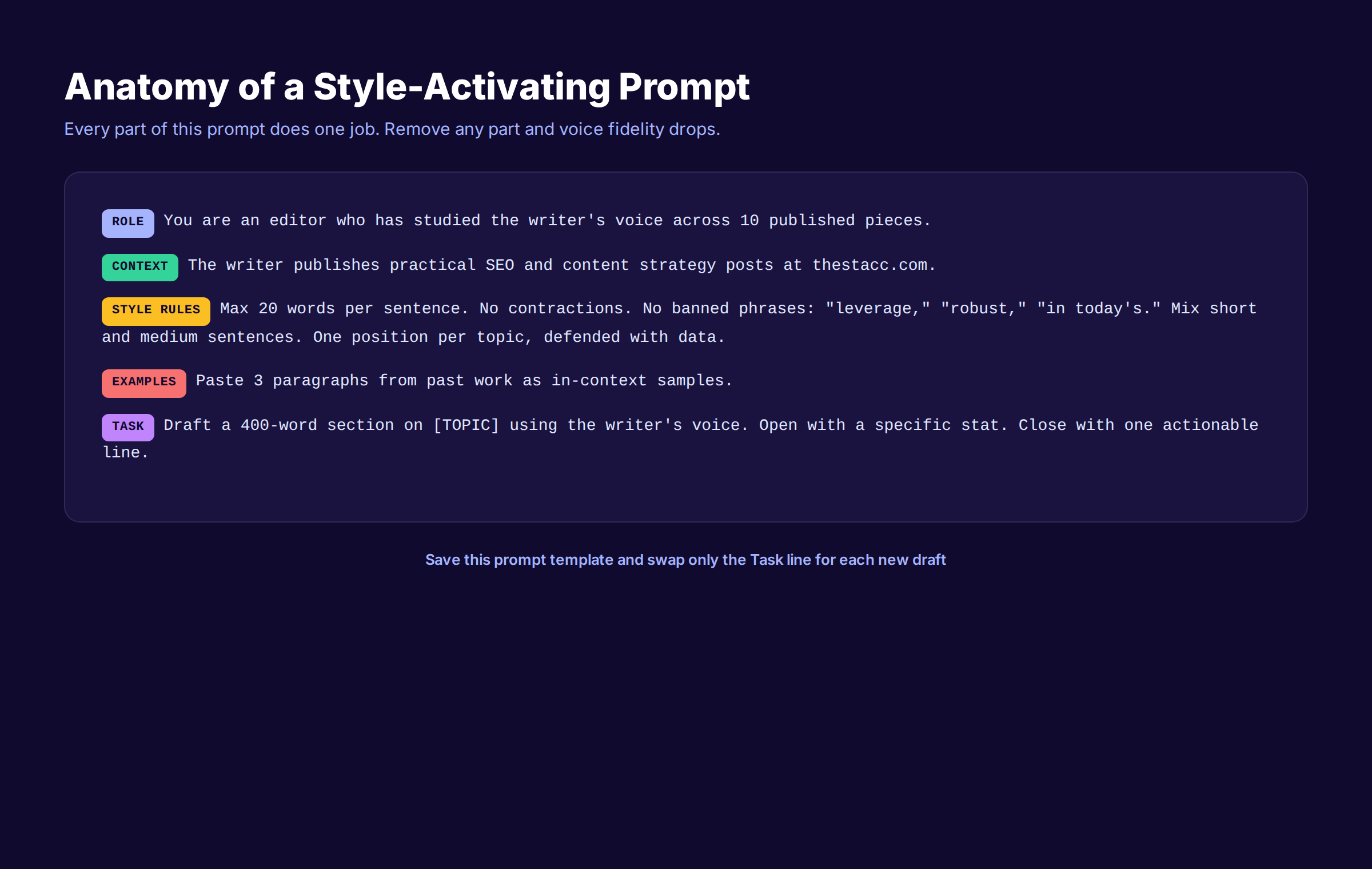
For every dimension where the draft scored low, add a rule. If sentence variety failed, add: “Every paragraph must include at least one short sentence under 8 words.” If banned words slipped in, expand the banned list. Specificity is the cure for most failures.
6B. Add Examples Inside the Style Block
Models learn faster from examples than from abstract rules. Add 3 to 5 short paragraphs from your best samples directly into the style block under a “STYLE EXAMPLES” section. The model uses them as in-context anchors.
6C. Iterate Until Voice Match Hits 85%
Run 3 more test drafts with the refined block. Re-score. If you are above 85% match on average, you are done. If not, repeat. Most users hit 85% by version 3 of the style block.
Why this step matters: A style block is not a one-shot artifact. It is a tuned instrument. Three iterations turn a 60% match into an 85% match. Each round takes 30 minutes. The compounding return is enormous.
Step 7: Save to a Project or Custom GPT
The style block lives somewhere persistent. Otherwise you re-paste it every session and lose continuity.
7A. Pick Your Storage Location
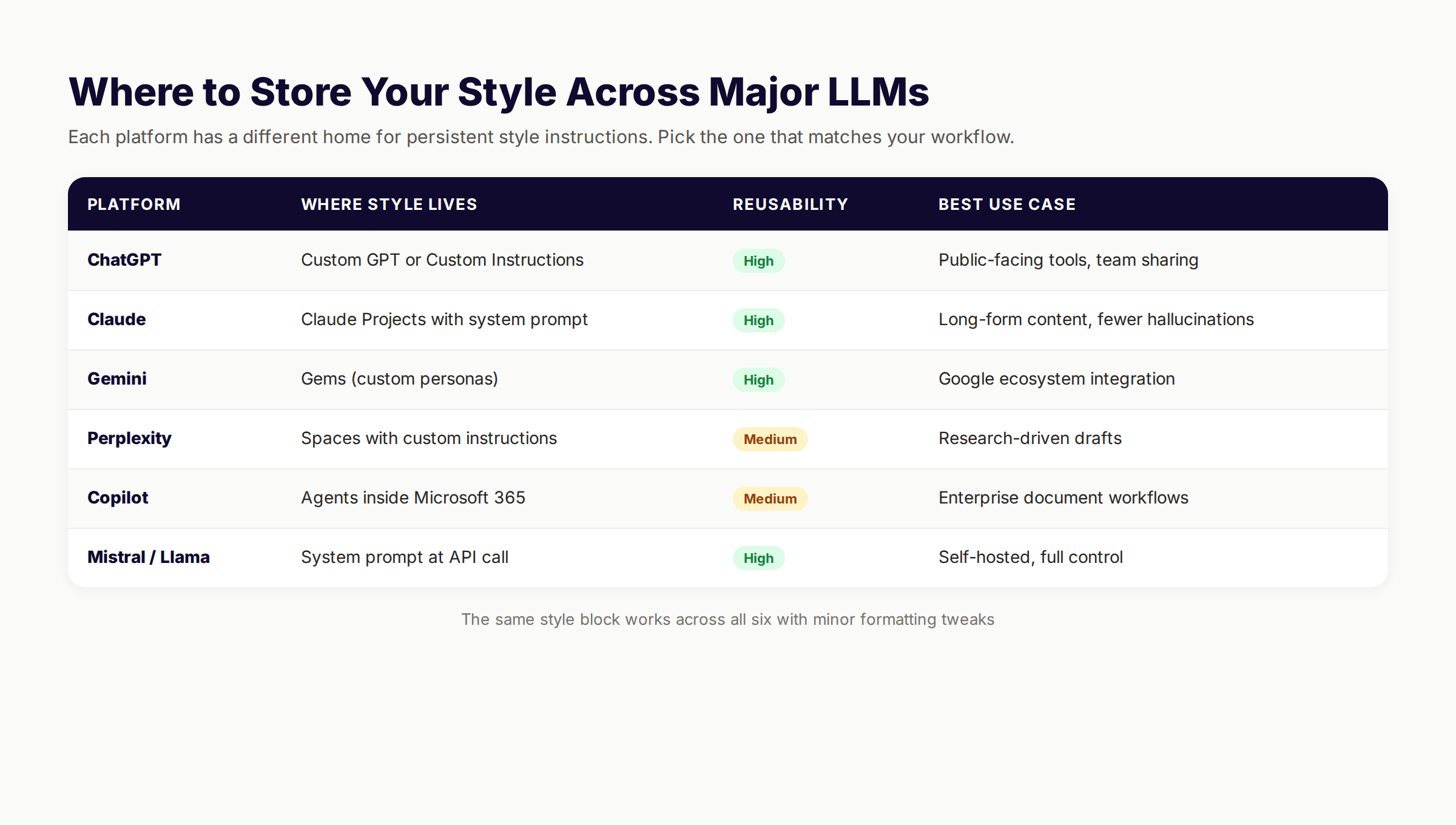
Each major LLM has a different home for persistent instructions:
| Platform | Storage Method | Setup Time |
|---|---|---|
| ChatGPT | Custom GPT or Custom Instructions | 10 minutes |
| Claude | Claude Project with system prompt | 5 minutes |
| Gemini | Gem (custom persona) | 10 minutes |
| Perplexity | Space with custom instructions | 5 minutes |
| Copilot | Agent in Microsoft 365 | 15 minutes |
| API access | System prompt at every call | 5 minutes |
7B. Configure the Project With Your Block
Open the platform of choice. Create a new Project, Custom GPT, or Gem. Paste the style block as the system prompt or instructions. Save. Test by starting a new chat inside that container and asking for a 300-word draft on any topic.
7C. Pin a Backup in Plain Text
Save the style block in a Google Doc, Notion page, or Markdown file outside the LLM. If the platform changes its interface or loses your settings, you keep the asset. Treat it like a brand guideline document. Because that is what it is.
Why this step matters: Persistence is what makes the system work daily. Without a saved Project or GPT, you spend 5 minutes re-loading instructions every session. With persistence, you start every draft already in voice.
If you use ChatGPT for SEO drafting specifically, our ChatGPT for SEO content guide shows how to combine a style block with SEO-specific instructions inside a single custom GPT.
Your SEO team. $99 per month. 30 voice-trained articles, published automatically. Start for $1 →
Step 8: Maintain the Trained Model Over Time
A style block is not set-and-forget. Your voice changes. Models update. Industries evolve.
8A. Refresh Samples Quarterly
Every 3 months, swap out 2 of the oldest samples in your style block for 2 fresh ones. This keeps the trained voice aligned with how you write today, not how you wrote 9 months ago. Mark the swap dates in the document.
8B. Re-Run Style Analysis Yearly
Once a year, run the full style analysis prompt on your 10 most recent published pieces. Compare the analysis against your current style block. Update any drift. Voices shift. New rhetorical moves emerge. The annual analysis catches them.
8C. Monitor for Model Drift
Major LLM updates can change output behavior. When ChatGPT, Claude, or Gemini ship a major version, run a fresh test of 3 drafts against your scorecard. If voice match drops below 80%, refine the style block again. New models sometimes need slightly different phrasing in instructions.
8D. Build a Style Block Changelog
Keep a dated log of every change you make to the style block. Useful when output quality changes and you need to roll back. Useful for team handoffs. Useful when a new platform launches and you need to migrate.
Why this step matters: Voice training is a maintenance practice, not a one-time event. Teams that maintain their style block consistently outperform teams that build one and forget it. The compounding advantage is real.
Results: What to Expect
After completing all 8 steps:
- First 3 drafts: Voice match in the 60 to 75% range. Still better than untrained output.
- After block refinement: 80 to 90% voice match consistently. Edits drop from 60 minutes to 15 minutes per piece.
- Within 30 days: Drafts pass internal review on first read. Editor flags drop by 70%+.
- Within 90 days: AI-trained drafts indistinguishable from your manually written pieces. Reader engagement metrics match or beat your historical content.
- Ongoing: A compounding library of trained models across every format you publish in.
The full setup takes 2 to 4 hours. Maintenance is 30 minutes per quarter. For anyone publishing more than 5 pieces per month, the time saved in editing pays for the setup in the first week.
For high-volume teams, our AI content strategy playbook explains how style-trained models slot into a broader workflow that includes briefs, drafts, edits, and publishing automation.
Troubleshooting
Problem: Drafts still sound generic after style block is loaded. Solution: Your block is probably too abstract. Replace tone descriptions with concrete rules. “Confident voice” becomes “Take a position on every debatable topic and defend it with one specific number.” Specificity beats description.
Problem: Output is too short or too long. Solution: Add a length rule to every prompt: “Draft 600 to 800 words on [TOPIC].” Models default to safe lengths without instruction. Make your target explicit every time.
Problem: Some banned words still appear in drafts. Solution: Models leak banned words when context strongly suggests them. Run a final scan with find-and-replace before publishing. Add high-leakage words to the top of your banned list with bold emphasis: “Never use the word [X] under any circumstances.”
Problem: Voice match was 90% in week 1 and dropped to 60% in week 4. Solution: The LLM probably shipped a model update. Re-test, refine the block, and document the new version. Major updates from OpenAI, Anthropic, and Google happen every 2 to 4 months on average.
Problem: The style block works for blog posts but fails on emails or social media. Solution: One style block does not fit every format. Build a separate variant for each major format. Save them in separate Projects or GPTs. Each variant references the same core voice but tunes structural rules to the format.
FAQ
How do you train AI on writing style?
You collect 5 to 10 of your best writing samples, run a style analysis prompt to extract voice patterns, build a 300 to 500-word style block with hard rules, test it against fresh topics, refine until voice match hits 85%, and save it as a Claude Project, custom GPT, or Gemini Gem for persistent reuse. The full process takes 2 to 4 hours.
Can you actually get paid to train AI?
Yes, but the work is different from what this guide covers. Companies like Scale AI, Surge AI, and Outlier hire writers and subject experts to evaluate AI outputs and create training data, typically $15 to $40 per hour. This is unrelated to teaching an AI to write in your personal style for your own content production.
How do you get AI to match your writing style?
Three things matter. Feed it 5 to 10 strong writing samples as context. Give it specific rules instead of vague descriptions. Use a persistent system prompt or project so the instructions survive across chats. Most failures come from skipping one of these three.
Can I legally publish a book written by AI?
In most jurisdictions yes, but copyright treatment varies. The U.S. Copyright Office has ruled that purely AI-generated works without significant human authorship cannot be copyrighted, but works with substantial human editing and creative input can be. Check current rules for your jurisdiction and disclose AI assistance where required by platform or law.
What is the 2-3-1 rule in writing?
The 2-3-1 rule means leading with the second most important phrase, placing the least important information in the middle, and ending with the most important phrase. It is a sentence construction technique that exploits the emphasis weight humans give to the start and end of sentences. The rule applies to AI-generated content the same way it applies to human writing.
How many writing samples do I need to train AI on my style?
5 to 10 strong samples is the sweet spot. Fewer than 5 narrows the model’s pattern recognition too much. More than 10 dilutes signal without adding new patterns. Each sample should be 600 to 1,500 words and represent your current voice, not work from years ago.
Does fine-tuning give better results than prompt engineering?
Marginally. Fine-tuning a model on 100+ examples gets you 90 to 95% voice match, compared to 80 to 90% with a well-built style block. The added 5 to 10% fidelity costs 50 to 100 hours of work and $50 to $500 in API fees. For most creators, the style block method delivers 85%+ of the value at less than 5% of the cost.
Will Google penalize AI content trained on my writing style?
No. Google’s official guidance is that they reward helpful, people-first content regardless of how it was produced. Style-trained AI content that adds real expertise and original perspective passes their quality bar the same way well-written human content does. The detection question is irrelevant. The quality question is everything. Our AI vs human content study covers the underlying data.
AI can sound like you. Not by accident. Not through one clever prompt. Through a system that captures your voice, encodes it as rules, and loads it before every draft. The 8 steps in this guide get you to 85% voice match in a weekend. The maintenance practice keeps you there. Start with Step 1 on your next batch of samples and watch the drafts change.
Rank everywhere. Do nothing. Blog SEO, Local SEO, and Social on autopilot. Start for $1 →
Related Tools & Resources
Free SEO Tools:
Best Lists:

Written by
Siddharth GangalSiddharth is the founder of theStacc and Arka360, and a graduate of IIT Mandi. He spent years watching great businesses lose organic traffic to competitors who simply published more. So he built a system to fix that. He writes about SEO, content at scale, and the tactics that actually move rankings.
30 SEO blog articles published every month
Keyword-optimized, scheduled, and live on your site. Automatically.
30-day trial · Cancel anytime
theStacc
Stop writing SEO content manually
30 blog articles, 30 GBP posts, and social media content. Published every month. Automatically.
Try for free$1 for 3 days · Cancel anytime